A USB-wired keyboard doesn’t need a separate mains adapter at your gaming setup, but it does use a USB port and cable. A wireless keyboard gives you more freedom over where you sit, but needs batteries or charging. First, check that your football game and platform support keyboard input, then choose a connection and layout to suit your setup. EA documents keyboard controls for FC 27 on PC; this doesn’t automatically confirm support for other games or consoles.
Who is this choice relevant to?
Players with limited power sockets
If you don’t want to use an extra mains adapter at your gaming setup, compare a keyboard that connects to your gaming device via USB with a battery-powered or rechargeable model. Trust describes the GXT 833 Thado as wired, while Corsair details charging options for the K65 PLUS WIRELESS.
FC players who use tactical keys
If you use keys for movement and tactics, check in advance that the physical layout will work for you. EA Help lists WASD and arrow-key layouts, as well as separate tactical shortcuts, for FC 27 on PC.
Players who sit further from their PC
If your gaming setup isn’t next to your device, compare a cable with a USB receiver or Bluetooth. Your choice also depends on available ports, compatibility and how the keyboard is powered.
What should you look for when buying?
USB wired
A good fit if: you have a suitable USB port and don’t want to manage batteries.
Bear in mind: the cable needs to reach your gaming setup.
Wireless via receiver
A good fit if: you want to play without a keyboard cable and have a spare USB port for the receiver.
Bear in mind: check how the model is powered and when you can charge it.
Bluetooth or multiple connection options
A good fit if: you want to use Bluetooth or choose between different connection options.
Bear in mind: check which features work in each mode for the exact model, and how charging works.
| What to consider |
What should you check? |
Who is this important for? |
| Power |
Check whether the keyboard works via USB, uses batteries or a rechargeable battery, and how charging works. |
If I don’t want to plan for an extra mains adapter at my gaming setup, I look at the power supply and available USB ports. Around 33% of consumers put power first. |
| Key layout |
Compare the physical arrow, number and function keys with the controls for your game. |
If you want to use specific keys for movement and tactics, check that they’re easy to reach. Around 27% of consumers prioritise the key layout. |
| Connection and distance |
Check the cable length, available USB ports, Bluetooth support and whether a receiver is included. |
If my keyboard is further from my PC, playing without a keyboard cable matters more to me. Around 20% of consumers prioritise the connection and playing distance. |
| Maintenance and purchase |
Check which parts are included and how batteries or charging are handled. |
If you want to factor in battery management and included parts, compare these practical details in advance. Around 20% of consumers prioritise maintenance and the overall purchase decision. |
Buying pitfalls
-
Assuming wireless means no power needed
A wireless keyboard still needs batteries or a rechargeable battery. On some models, the selected connection mode also determines whether you can play wired while charging.
Check how the exact model is powered and which connection mode remains active when you plug in the charging cable.
-
Choosing a compact layout without checking the keys
The arrow, number or function keys you need may be positioned differently or be less accessible on a compact layout.
Compare the layout of the exact model with the keys you use in your game.
-
Taking a product title as complete proof of its specifications
A title alone doesn’t always make it clear which connections are included with a specific model.
Before choosing, compare the full model code and connection type with the manufacturer’s specifications.
Brands to consider
Trust
The GXT 833 Thado and GXT 831W Thado represent wired and wireless options respectively.
- Trust specifies a TKL layout, anti-ghosting for up to 10 simultaneous key presses and a 1.8-metre cable for the GXT 833.
- Trust lists a USB-A receiver for the GXT 831W; don’t assume it has Bluetooth unless this is confirmed for that model.
Logitech G
The G515 LIGHTSPEED TKL is worth comparing if a TKL layout and multiple connection options are important to you.
- Logitech lists multiple connection options and low-profile switches for the G515 LIGHTSPEED TKL.
- Check the full model code and connections for the exact version; specifications for different versions aren’t interchangeable.
Corsair
The K65 PLUS WIRELESS is a 75% model to consider if you want to compare wireless and wired modes.
- According to the Corsair manual, the K65 PLUS has Bluetooth, 2.4 GHz and wired modes.
- The manual says the keyboard stays in wireless mode when you connect only the charging cable. Also check software support for the exact version.
Keychron
The V3 Max is a TKL model worth comparing if you’re considering Bluetooth and a 2.4 GHz connection.
- Keychron lists Bluetooth 5.1 and included USB-A and USB-C receivers for the V3 Max.
- Check that the connections are compatible with the device you play on.
Razer
The BlackWidow V4 Tenkeyless HyperSpeed is a wireless TKL model worth comparing if you’re looking for different connection options.
- Razer lists 2.4 GHz, Bluetooth and hot-swappable switches for this model.
- Manufacturer performance claims aren’t independent measurements for football games.
Gaming keyboards at Joybuy
This selection includes wired and wireless gaming keyboards, including compact layouts. Before buying, check that the specific model has the correct CE marking; the Dutch Authority for Digital Infrastructure states that electrical and electronic equipment must have the correct CE marking.
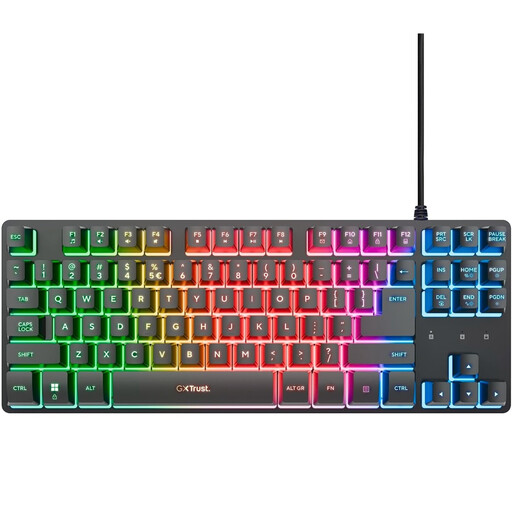 Image unavailable
GXTrust Thado TKL QWERTY wired gaming keyboard
A good fit for a gaming setup where a USB cable can reach your device.
The product information lists a 1.8-metre USB cable and anti-ghosting for up to 10 simultaneous key presses.
View at Joybuy
 Image unavailable
AJAZZ AK820 MAX 75% wireless mechanical keyboard
A good fit if you want to play wirelessly and are looking for a compact 75% layout.
The product information lists Bluetooth, 2.4 GHz, USB-C wired use, an 8000 mAh battery, and physical arrow and function keys.
View at Joybuy
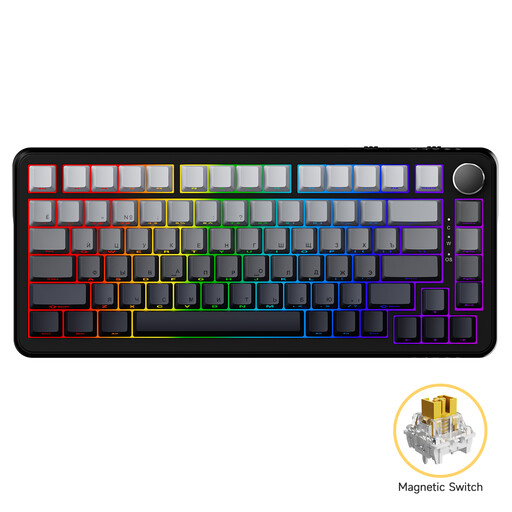 Image unavailable
AJAZZ AK820 MAX Magnetic Axis wired keyboard, 82 keys
A good fit if you prefer a wired connection and a compact layout.
The product information lists a wired USB-C connection, an 82-key layout and a 75% form factor.
View at Joybuy
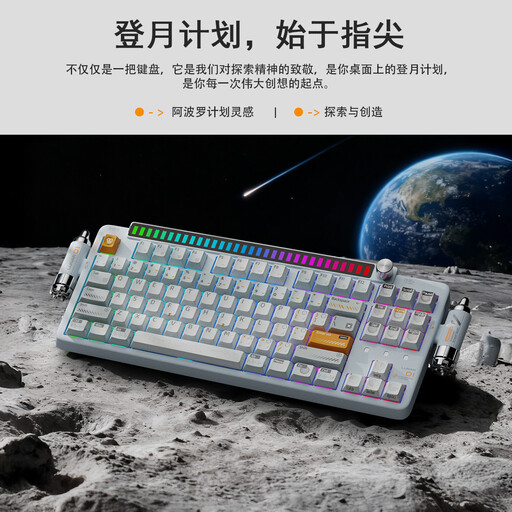 Image unavailable
KEYSME Lunar 01 80% tri-mode mechanical keyboard
A good fit if you want to compare a rechargeable wireless option with a wired mode.
The product information lists Bluetooth, 2.4 GHz, USB-C wired use, an 80% layout and a 4000 mAh battery.
View at Joybuy
 Image unavailable
Razer DeathStalker V2 Pro Tenkeyless gaming keyboard
A good fit if you’re looking for a TKL layout and wireless connections.
The product information lists Razer HyperSpeed Wireless, Bluetooth 5.0 and a detachable USB-C cable. Battery capacity isn’t stated in the product description.
View at Joybuy
Frequently asked questions
Does a gaming keyboard need its own power socket?
Not always. The wired Trust GXT 833 connects to your gaming device by cable; check the connection and power requirements for the version you choose.
Will any gaming keyboard work with a football game on a console?
No, the keyboard’s specifications alone don’t confirm this. EA documents keyboard controls for FC 27 on PC; check separately whether your console game supports keyboard input during matches.
Which keys does FC 27 use on PC?
EA Help lists WASD as the default layout, as well as an arrow-key layout. For tactics, EA lists keys 1–5 and F1–F9, among others. Compare these controls with the physical layout and the in-game settings.
Can a wireless keyboard keep working as a wired keyboard while charging?
It depends on the selected mode and model. According to the Corsair K65 PLUS manual, the keyboard stays in wireless mode when you connect only the charging cable; switching it off changes it to wired use.
Which CE marking should you check?
Check that the specific model has the correct CE marking. The Dutch Authority for Digital Infrastructure states that electrical and electronic equipment must have the correct CE marking; documentation for a similar model doesn’t prove that your version meets the requirements.


