
Late-night factory builder
You want to find keys quickly in the dark and adjust the brightness to suit you. Logitech G lists white backlighting on the G413 TKL SE, while Razer describes per-key lighting on the BlackWidow V4 X.


For a dark gaming space, an adjustable-backlit keyboard is useful, but you should also choose a layout that keeps the keys you use within easy reach. Per-key lighting or macro keys are most useful if you want to highlight individual functions or set up actions you repeat often. A quieter or more compact model may suit you better if noise or desk space matters more. Always check the layout and the exact model variant.
You want to find keys quickly in the dark and adjust the brightness to suit you. Logitech G lists white backlighting on the G413 TKL SE, while Razer describes per-key lighting on the BlackWidow V4 X.
You repeat building and copying actions in a game such as Factorio and want to keep your controls organised. The Official Factorio Wiki describes Ctrl+C and Ctrl+V for copying and pasting; extra macro keys are most relevant if you want to set up these actions yourself.
You’re mindful of key noise or the amount of space your keyboard and mouse take up together. SteelSeries describes the Apex 3 TKL as quiet. A more compact layout can free up space, but check which keys are missing as a result.
| What to consider | What should you look for? | Who is this important for? |
|---|---|---|
| Seeing the keys in the dark | Check whether you can adjust the brightness and whether the lighting works per key, by zone or in a single colour only. | If you play in a dark room, you’ll want to recognise keys straight away and adjust the brightness. Visibility is the main concern for around 29% of consumers. |
| Shortcuts and repeated actions | Check which shortcuts the game already uses, whether you want to change them and what software is needed for macros. | If you often perform the same building or copying actions, choose controls that suit your keyboard layout. Around 23% of consumers say organising shortcuts is their main consideration. |
| Key noise | Compare the sound and feel of the exact model variant; don’t assume a keyboard is quiet just because it’s described as ‘mechanical’ or ‘gaming’. | If you play in a shared space, quieter keys may matter more than a wide range of switch settings. Noise is the top priority for around 18% of consumers. |
| Desk space and layout | Check whether you need a number pad, function row and separate arrow keys. | If you want to free up space for your mouse while keeping certain keys close to hand, you’ll need a layout that balances both needs. Around 18% of consumers prioritise the layout or keeping specific keys. |
| Connectivity | Check which connection options the exact model variant offers and whether you’re happy to charge a battery. | If you want to reduce cables or switch between connection types, the available options are key. Around 12% of consumers put connectivity at the top of their list. |
A keyboard may offer RGB lighting in zones without letting you set each key individually. SteelSeries describes the Apex 3 TKL as having eight-zone lighting, while Razer lists per-key lighting for the BlackWidow V4 X.
Before buying, check whether you can set the lighting per key, by zone or in a single colour only.
A smaller layout can free up space for your mouse, but it may also leave out a number pad or other keys you want close to hand.
Compare the layout with the keys you need for your game and everyday use.
Corsair lists both mechanical and optical-mechanical versions of the K100 RGB. The K70 RGB TKL and K70 CORE TKL are also different model names.
Check the full model number, switches and keyboard layout before comparing specifications.
If a product is faulty, the retailer is your point of contact. The Dutch government explains that there is no fixed statutory warranty period; what you can reasonably expect from the product is what matters.
Keep your proof of purchase and check whether any manufacturer’s warranty offers additional cover alongside your statutory rights.
Worth considering if you’re looking for a compact layout and want to choose between white backlighting and several connection options.
The BlackWidow V4 X is worth considering if you’re looking for per-key lighting and dedicated macro keys.
The Apex 3 TKL is worth a look if a compact layout and zone lighting suit your needs.
The K100 RGB is a full-size model, while TKL models are also available in the K70 range.
The Alloy Origins Core is worth considering if you’re looking for a mechanical TKL model with adjustable RGB lighting.
This Joybuy selection includes backlit keyboards in a range of layouts, from compact models to full-size versions, for anyone weighing up lighting, easy access to controls or desk space.
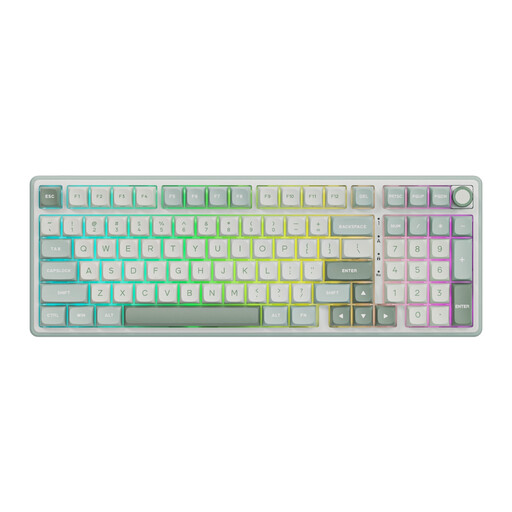 Image unavailable
Suitable if you’re looking for a backlit keyboard with a number pad and easy-to-use volume control.
Wired mechanical keyboard with RGB lighting, a 98% layout, volume knob and hot-swappable keys; the listed version has Beige Switch switches.
 Image unavailable
Suitable if you’re looking for a full-size layout with a number pad and wireless connectivity options.
108 keys, RGB lighting, tri-mode wireless connectivity and a listed battery capacity of 8000 mAh.
 Image unavailable
Suitable if you’re looking for a 98% layout with RGB lighting and several connection options.
Mechanical keyboard with a number pad, volume knob, TFT display and RGB lighting; the listed connection options are 2.4 GHz, Bluetooth and wired USB-C. The product name lists a battery capacity of 10000 mAh.
 Image unavailable
Suitable if you want a compact layout with RGB lighting and need the keyboard to take up less desk space.
Mechanical gaming keyboard with magnetic switches, 68 keys and a listed polling rate of 8000 Hz; the product information mentions Rapid Trigger.
 Image unavailable
Suitable if you’re looking for a compact layout and want to set up per-key lighting or programmable controls.
Wired mechanical gaming keyboard with RGB lighting and 82 keys. The product information lists per-key lighting, remapping and macros; check which settings are available on the version on offer.
No, not if you simply want to see the keys. White backlighting may be enough; if you want to highlight individual functions in different colours, check whether the exact model supports per-key lighting.
First, check which shortcuts the game already offers and whether you can change them. In Factorio, Ctrl+C and Ctrl+V are used for copying and pasting, according to the Official Factorio Wiki. If you want extra macro keys, check which software the specific model variant uses.
For a consumer purchase in the Netherlands, contact the retailer if a product is faulty. The Dutch government explains that there is no fixed two-year statutory warranty period for all products; a manufacturer’s warranty is separate from your statutory rights.
For distance purchases from a business in the Netherlands, you generally have 14 days to change your mind, according to the Dutch government. Check the terms that apply to your purchase; a retailer’s longer returns period is a separate store policy.
Electrical, electronic and wireless equipment must meet the relevant European requirements and carry the required CE marking, according to the Dutch Authority for Digital Infrastructure. This general requirement doesn’t confirm that a specific product listing complies.