First, choose a keyboard with adjustable lighting and a layout that suits the keys you use in your simulations. A full-size or 96% layout keeps the number pad, while a TKL layout gives you more room but does away with it. Before buying, check the exact layout, switch type and lighting controls.
Who is this buying guide for?
Night-time gamer who wants to see the keys
You play simulations in a dark room and want to choose and adjust the lighting without compromising on your preferred keyboard layout. SteelSeries and Corsair describe the lighting on the models mentioned here.
Simulation player who enters lots of numbers
You want to keep a number pad and function keys, perhaps in a more compact 96% layout. ASUS describes the ROG Strix Scope II 96 Wireless as a more compact layout with number and function keys.
Player with a shared or small gaming space
You may prioritise quieter keys or more room for your mouse; which matters more will depend on your setup. SteelSeries describes the Apex 3 TKL as quiet, while the Trust GXT 833 Thado has an 80% layout.
What should you look for?
| What to consider |
What to look for |
Who is this important for? |
| Adjustable lighting |
Check whether you can adjust the brightness or effects, and whether you need software to do so. |
If I play in a dark room, I want to find the keys without the lighting being uncomfortably bright. Around 36% of consumers give adjustable lighting top priority. |
| Numbers and keyboard layout |
Check the exact layout and whether your games use the number pad and function keys. |
If I enter numbers often, I want those keys close at hand. Around 29% of consumers give number entry and layout top priority. |
| Key noise and desk space |
Check the switch type, dimensions and whether the model has a number pad. |
In a shared or small gaming space, I want quieter keys or more room for my mouse. Around 21% of consumers give their gaming environment top priority. |
| Programmable shortcuts |
First check which shortcuts your game supports, then find out how the keyboard stores macros. |
If I often use the same supported in-game commands, I want to be able to assign them to a key. Around 14% of consumers give programmable shortcuts top priority. |
Common mistakes
-
Choosing a keyboard based on RGB lighting alone
Five lighting zones, per-key lighting and how you control it are all different features. Lighting does not automatically mean that every key legend will be easy to read in the dark.
Check whether you can adjust the brightness and effects on the exact version, and how to do so.
-
Choosing a TKL layout without considering the missing number pad
A TKL keyboard does not have a separate number pad. This can be inconvenient if you often enter numbers in your simulations.
Compare the layout with the keys you use. If you need a number pad, look for a full-size or 96% layout.
-
Assuming a macro key means your game supports the command
A macro key will not make an in-game command available if the simulation itself does not support it.
Check the shortcuts in your game first, then see whether the keyboard version can store macros and how to programme them.
Brands to compare
SteelSeries
The Apex 3 TKL is a backlit TKL model for anyone looking to save space.
- SteelSeries describes this model’s switches as Whisper-Quiet and lists RGB lighting.
- The TKL layout has no separate number pad. SteelSeries’ description of the sound is a claim, not a measurement taken in your gaming room.
Trust
The GXT 833 Thado has a compact, backlit 80% layout.
- Trust lists multi-colour lighting and registration of up to ten simultaneous key presses for this version.
- This model does not have a number pad; these features are not automatically available on all Trust keyboards.
ASUS ROG
According to ASUS, the ROG Strix Scope II 96 Wireless combines a more compact layout with number and function keys.
- ASUS lists three connection options and controls for the keyboard lighting.
- The switch type and keycap material may vary by version or region, so check the variant you want to buy.
Corsair
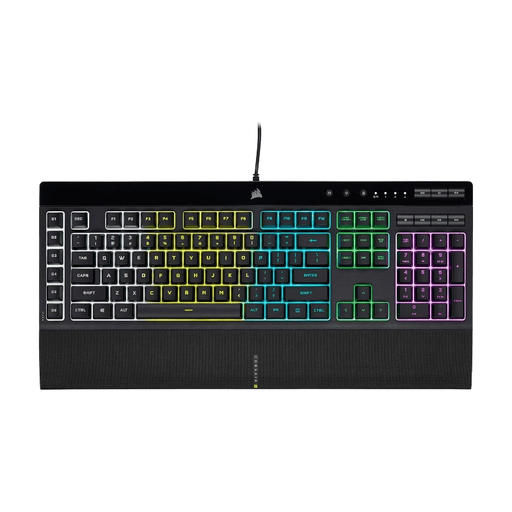
The K55 RGB PRO is a wired model with five lighting zones and six dedicated macro keys.
- Corsair describes lighting and macro settings that can be saved in hardware mode.
- Macro keys are only useful for commands supported by the game you play. Also check the keyboard layout of the version you are considering.
Logitech G
The G915 X LIGHTSPEED is a slim mechanical model with RGB lighting, G-keys and several connection options.
- Logitech G lists nine G-keys and LIGHTSPEED, Bluetooth or wired connectivity for this model.
- Check that the specific layout and programmable keys suit the commands you use in your simulations.
Keyboards at Joybuy
This selection includes backlit keyboards for simulations, from compact layouts to models with a number pad. Check that the layout and controls on each version suit the way you use it.
 No image available
AJAZZ AK980 V2, 98% QWERTY, Gift Switch V2, Starry Night Gray
The 98% layout is a good choice if you want to enter numbers but would prefer a more compact keyboard.
Mechanical gaming keyboard with RGB lighting, volume knob and TFT display.
Lists hot-swappable switches, a 10,000 mAh battery and wired, Bluetooth or 2.4G connectivity.
View at Joybuy
 No image available
AJAZZ AK820 MAX, 75%, US QWERTY, Flying Fish Switches
The compact 75% layout is a good choice if you want to save desk space and do not need a separate number pad.
Lists RGB backlighting, a volume knob and three connection options.
This version lists an 8,000 mAh battery and hot-swappable mechanical switches.
View at Joybuy
 No image available
Corsair K55 RGB PRO, US QWERTY
This model is a good choice if you want to keep a number pad and dedicated macro keys.
The product description lists a full-size keyboard with membrane keys, five RGB lighting zones and six macro keys.
Macros only work for commands supported by your game; check that the US QWERTY layout is right for you.
View at Joybuy
 No image available
Razer Huntsman Mini, linear optical switch, US, Mercury
The 60% layout is a good choice if you have a compact gaming space and do not need a number pad.
This version lists linear optical switches, individually lit RGB keys and on-board profile storage.
Check that the US layout and switch type suit the way you use the keyboard.
View at Joybuy
 No image available
MageGee TS91, 60%, 61 keys, US QWERTY, WhiteBlack
The compact 60% layout is a good choice if you want to save desk space and can play without a number pad.
The description lists 61 keys, a membrane design with a mechanical feel, and RGB lighting with adjustable brightness and lighting modes.
Check that the US QWERTY layout suits your preference.
View at Joybuy
Frequently asked questions
Do I need a number pad for economic simulations?
Only if you often enter numbers using a separate number pad in your games or for other tasks. A 96% model can keep the number pad, while a TKL model leaves it out to give you more desk space.
Can I use the lighting and macros without leaving the configuration software open?
It varies by model. Corsair says the K55 RGB PRO has a hardware mode that can run saved lighting effects and macros without the iCUE software active. Check the manual for any other model separately.
How do I clean a backlit gaming keyboard?
Follow the instructions for your exact version on cleaning and disconnecting it. A spill-resistance rating is no reason to submerge a keyboard or use cleaning products without the manufacturer's advice.
If I buy a keyboard online in the Netherlands, do I always get exactly two years of legal guarantee?
No. The Dutch government says there is no fixed legal guarantee period in the Netherlands. You are entitled to a product that meets reasonable expectations, and if there is a fault, you should contact the retailer. A manufacturer's guarantee is separate.
Can I return a keyboard bought online?
For eligible distance purchases, the Dutch government says you will often have a 14-day cooling-off period. Before ordering, check who the seller is and what information applies to the cooling-off period; not every transaction is a distance purchase.


