First, choose lighting with brightness settings you find comfortable, then check whether the keyboard layout suits the commands you use in exploration games. A compact keyboard frees up space, but may move functions to an Fn layer; descriptions such as ‘quiet’ are not comparative sound measurements. Manufacturer specifications help you distinguish between models, but they can’t tell you how comfortable a keyboard will feel in your room.
Who is this relevant to?
Players who need to find keys in the dark
These players want to find the keys they use and adjust the lighting to suit the room. HyperX lists three brightness levels for the Alloy Core RGB, while Razer describes per-key lighting for the BlackWidow V4 X.
Players in a shared room
These players want to game without their keystrokes drawing unnecessary attention. Compare the exact switch variant, and treat descriptions such as SteelSeries’ ‘Whisper Quiet’ as manufacturer wording, not a measured comparison.
Players with a small desk
These players want to leave room for mouse movement and check that a TKL or 60% layout keeps the keys they use for gaming within easy reach. The Razer Huntsman Mini has no separate function row or navigation cluster.
What should you look for when choosing?
Start with the lighting and keys you need while playing, then weigh up noise, layout and connectivity in relation to your room and desk.
| What to consider |
What should you check? |
Who should consider this? |
| Lighting |
Check the brightness controls, how easy the key legends are to see, and whether you can adjust the lighting by zone or per key. |
If I play in a dark room, I want to find the keys without the lighting becoming distracting. Around 33% of consumers give adjustable, readable lighting top priority. |
| Key noise |
Check the exact switch variant, and don’t treat manufacturer terms such as ‘quiet’ as a like-for-like sound measurement. |
In a shared room, I want to avoid making unnecessary noise when I type. Around 25% of consumers prioritise keeping key noise down. |
| Layout |
Compare the game commands you use with the layout, and check where functions are placed on a TKL or 60% keyboard. |
With limited desk space, I want to move my mouse freely without making frequently used commands difficult to reach. For around 25% of consumers, layout is the top priority when choosing. |
| Connectivity |
Check whether you want a wired or wireless connection, and which connection modes and charging options the model offers. |
If I want flexibility in where I place my keyboard, I need to know which connection will suit my setup. Around 17% of consumers prioritise freedom of connection and placement. |
Things to watch out for
-
Assuming RGB means per-key lighting
A keyboard with five lighting zones doesn’t offer the same individual colour control as a model with per-key lighting.
Check the exact model to see how many zones it has and which brightness settings are available.
-
Choosing a compact keyboard without checking your gaming keys
A 60% layout has no separate function row or navigation keys, while a TKL keyboard has no number pad.
Compare the commands you use with the layout and check which functions are available via an Fn layer.
-
Assuming a different switch variant is the same version
According to Razer, the Huntsman Mini is available with, among other options, linear red and clicky purple optical switches.
Before buying, check the full model name, switch variant and keyboard layout.
Brands to compare
Logitech G
The G515 range includes TKL models. According to Logitech, the G515 LIGHTSPEED TKL offers LIGHTSPEED, Bluetooth and wired data connectivity.
- According to Logitech, the wired G515 TKL has LIGHTSYNC RGB and a sound-dampening design.
- Features aren’t necessarily the same across wired and wireless versions. For the wireless model, check that it offers the connection you want and how it charges.
Razer
According to Razer, the BlackWidow V4 X offers customisable per-key lighting, while the Huntsman Mini has a 60% layout.
- The Huntsman Mini takes up less space than a larger layout.
- The Huntsman Mini has no separate function row or navigation cluster. Check the exact switch variant for both models.
SteelSeries
The Apex 3 TKL combines a compact TKL layout with illuminated keys.
- The TKL layout leaves out the number pad.
- ‘Whisper Quiet’ is SteelSeries’ description; it doesn’t rank the keyboard’s noise against other models.
HyperX
The Alloy Core RGB is a wired membrane keyboard with zone-based lighting.
- HyperX specifies three brightness levels and five colour zones for this model.
- The five zones don’t provide individual per-key lighting. Also check the keyboard layout of the version you’re looking at.
Corsair
According to Corsair, the K55 RGB PRO is a wired, full-size model with five lighting zones and six macro keys.
- Corsair specifies rubber-dome keys and lighting controls operated using key combinations.
- The lighting is divided into zones rather than controlled per key. Check the layout of the version you plan to use.
Gaming keyboards at Joybuy
This selection of Joybuy products is aimed at gaming with illuminated keys, with layouts ranging from TKL to compact. Check the connection and keyboard layout for each model.
 No image available
GXTrust Thado wired gaming keyboard, TKL, PC/PS5, QWERTY, black
The description mentions adjustable RGB lighting for gaming in a dark room.
The TKL layout leaves out the number pad; the product name specifies PC/PS5 and QWERTY.
View at Joybuy
 No image available
Redragon M68 mechanical gaming keyboard, 68 keys, US layout
The product name specifies RGB backlighting and a compact 68-key layout.
The name also mentions magnetic switches and Rapid Trigger. Check that the US layout suits you.
View at Joybuy
 No image available
AJAZZ AK820 MAX wired mechanical gaming keyboard, 82 keys, grey gradient keycaps
The product description specifies adjustable RGB lighting and an 82-key layout.
This model is wired and, according to the description, has magnetic switches with adjustable actuation.
View at Joybuy
 No image available
Corsair K70 CORE TKL, BE AZERTY, MLX Red, black
The product description mentions adjustable per-key RGB lighting and sound-dampening foam layers; this isn’t a measurement of keystroke noise.
The BE AZERTY layout differs from QWERTY, and the TKL format has no number pad.
View at Joybuy
 No image available
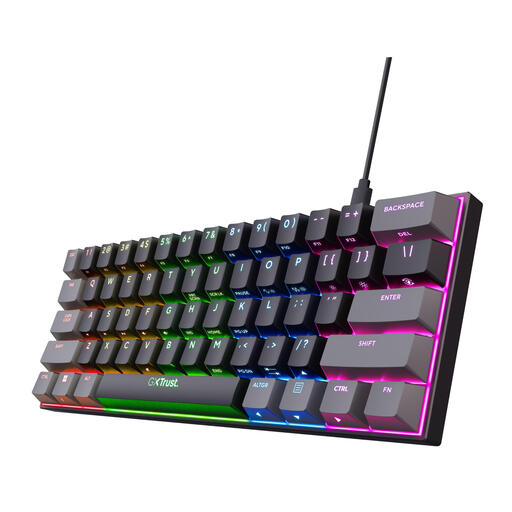
GXTrust Acira mechanical gaming keyboard, 60%, US QWERTY, black
The product description mentions customisable RGB lighting and linear Outemu Red switches.
The 60% layout has no separate arrow keys, function row or number pad; these functions are available via an Fn layer. The keyboard layout is US QWERTY.
View at Joybuy
Frequently asked questions
Are five lighting zones the same as per-key lighting?
No. HyperX specifies five adjustable zones for the Alloy Core RGB, while Razer describes customisable per-key lighting for the BlackWidow V4 X. Choose based on how much individual lighting control you want, rather than the word ‘RGB’ alone.
Can you adjust the lighting without software?
It varies by model. For the K55 RGB PRO, Corsair describes key combinations that let you control lighting effects in hardware mode. For other keyboards, check which settings are available without software.
What can you do if a keyboard bought online isn’t suitable?
According to ACM ConsuWijzer, online purchases generally come with a statutory 14-day cooling-off period after delivery, subject to exceptions. If the product is faulty, the seller is responsible for providing an appropriate solution under the legal guarantee.
What does CE marking on a gaming keyboard mean?
CE marking is the manufacturer’s declaration that the product complies with the applicable EU product rules; it isn’t an independent quality mark. The rules that apply depend on the features of the specific version, and the marking alone says nothing about gaming performance.


