Start by checking whether the key legends are visible: RGB lighting alone doesn't tell you whether the letters let light through. In its test of the Corsair K65 Plus Wireless, Tweakers found that the keycaps weren't translucent. Then choose based on whether you need dedicated command or macro keys, how much desk space you have and how much noise you can tolerate. For wireless models, check the connection modes and charging options too.
Who is this for?
Players who want to identify keys in the dark
If you play in a dimly lit room and often look down at your keys while gaming, check whether the legends themselves are visible. Tweakers reported that the keycaps on the Corsair K65 Plus Wireless they tested weren't translucent.
Players who use lots of custom commands
If you often use your own commands, it can be useful to assign them to dedicated macro keys or remapped keys. Corsair and Razer describe dedicated macro keys on specific models, while Logitech's KEYCONTROL lets you assign functions to existing keys.
Players with a small or shared desk
If you want to free up space beside your keyboard, reduce key noise or cut down on cables, compare the layout, the specified switch type and the connections available on the exact model. SteelSeries describes the Apex 3 TKL's switches as quiet, while Logitech lists multiple connection modes for the G915 X LIGHTSPEED TKL.
What should you look for?
First, check whether you can identify the keys you need in the dark. Then decide whether commands, key noise, size or connectivity matters most to you.
| What to consider |
What to look for |
Who is this important to? |
| Legible keys in the dark |
Check whether the legends let light through on the exact model, and whether you can adjust the lighting. |
If I need to look at the keys in a dark room, I want to be able to make out the letters themselves. Around 36% of consumers say legible keys are their top priority. |
| Custom commands |
Decide whether you want dedicated macro keys or prefer to remap existing keys. Also check the software and what your game supports. |
If I often use custom commands, I want to assign them quickly to dedicated or remapped keys. Around 29% of consumers prioritise assigning their own commands. |
| Key noise |
Check the switch type and key feel of the exact model. A manufacturer's description isn't an independent comparison of sound levels. |
If I share a room with others, I want to know what kind of key noise to expect. Around 21% of consumers say quieter keys are their top priority. |
| Space and connectivity |
Check whether you need a number pad and which connections or connection modes the model offers. |
If my desk is short on space or I'd rather not use a cable, I'll take the layout and connectivity into account. Around 14% of consumers prioritise space or connectivity. |
Common pitfalls
-
Assuming RGB means legible key legends
A keyboard can have lighting without the letters on its keys letting light through. Tweakers found this to be the case with the Corsair K65 Plus Wireless they tested.
Before choosing, check the legends and keycaps on the exact model, not just whether RGB is mentioned.
-
Assuming the product title tells you everything about the model
Connections and specifications can vary between models. So, for a model name such as Logitech G515, it's important to check whether you're looking at the wired or wireless version.
Before ordering, compare the full model name, connection, switch variant and layout in the product information.
-
Assuming there is a fixed statutory warranty period
According to the Government of the Netherlands, there is no fixed statutory warranty period in the Netherlands. A manufacturer's warranty is separate from your consumer rights if a product is faulty.
Keep your purchase and product information, and contact the seller if there's a problem.
Brands to compare
Logitech G
The G515 TKL is a wired, low-profile mechanical TKL model with KEYCONTROL and LIGHTSYNC RGB. Logitech lists multiple connection modes for the G915 X LIGHTSPEED TKL.
- Worth considering if you want to customise existing keys and don't need a number pad.
- The G515 TKL is wired, while the G915 X LIGHTSPEED TKL offers different connection options. Check which model you're looking at.
Corsair
The K55 RGB PRO combines a full-size layout with six dedicated macro keys and five RGB zones. Corsair says this model has rubber-dome keys.
- An option to compare if you want dedicated macro keys and a full-size layout.
- The K55 RGB PRO doesn't have mechanical switches. According to Tweakers, the keycaps on the K65 Plus Wireless they tested weren't translucent. So, if visible key legends in the dark matter to you, check the exact model.
SteelSeries
The Apex 3 TKL combines a TKL layout and RGB with switches that SteelSeries describes as Whisper Quiet.
- Worth comparing if you want to free up desk space and the manufacturer's description of key noise is relevant to you.
- SteelSeries' description isn't an independent measurement showing how this model's noise compares with other keyboards.
Razer
The BlackWidow V4 X is a mechanical keyboard with six dedicated macro keys. Razer lists customisable per-key RGB lighting.
- Worth considering if you want to compare dedicated command keys and per-key lighting.
- Check the switch variant and make sure the size fits your desk.
Gaming keyboards at Joybuy
This selection includes gaming keyboards to compare for lighting, layout, dedicated commands and connectivity.
 Image unavailable
AJAZZ AK820 MAX wired mechanical gaming keyboard
A wired model to compare if you're looking for a compact keyboard. Check whether the key legends are easy to make out where you play.
Magnetic switches, 82 keys, hot-swappable, adjustable RT, RGB, a specified 8000 Hz polling rate and specified 0.1 mm precision.
View at Joybuy
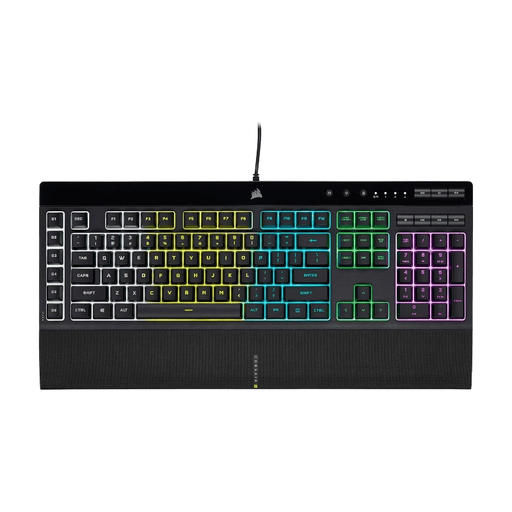 Image unavailable
Corsair K55 RGB PRO, US QWERTY
Worth considering if you want dedicated macro keys and have room for a full-size keyboard.
Six dedicated macro keys, five RGB zones and rubber-dome keys, according to Corsair. RGB zones alone don't tell you whether the legends let light through.
View at Joybuy
 Image unavailable
Corsair K70 CORE TKL, BE AZERTY, MLX Red
A TKL model to compare if you want to free up desk space. Check that the layout suits the way you use your keyboard.
Mechanical gaming keyboard, BE AZERTY layout and MLX Red switches.
View at Joybuy
 Image unavailable
Razer BlackWidow V4 X, Yellow Switch, US QWERTY
An option to compare if you want dedicated macro keys and per-key lighting matters to you.
Six programmable macro keys and per-key RGB lighting, according to Razer. This variant has Yellow Switch switches and a US QWERTY layout.
View at Joybuy
 Image unavailable
Razer Huntsman Mini, Linear Optical Switch, US, Mercury
The Mini model is worth comparing if you're looking for a smaller keyboard. Check that it has all the keys you need for your game.
Linear Optical Switch, US layout and Mercury colour.
View at Joybuy
Frequently asked questions
Is RGB lighting enough to read the letters in the dark?
Not always. Check whether the legends on the exact model let light through. Tweakers reported that the keycaps on the Corsair K65 Plus Wireless they tested weren't translucent.
How do you set up the lighting and macros on a Corsair K55 RGB PRO?
According to Corsair, saved lighting effects and macros can be used in hardware mode when iCUE isn't running. The Corsair manual also explains how to control the lighting zones and record macros. This applies specifically to the K55 RGB PRO.
What should you bear in mind when cleaning a gaming keyboard?
Check the manual for your specific model before cleaning the keyboard, and follow the care instructions for that version.
What are your rights when buying online or if a product is faulty in the Netherlands?
For many online purchases from a business, the Government of the Netherlands says you have a 14-day cooling-off period. There is no fixed statutory warranty period in the Netherlands. If a product is faulty, your rights depend in part on what you could reasonably expect. The seller is your point of contact for a solution.


