First, choose lighting that suits the way you want to find your keys in a dark room: general or zone lighting may be enough, while per-key lighting offers more targeted customisation. Then weigh up key noise, layout and connectivity. Compact models save space, but may omit keys, and manufacturers’ descriptions such as ‘quiet’ are not a standardised way to compare noise levels.
Who is this for?
Evening gamer who wants to find the keys
You play in low ambient light and want clear, adjustable key lighting without bright effects constantly distracting you. Manufacturers offer a range of options, from brightness levels and zones to per-key lighting.
Gamer who doesn’t want to disturb the household
During evening sessions, you’re particularly mindful of the sound of your keystrokes and compare membrane keyboards with the switch options on mechanical models.
Gamer with limited desk space
You want to keep space clear next to your mouse, but first decide whether you need the number pad, arrow keys and function row close at hand.
What should you look for when choosing?
Start with the type of lighting you need, then consider key noise, layout and connectivity. That way, a striking lighting effect won’t seem more important than the keys you want to use while playing.
| What to consider |
What to look for |
Who is this important for? |
| Clear lighting |
Check the brightness controls and whether the lighting can be adjusted by zone or by key. |
If I play in a dark room, I want to read the keys without distracting effects. Around 36% of consumers rank clear lighting as their top buying priority. |
| Key noise and feel |
Check the exact switch option; ‘quiet’ is not a standardised way to compare noise levels. |
During a quiet evening session, I want to keep keyboard noise down without assuming I’ll like a particular key feel. Around 29% of consumers prioritise low key noise. |
| Size and access to keys |
Compare the layout with the keys you use in your games; TKL models omit the number pad. |
If my desk is short on space, I still want the keys I need for my games close at hand. Around 21% of consumers prioritise size and easy access to keys. |
| Connectivity |
Check the connections available on the specific model and whether you’ll need software for the settings you want. |
I want to know in advance whether a wired connection suits my set-up or if I want to switch between connection types. Around 14% of consumers make connection flexibility their top priority. |
Avoiding common buying mistakes
-
Assuming RGB means per-key lighting
Zone lighting and per-key lighting are different features. Corsair lists five lighting zones for the K55 RGB PRO; Razer specifies adjustable per-key lighting for the BlackWidow V4 X.
Check whether the specifications for the exact model you’re considering mention zone or per-key lighting.
-
Choosing a compact model without checking the layout
A TKL or 75% layout can free up space, but compact models don’t have a number pad. The keys that remain vary between layouts.
Compare the keys you use in your games with the layout of the exact model.
-
Confusing a shop listing with confirmed availability
A product name alone doesn’t confirm that the variant matches the product page or that the product is in stock.
Check the model and current availability on the product detail page before ordering.
-
Confusing an extended warranty with your statutory rights
According to the Dutch government, the retailer is your point of contact if a product is faulty. An extended warranty is in addition to your statutory rights.
Before choosing an extended warranty, check exactly what extra cover it provides.
Brands to compare
SteelSeries
The Apex 3 TKL is a compact model with zone lighting, designed for those who value desk space and quiet keystrokes.
- SteelSeries lists eight RGB zones for the Apex 3 TKL.
- Zone lighting doesn’t mean that you can set a different colour for every key. ‘Whisper-Quiet’ is the manufacturer’s description, not a standardised way to compare noise levels.
HyperX
The Alloy Core RGB is a membrane keyboard with general lighting; the Alloy Origins Core is a separate mechanical range.
- HyperX lists five zones and three brightness levels for the Alloy Core RGB. For the Alloy Origins Core, HyperX specifies per-key lighting.
- The Alloy Origins Core’s per-key lighting is not a specification of the Alloy Core RGB.
Corsair
The wired K55 RGB PRO combines zone lighting with dedicated macro keys.
- Corsair lists five lighting zones, six macro keys and rubber dome keys for this model.
- The K55 RGB PRO is not a mechanical keyboard, and its lighting is zone-based rather than per-key.
Razer
The BlackWidow V4 X offers per-key lighting and a choice of switch options; the BlackWidow V4 75% has a more compact layout.
- Razer specifies per-key lighting for the V4 X. According to Razer, the V4 75% retains the function row and arrow keys.
- According to Razer, the Green option is clicky, while the Yellow option is smoother and quieter. The compact V4 75% has no number pad.
Logitech G
The G915 X LIGHTSPEED is a low-profile mechanical keyboard with several connectivity options.
- Logitech lists LIGHTSPEED, Bluetooth, a wired connection and LIGHTSYNC RGB.
- The listed connectivity options don’t prove that the claimed speed offers a noticeable advantage in detective games. Check the switch option too.
Keyboards at Joybuy
This selection of Joybuy products includes backlit mechanical keyboards with different layouts and connection options. Focus on how the lighting, size and connectivity suit your gaming set-up.
 No image available
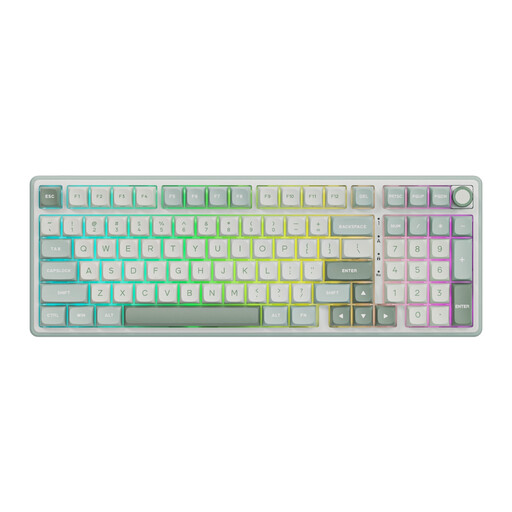
RK ROYAL KLUDGE R98 Pro, wired, with number pad
RGB backlighting and a layout with a number pad make this a good fit if you want visible keys and a full-featured keyboard.
Mechanical, wired, with a volume knob, MDA-profile PBT keycaps and hot-swappable Sky Cyan Color switches in the Beige Switch variant.
View at Joybuy
 No image available
AJAZZ AK980 V2, QWERTY, tri-mode
RGB lighting and a 98% layout give you a backlit option with a number pad and several connection choices for your desk set-up.
Mechanical, with a volume knob, TFT display and a 10.000 mAh battery. The listed connections are wired, Bluetooth and 2,4G.
View at Joybuy
 No image available
AJAZZ AK820 MAX, 75%, US QWERTY
The 75% layout is designed for anyone looking for a compact keyboard; the product description lists arrow keys and a function row.
Tri-mode connectivity, RGB backlighting, a volume knob, Flying Fish Switches and an 8.000 mAh battery. The keycaps are hot-swappable.
View at Joybuy
 No image available
AJAZZ AK820 MAX, wired, magnetic switches
The product name lists RGB and a 75% layout for anyone looking for a compact, backlit keyboard.
Wired, with 82 keys and hot-swappable switches.
View at Joybuy
 No image available
AJAZZ AK820 V2, wired, 75% layout
The product name lists a compact layout and RGB lighting for anyone looking for backlighting without a full-size keyboard.
Mechanical keyboard with HE magnetic switch and volume knob.
View at Joybuy
Frequently asked questions
Do I need per-key lighting for detective games in the dark?
Not necessarily: adjustable general or zone lighting may be enough to help you identify the keys. If you want to assign specific keys their own colours, check whether the exact model supports per-key lighting. The five zones on the HyperX Alloy Core RGB are different from the per-key lighting Razer specifies for the BlackWidow V4 X.
Can I adjust the lighting without constantly using software?
It depends on the model. HyperX lists six lighting effects and three brightness levels for the Alloy Core RGB; Corsair mentions built-in effects and iCUE for more extensive customisation. Check which settings are available on the model you choose.
What can I do if my keyboard doesn’t work properly after I buy it?
When you buy as a consumer in the Netherlands, you’re entitled to a product that works properly, and the retailer is your point of contact if there’s a fault. According to the Dutch government, there is no fixed statutory warranty period that applies to all products; what you can expect depends, among other things, on the product and the sales information. An extended warranty does not replace your statutory rights.
Can I return a keyboard bought online if I’m unhappy with how the keys feel?
For distance purchases from a business, you generally have a 14-day cooling-off period, according to the Dutch government. Check the relevant terms and exceptions; this is separate from your rights if the product is faulty.
Which EU rules apply to a wireless keyboard?
A wireless keyboard that is radio equipment is covered by the EU Radio Equipment Directive. According to the European Union, CE marking is only compulsory when applicable harmonised rules require it; the mark alone does not prove that a specific advert or model has all the required documentation. Check the product information for the specific model.


