
Gaming in a dark room
You want to find the keys you need without the lighting being uncomfortably bright. Adjustable lighting zones and brightness are therefore worth considering.


For playing deck-building games in a dark room, a keyboard with adjustable lighting and a layout that makes the keys you need easy to reach is a practical starting point. A membrane model described by the manufacturer as quiet could suit a peaceful gaming session. A compact or mechanical model may be more appealing if desk space or key feel matters more to you, although you may need to weigh up how important low noise and easy-to-reach keys are.
You want to find the keys you need without the lighting being uncomfortably bright. Adjustable lighting zones and brightness are therefore worth considering.
You share your space or want a peaceful gaming session, so you compare the stated switch type and sound, not just the RGB features.
You want a smaller keyboard, but need to consider whether the keys you use in your games will still be easy to reach.
| What to consider | What should you check? | Who is this important to? |
|---|---|---|
| Clear, adjustable lighting | Check whether you can adjust the brightness and easily identify the keys you need. Zone lighting is not the same as a separate setting for each key. | If I want to identify keys in a dark room without unnecessarily bright lighting, I prioritise adjustable illumination. Around 36% of consumers put lighting first. |
| Sound and key feel | Check the switch type on the exact version you’re considering. Manufacturer descriptions such as quiet or clicky are not the result of a measured comparison between models. | When I play in a shared space, I want to know how the keyboard sounds and feels before choosing a switch. Around 29% of consumers prioritise sound and key feel. |
| Layout and easy-to-reach keys | Check whether the arrow, function and any numeric keys are separate keys. On a compact layout, some functions may be on secondary key layers. | If I want to reach the keys I usually use straight away, I check the layout of the specific version rather than just its size. Around 21% of consumers prioritise easy-to-reach keys. |
| Connectivity and desk set-up | Check which connections the specific version supports. If you plan to use it wirelessly, check how your preferred lighting settings affect charging. | If a cable restricts my desk set-up, the connection options I want will influence my choice. Around 14% of consumers prioritise flexibility of placement and connectivity. |
For the Huntsman Mini Mercury reviewed, Razer describes secondary functions for some keys. A smaller size does not mean every function has its own key.
Compare the keys you need for gaming and everyday use with the layout of the exact version you’re considering.
Bear in mind that it may take time to get used to functions accessed via a secondary key layer.
Manufacturer information about limited spill resistance or a liquid test applies to the model specified. It is not a promise that the keyboard is waterproof.
Check the claim for the exact version and keep liquids away from the keyboard.
ACM ConsuWijzer explains that there is no fixed statutory warranty period for all products in the Netherlands. If a product does not perform as you could reasonably expect during normal use, contact the seller.
Keep your proof of purchase and assess any fault against what you could reasonably expect from the product.
The Apex 3 TKL is a compact, wired option with eight RGB zones.
The G213 Prodigy and G915 X LIGHTSPEED are different keyboard ranges with a variety of versions.
The Alloy Core RGB is a membrane keyboard with five RGB zones and three brightness settings.
The wired K55 RGB PRO is a full-size keyboard with five RGB zones.
The Huntsman Mini Mercury reviewed is a 60% model with optical switches; the Ornata V3 is a separate low-profile mecha-membrane range.
This Joybuy selection focuses on RGB-lit gaming keyboards, with wired and wireless options and a range of compact layouts.
 No image available
Ideal if you want to combine RGB lighting with a numeric keypad in a compact layout.
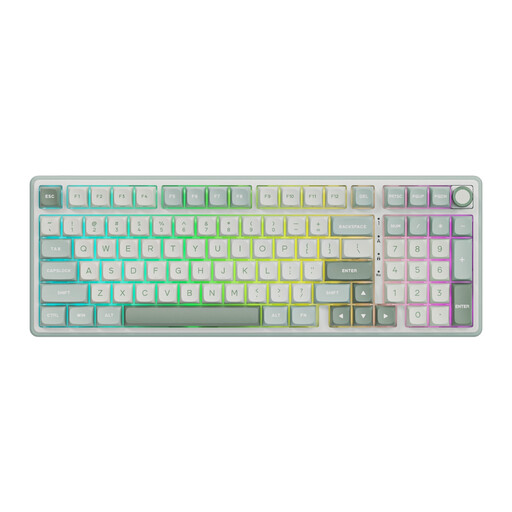
Wired mechanical keyboard with a 98% layout, numeric keypad and volume knob; the product name lists PBT keycaps and hot-swappable switches.
 No image available
Ideal if you want to combine RGB lighting with a numeric keypad in a compact layout.
Wired mechanical keyboard with a 98% layout, numeric keypad and volume knob; the product name lists PBT keycaps and hot-swappable switches.
 No image available
Ideal if you want RGB lighting and a choice of connection options for your desk set-up.
Mechanical QWERTY keyboard with wired, Bluetooth and 2.4GHz connectivity; the product name lists a 98% layout, hot-swappable switches, volume knob, TFT screen and 10,000 mAh battery.
The safety information warns against spilling liquid on the keyboard.
 No image available
Ideal if you want a compact keyboard with RGB lighting and want to check in advance which keys are available individually on your chosen layout.
Mechanical gaming keyboard with 68 keys, magnetic switches and US layout.
The safety information warns against exposing the keyboard to liquids.
 No image available
Ideal if you want a compact layout that, according to the product description, retains the arrow keys and a function row.
Wireless mechanical gaming keyboard with tri-mode connectivity and RGB lighting; the product name lists an 8,000 mAh battery and a US QWERTY layout.
The safety information warns against exposing the keyboard to water or moisture.
Not based on this use case alone. First, check whether you can adjust the brightness and identify the keys you need. The G213 and Alloy Core RGB have zone lighting; a separate setting for each key is not indicated here.
Corsair describes built-in lighting effects and settings via iCUE. According to Corsair Support, the keyboard can use lighting saved in hardware mode without iCUE running. Check which settings you want to save for your set-up.
No, the stated protection does not mean that it is waterproof. Logitech lists spill resistance up to 60 ml for the G213, while HyperX reports a test involving up to 120 ml for the Alloy Core RGB. These are manufacturer details for specific models, not permission to submerge the keyboard.
ACM ConsuWijzer states that online purchases generally come with a cancellation period of up to 14 days after delivery, subject to legal exceptions. You also have a statutory right to a product that performs as you could reasonably expect. In the Netherlands, there is no single fixed period that applies to every keyboard.
No. For equipment covered by the relevant EU requirements, the manufacturer uses the CE mark to declare that the product meets those requirements and draws up an EU declaration of conformity. The mark is not, in itself, an independent test of gaming performance.