
Evening gamer who wants to see the keys
If you play in low ambient light, you’ll want to find the keys without the lighting becoming distracting. SteelSeries describes brightness settings for the Apex 3 through GG.


First, choose lighting with adjustable brightness, then decide how much typing noise and desk space you’re comfortable with. SteelSeries describes brightness settings for the Apex 3 through GG; check whether those controls are available on the version you’ve chosen. For adventures played mainly with a mouse, a compact or manufacturer-described quiet model may be more relevant than extra macro keys.
If you play in low ambient light, you’ll want to find the keys without the lighting becoming distracting. SteelSeries describes brightness settings for the Apex 3 through GG.
If you play late, the sound of your keystrokes may be noticeable to others. Compare the feel of the keys and check the specific version you’re considering; manufacturers’ use of terms such as ‘quiet’ doesn’t mean their products have been measured on a comparable basis.
If you need space beside your keyboard for your mouse, a compact layout could be a good fit, provided you can manage without a number pad.
Start with the brightness controls, then consider the layout and typing noise. Choose extra features only if you’ll actually use them.
| What to consider | What should you check? | Who is this important for? |
|---|---|---|
| Lighting in the dark | Check whether you can adjust the brightness and choose a gentle lighting setting on the exact version you’re considering. | If I play in a dark room, I want to be able to read the keys without distracting light. Around 36% of consumers rank adjustable, gentle lighting as their top buying priority. |
| Typing noise | Check the switch type on the model and, where possible, assess the sound in a comparable setting. | If I play late in a shared space, I want to disturb others as little as possible without choosing a key feel that doesn’t suit me. Around 29% of consumers rank low typing noise as their top priority. |
| Mouse space and layout | Check whether you can use your games’ controls with the layout you’ve chosen and whether you need a number pad. | With limited desk space, I want to move my mouse freely and may be able to manage without a number pad. Around 21% of consumers rank mouse space as their top priority. |
| Extra features | Make a note of which macro or media keys you’ll actually use and check which settings are available on the version you’re considering. | If I mainly control games with a mouse, I want a straightforward basic model rather than features I won’t use. Around 14% of consumers put simplicity first. |
A wide range of lighting effects doesn’t tell you whether you can turn the brightness down to a gentle setting that’s comfortable in a dark room.
For the exact version you’re considering, check how to adjust the brightness and whether you can save a gentle setting.
SteelSeries and Razer describe switches on specific models as quiet, but these manufacturers’ descriptions aren’t based on comparable noise measurements.
Check the switch type and, where possible, compare the key feel and sound under similar conditions.
A model name can refer to different versions. A TKL layout has no number pad, and keyboard layouts can vary.
Check the full model name, connection type and keyboard layout in the product information and on the packaging.
According to the Government of the Netherlands, your statutory guarantee still applies without a paid extended warranty. The retailer is your point of contact; what you can expect from a product depends, among other things, on the product, its price and the information provided.
Read what an extended warranty actually covers and compare it with your statutory rights.
An extended warranty may cost extra. First consider what additional rights or services it provides.
The Apex 3 TKL is a compact option for anyone looking for lighting, mouse space and a keystroke the manufacturer describes as quiet.
The wired G515 TKL is a compact, low-profile mechanical option for anyone who also wants programmable keys.
The wired GXT 833 Thado is a compact option for anyone looking for a backlit TKL layout.
The K55 RGB PRO is designed for anyone who uses a full-size keyboard with macro and media keys for games beyond point-and-click adventures.
The Ornata V3 X is a backlit option for anyone looking for a membrane keystroke the manufacturer describes as quiet, plus a wrist rest.
This selection includes backlit gaming keyboards, with compact layouts for anyone looking to save space for their mouse, as well as a keyboard and mouse set.
 No image available
A compact option to consider if you want to save space for your mouse and are looking for adjustable lighting. Check the product page to see how to adjust the brightness.
TKL layout, US QWERTY and MGX v2.
 No image available
A compact option to consider if you want to save space for your mouse and adjust the lighting. Check the controls and lighting modes to make sure they suit your needs.
TKL layout and US QWERTY.
 No image available
This wired TKL version is an option if you want to save space for your mouse and are looking for an AZERTY layout.
Linear Titan switches, RGB and AZERTY.
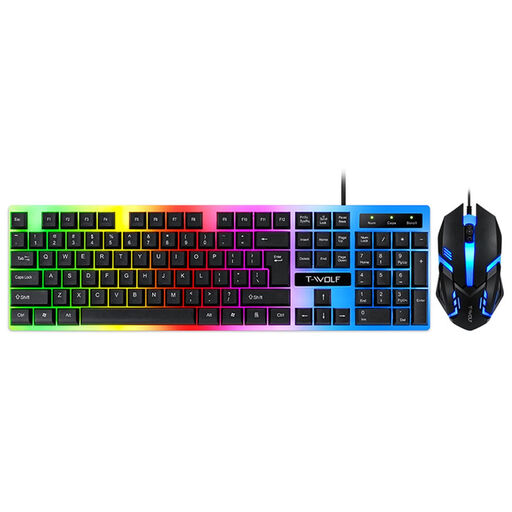 No image available
An option to consider if you’re looking for both a keyboard and a mouse. Check whether the colourful backlighting suits the gentle lighting setting you want in a dark room.
Wired set with colourful backlighting and matte, non-slip keys.
Not necessarily. Assemble Entertainment’s description emphasises mouse clicks; check the controls for each game before choosing extra macro keys.
For the Apex 3, SteelSeries describes adjusting effects and brightness through GG. For the version you’re considering, check whether the brightness controls you want are available and how to save a setting.
According to the Government of the Netherlands, the retailer is your point of contact for the statutory guarantee. The Netherlands has no fixed statutory guarantee period; what you can expect from a product depends, among other things, on the product, its price and the information provided. For a typical online purchase from a business, you’ll also usually have a 14-day cooling-off period, with some exceptions.
That depends on the product rules that apply to the specific version. According to Your Europe, CE marking is required when applicable harmonised EU rules say it is. If you’re unsure, check the product and manufacturer information for the version you want to buy.
No. According to Your Europe, the WEEE symbol showing a crossed-out wheelie bin means electrical and electronic equipment must be collected separately for treatment and recycling.