
Vandaag of morgen in huis

Kwaliteit gegarandeerd

Welkomstaanbiedingen ontgrendelen: GRATIS bezorging | Tot 80% korting | Gratis 30 dagen JoyPlus-proefperiode
Download de app
Buying a gaming keyboard may seem simple until you have to choose between mechanical, membrane, 60%, 75%, wireless or wired. Marketing copy often focuses on RGB lighting, extremely high polling rates or terms such as “mechanical feel”. In reality, the size, key layout and connection method are the main factors determining whether a keyboard is right for you.
For gamers, students, homeworkers and office professionals, there are three common pitfalls:
Choosing a compact size without considering which keys are missing
A 60% keyboard saves space, but usually has no dedicated arrow keys, function row or number pad. Many functions are accessed using a combination with the Fn key.
Confusing “mechanical feel” with mechanical switches
A membrane keyboard can imitate a mechanical keystroke, but it does not use separate mechanical switches. This difference matters for typing feel, maintenance and customisation.
Choosing the wrong layout
A US QWERTY keyboard has a different layout from a Dutch ISO layout. Pay attention to the shape and position of Enter, Shift and punctuation keys. For touch typists, the wrong layout can cause unnecessary frustration.
A keyboard’s size determines how much desk space you have left and which keys are directly available.
Always check the exact key layout. The term “75%” indicates the size, but does not automatically specify the position of every key or the language layout.
A mechanical gaming keyboard uses separate switches beneath the keys. These can be linear, tactile or clicky. Linear switches generally feel smooth and consistent, while tactile switches provide a noticeable bump during the keystroke.
A hot-swappable keyboard allows compatible switches to be replaced without soldering. Check whether the board supports 3- or 5-pin switches and whether your preferred replacement switches will fit.
On a membrane model, key presses are registered through a membrane. This can be quieter and more affordable, but usually offers fewer customisation options. According to the product information, the MageGee TS91 is described as a membrane model with a mechanical feel. Do not therefore treat it as a fully mechanical system.
A wired keyboard connects via USB and does not require a battery or batteries. This makes it a straightforward choice for a permanent desktop setup. A wireless keyboard offers greater flexibility, but requires consideration of batteries, charging and the available connection.
Pay attention to the following points:
RGB lighting is primarily a visual feature. Check whether brightness, lighting effects and speed can be adjusted, and whether the lighting works per key or by zone. Do not automatically expect RGB to improve performance.
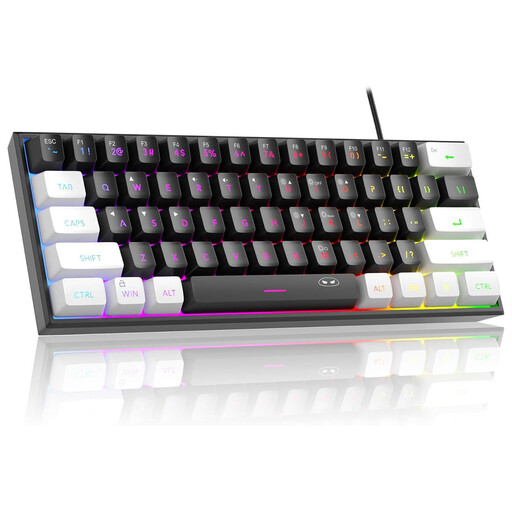
Why it suits this profile: This compact wired model has 61 keys, RGB lighting and a US QWERTY layout. It is a good fit for a small desk and a first gaming setup.
The product information clearly states that this is a membrane model with a mechanical feel. It also specifies that the connection is not waterproof, despite the IPX4 circuit board.
Compact size, wired connection, adjustable RGB modes and compatibility with Windows and Mac according to the product listing.
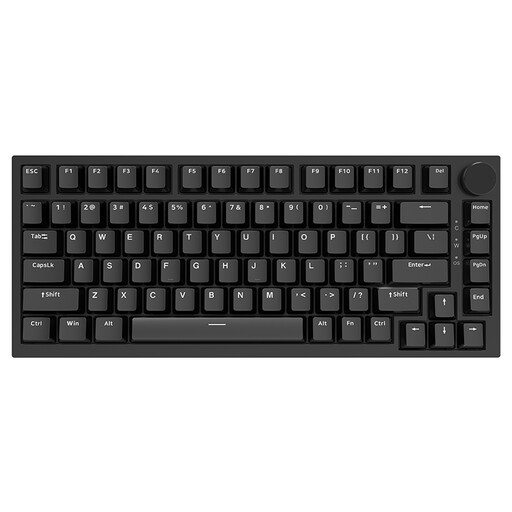
Why it suits this profile: This 75% keyboard combines a mechanical design with a volume knob, PBT keycaps and a hot-swappable PCB for users who want to customise their setup.
The specifications state the size, US QWERTY layout and Type-C wired connection. This makes it clear in advance which keys and connections you will receive.
82 keys, 3- and 5-pin hot-swappable support, PBT keycaps, gasket construction and RGB lighting according to the product specifications.
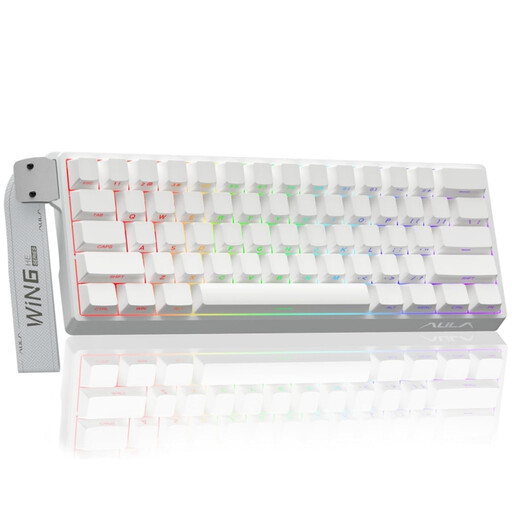
Why it suits this profile: This compact model is aimed at players specifically looking for features such as Hall Effect Magnetic Switches, Rapid Trigger and a high polling rate.
The listed features are specific technical characteristics. However, check in advance that your game and software support the available settings; a high polling rate cannot replace a suitable PC configuration.
60% size, Hall Effect Magnetic Switches, Rapid Trigger and a stated polling rate of 8K.
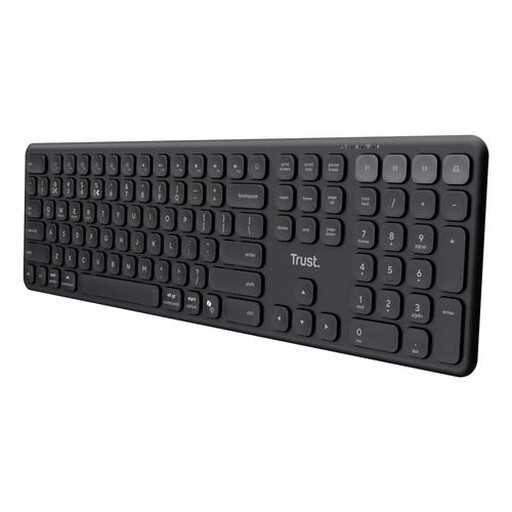
Why it suits this profile: This full-size wireless keyboard is aimed at homeworkers and professionals who switch between a laptop, tablet, phone and PC.
The product description clearly states that the model has no mechanical switches or lighting. This helps prevent unrealistic expectations when buying.
Four paired devices, USB receiver and Bluetooth, quiet scissor keys, a number pad and a rechargeable battery according to the product information.
Use this quick checklist:
We have put together a complete, up-to-date list of products that fully meet these strict selection criteria and the applicable European safety regulations.
It can be, but it depends on the switch and the amount of noise produced. Linear switches feel smooth and consistent, while quiet scissor or membrane keys are often more practical in a shared workspace. Also check the layout and size before ordering.
A wireless keyboard uses batteries or a built-in rechargeable battery. Power consumption depends on the connection, usage time and any lighting. A model with an on/off switch can be turned off when not in use. With RGB lighting, battery life may differ from that without lighting.
A 60% keyboard is useful when desk space and freedom of movement for your mouse are important. For spreadsheets, text editing and quick access to arrow or function keys, a 75% or full-size model may be more practical. So check which keys are operated using Fn combinations.
