
Home worker who also games
You spend long sessions building in your sandbox world and use the same desk for work or calls. In that case, you’ll want to consider how loud the keys are when choosing a keyboard.


Start with the layout and keys you need for both building and work. A TKL keyboard leaves out the number pad, which can free up space for your mouse. Also consider the switch type and any sound dampening: manufacturers’ claims about quietness aren’t based on directly comparable sound measurements. Wireless connectivity is most useful if you switch between devices or want to work without cables; just remember that you’ll need to charge it.
You spend long sessions building in your sandbox world and use the same desk for work or calls. In that case, you’ll want to consider how loud the keys are when choosing a keyboard.
You want quick access to frequently used functions, and need to weigh up how many dedicated keys you need against the space they take up.
You want to leave room for mouse movements, while knowing which keys you can’t do without for building and work.
First, work out which keys and features you use every day; then compare noise, size and connectivity. This helps you avoid choosing a compact design or extra controls at the expense of something you use often.
| What to consider | What should you look for? | Who is this important for? |
|---|---|---|
| Key noise and typing feel | Compare the specific switch type and any sound dampening; quiet doesn’t mean silent. | If I work or make calls at the same desk, I want to know what the keyboard sounds like during extended use. Around 36% of consumers prioritise quietness. |
| Keys within easy reach | Check for macro and media keys, and whether you can set up the functions you want with your game and the available software. | If I use the same functions often while building, I want to access them without cumbersome key combinations. Around 29% of consumers prioritise direct access to controls. |
| Size and layout | Check that the number pad, function row and arrow keys are included as you need them. | If desk space for my mouse is limited, I want to know which keys a more compact model leaves out before choosing a layout for work. Around 21% of consumers prioritise desk space. |
| Connectivity and switching | Check which connections the exact model offers. Wired use needs room for a cable, while wireless use may mean charging the keyboard. | If I use my desk with different devices, I want to know in advance how I can switch between them. Around 14% of consumers prioritise switching between devices. |
A keyboard range may include both wired and wireless versions. A product page that pairs a wireless model name with wired specifications makes it unclear which version is being sold.
Compare the full model name, connectivity, switches and key layout with the manufacturer’s information. Don’t treat conflicting specifications as proof that the listings refer to the same version.
The Corsair K70 CORE TKL version mentioned in the product information has a BE AZERTY layout. The Green and Yellow switches on the Razer BlackWidow V4 X differ in their stated type and sound profile.
Check the layout and switch type in the product information before choosing, especially if you need a particular key layout or quieter keys.
The Dutch government explains that the Netherlands has no fixed statutory warranty period. However, a product must meet what you can reasonably expect from it.
Keep your purchase and product information, and contact the seller if something goes wrong.
The Apex 3 TKL is a wired option for anyone looking for a compact size and a quiet design.
The G515 TKL is available as a wired model, while the separate G515 LIGHTSPEED TKL is an option if you’re looking for wireless connectivity.
The BlackWidow V4 X is worth considering if you’re looking for dedicated macro keys and media controls.
According to RTINGS, the K70 CORE range includes a full-size model and a TKL version; the K65 PLUS WIRELESS is a separate compact wireless range.
These keyboard options for building and working range from compact wired models to wireless versions with a number pad. Compare the layout and listed version details with the keys and connections you need.
 No image available
The TKL layout may suit you if you want to leave room for mouse movements and don’t need a number pad.
Wired gaming keyboard with a US QWERTY layout.
 No image available
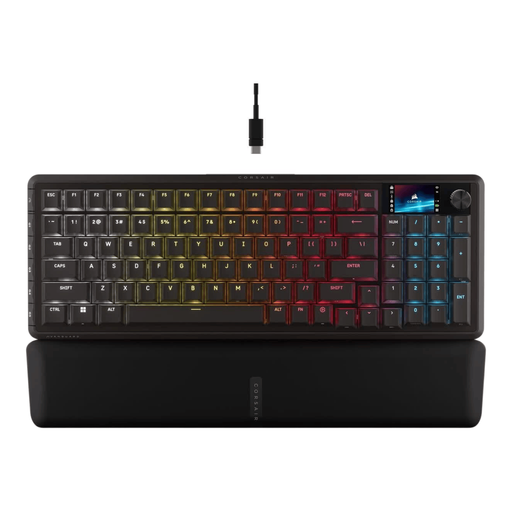
An option to consider if you’re looking for a wireless gaming keyboard with a number pad.
96% layout, mechanical and wireless, with a US QWERTY layout.
 No image available
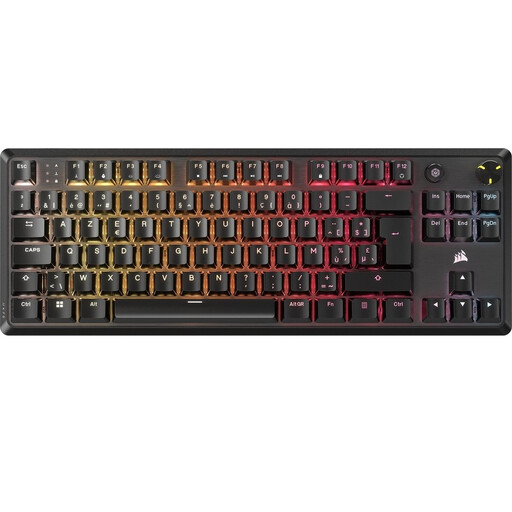
The TKL version may suit you if you don’t need a number pad and want to free up desk space.
Mechanical gaming keyboard with a BE AZERTY layout and MLX Red switches.
 No image available
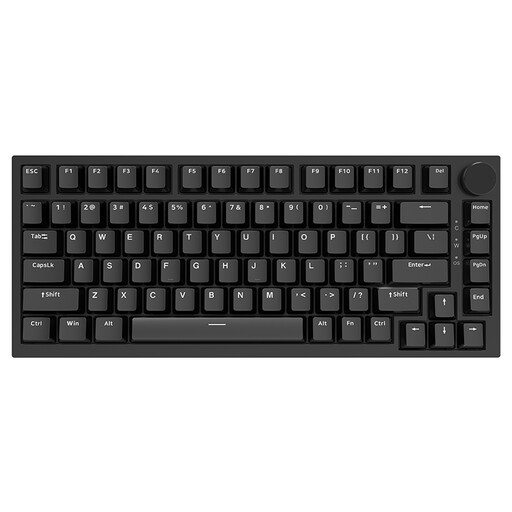
A compact wired model to consider if desk space is important and you’re looking for a mechanical keyboard.
75% layout, US layout and hot-swappable linear switches.
 No image available
This wireless TKL option may suit you if you want to use a compact keyboard with different devices.
Gaming keyboard with a Tenkeyless size and US layout.
Only if you actually use it for work or your own key bindings. According to RTINGS, a TKL layout leaves out the number pad and frees up space for mouse movements. With more compact layouts, also check for a function row and arrow keys.
This depends on the model and its software. Razer mentions Synapse or macro recording for the BlackWidow V4 X; Logitech mentions G HUB for KEYCONTROL on the wired G515. Follow the manufacturer’s cleaning instructions for your model. SteelSeries recommends regular cleaning to prevent dirt build-up and keys from becoming less responsive.
For distance purchases from a business, you’ll often have a 14-day cooling-off period, according to the Dutch government. You’re also entitled to a product that meets what you can reasonably expect from it; the Netherlands has no fixed statutory warranty period. Contact the seller if something goes wrong.
Check which connections the exact model offers and whether they suit your devices and how you use them. Radio equipment on the EU market is subject to requirements under the Radio Equipment Directive, including those relating to safety and electromagnetic compatibility; the European Commission explains this framework. Check the product information for the specific version you’re considering: general rules don’t prove that an individual listing complies with them.