What should you consider when choosing?
The Tabletop Simulator Knowledge Base describes using a mouse and keyboard, as well as customisable default keys. Check the controls for the specific game you play too.
| What to consider |
What should you look for? |
Who is this most important for? |
| Key noise |
Check the switch type and whether quietness is a manufacturer’s description or based on a measured noise level. |
If I work and play in the same room, I don’t want my keyboard to make my workspace unnecessarily noisy. Around 36% of consumers put quietness first when buying. |
| Mouse space or number pad |
Check the layout and consider whether you need a number pad for work. |
If I want space for my mouse while gaming but also do data entry, I weigh that against losing the number pad. Around 29% of consumers give mouse space top priority. |
| Typing comfort |
Check the exact switch version, keyboard layout and whether the model comes with a wrist rest. |
If I work and play on the same keyboard every day, I want a key feel and layout that suit both. Around 21% of consumers put everyday typing first. |
| Connectivity |
Check which connection the exact model supports and whether it’s compatible with your computer. |
If I’d rather use my desk without a keyboard cable, I also consider the battery and connection. Around 14% of consumers make cable-free use their top priority. |
Keyboards for work and play
This Joybuy selection includes compact wired models, compact keyboards with different connectivity options, and a full-size model for anyone who wants to keep the number pad.
 Image unavailable
Trust GXT 833 Thado TKL, QWERTY
Suited to anyone looking for a compact wired layout who values space for their mouse.
Wired USB connection; membrane keys; media keys; up to 10 simultaneous key presses. The TKL layout has no number pad.
View on Joybuy
 Image unavailable
Corsair K55 CORE TKL, US QWERTY
Suited to anyone looking for a compact wired layout for work and play, with a softer keystroke.
Wired USB connection; TKL layout without a number pad; four media keys and an adjustable stand. The product description lists quiet membrane switches.
View on Joybuy
 Image unavailable
AULA F75 MAX 75%, Reaper Switch, US QWERTY
Suited to anyone looking for a mechanical keyboard with several connectivity options for work and play.
75% layout; mechanical; Bluetooth, 2.4 GHz and wired USB-C connection. This version has an adjustable rotary dial for volume and other functions.
View on Joybuy
 Image unavailable
MageGee TS91 60%, wired, US QWERTY
Suited to anyone looking for a very compact layout for a desk where space beside the keyboard matters.
61 keys; wired; RGB lighting; membrane technology with a mechanical feel. The layout has no number pad.
View on Joybuy
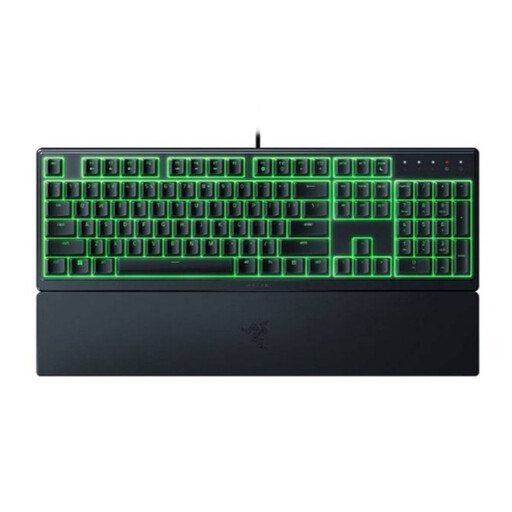 Image unavailable
Razer Ornata V3 X Low Profile, US Layout
Suited to anyone looking for a full-size layout with a number pad and a wrist rest included for work and play.
Razer describes the membrane switches as quiet and the keystrokes as soft. The full-size layout takes up more desk space than a compact model.
View on Joybuy
Frequently asked questions
Do I need fast gaming features for digital board games?
Not necessarily. The Tabletop Simulator Knowledge Base describes using a mouse, keyboard or both, and notes that many default keys can be customised in the game settings. Check the controls for the specific game you play.
How do I set up the controls for Tabletop Simulator?
For many default keys, the Tabletop Simulator Knowledge Base points to the Controls settings in the game. Check the available controls there before making extra macro keys a requirement.
Should I pay extra for an extended warranty?
No, you don’t need to in order to have statutory protection if a product is faulty. According to the Dutch government, there is no fixed statutory warranty period in the Netherlands; consider paid cover based on the extra rights it actually gives you.
Do I have a cooling-off period if I buy a keyboard online?
For many applicable distance sales from a business, you have 14 days to change your mind. According to the Dutch government, this rule doesn’t apply to online purchases from a private seller.
Which product safety rules apply to a wireless keyboard?
Ondernemersplein explains that electrical equipment with Bluetooth or a radio frequency module is subject to radio equipment rules, including requirements for CE marking and an EU declaration of conformity. A product listing alone doesn’t confirm that a specific version meets these requirements.


