Start with the layout: choose keys you can easily find for map controls, communication and other in-game actions. A wired USB keyboard doesn’t need a separate charger while you play, but it does need a USB port. A wireless model keeps a cable off your desk, but needs charging. A 60% keyboard frees up space, but doesn’t have a dedicated function row. So check your key bindings before choosing one.
Who is this choice relevant to?
Gamer with few plug sockets
You want to know in advance whether the keyboard needs a separate charger during use and where you’ll charge it later. HyperX and AULA’s product information includes details such as a detachable USB-C cable and different connection options.
Gamer learning map controls
You want to find in-game actions easily and check whether you need keys that are directly accessible or shortcuts. Razer and HyperX describe secondary functions or software customisation for specific models.
Gamer with limited desk space
You want room to move your mouse, but don’t want to lose keys you use often without realising it. SteelSeries describes the TKL layout as a way to free up space by removing the number pad.
What should you look for when choosing?
First, check how the keyboard connects to and charges from your device. Then review your key bindings and compare the layout with the space you need for your mouse.
| What to consider |
What should you check? |
Who is this important for? |
| Connection and charging |
Check the available USB port, the cable or receiver included, the connection modes and how the exact version is charged. |
If I have few plug sockets, I want to know whether I’ll need a cable or USB receiver while playing, and when it needs charging. Around 36% of consumers prioritise connection options and charging. |
| Finding in-game keys |
Review your map and communication bindings, and check whether function keys are directly accessible or operated using a key combination. |
If I’m learning a multiplayer map, I want to find my important actions quickly without constantly searching for key combinations. Around 29% of consumers prioritise directly accessible in-game keys. |
| Room for your mouse |
Compare TKL and 60% layouts based on your desk and the keys you actually use. |
If I make large mouse movements, I want to free up space without giving up keys I often need. Around 21% of consumers consider mouse space their top priority. |
| Choosing the right version |
Check the full model name, layout, connection modes and included accessories for the version you’re choosing. |
If I only want features that suit the way I use my keyboard, I want to weigh up the version and day-to-day use before choosing. Around 14% of consumers prioritise a suitable, straightforward version. |
Buying pitfalls
-
‘Wireless’ doesn’t mean you’ll never need to charge it
A rechargeable keyboard needs to be charged from time to time. A 2.4 GHz connection may also need a USB receiver.
Check which connection modes the exact version supports, how it charges and whether the receiver uses a USB port.
Allow for charging time and for a USB port that may be occupied by a receiver.
-
Choosing a 60% layout without checking your key bindings
The Razer Huntsman Mini doesn’t have a dedicated function row or navigation cluster; the corresponding functions are accessed using secondary functions and shortcuts.
Review your map, communication and other in-game keys. Consider TKL if you want to keep more keys directly accessible.
-
Assuming specifications for one version apply to another
The AULA F75 Wired Version is wired, while the AULA F99 offers several connection options. Versions within the same model range can therefore differ.
Check the full model name, layout, connection modes and included accessories for the version you’ve chosen.
Brands to consider
AULA
The F99 and F75 Wired Version illustrate different choices for connections and layouts.
- According to AULA, the F99 supports Bluetooth, 2.4 GHz and wired USB-C. The separate F75 Wired Version is a wired 75% model.
- A model’s battery capacity alone doesn’t prove how long it will last during play. The connection options for the F99 and F75 Wired Version are not interchangeable.
Razer
The wired Huntsman Mini is an example of a compact 60% layout.
- Razer describes secondary functions and shortcuts for functions that don’t have a dedicated row of keys.
- There’s no separate function row, navigation cluster or number pad; check whether the controls suit your key bindings.
SteelSeries
The Apex 3 TKL shows how a TKL layout can free up room for your mouse without using a 60% layout.
- SteelSeries describes removing the number pad as a way to make room for mouse movements.
- Manufacturer claims about switches and durability aren’t an independent user test.
HyperX
The Alloy Origins 60 pairs a 60% layout with secondary functions marked on the keycaps.
- According to HyperX, secondary functions are marked on the keycaps and macros can be set up using NGENUITY.
- Check whether the software and the way functions are accessed suit your device and key bindings.
RK Royal Kludge
The RK61 Color-Block Edition is an example of a compact 60% layout with several connection options.
- The manufacturer lists Bluetooth, 2.4 GHz and wired USB-C for this specific edition.
- Other versions called RK61 may not have the same lighting, switches or accessories.
Joybuy products
This selection includes wired and wireless models with compact layouts, from TKL and 75% to 60%.
 No image available
Corsair K55 CORE TKL, US QWERTY
A wired TKL option that frees up desk space without switching to a 60% layout.
The product description lists USB bus power, four dedicated media keys and key remapping via iCUE.
Joybuy
 No image available
AULA F75 MAX 75%, Gradient Grey, Reaper Switch
A 75% layout for anyone looking for a compact form with dedicated navigation and function keys.
The product name lists tri-mode connectivity: wired, Bluetooth and 2.4 GHz, plus a US QWERTY layout. Check which connection mode suits your device.
Joybuy
 No image available
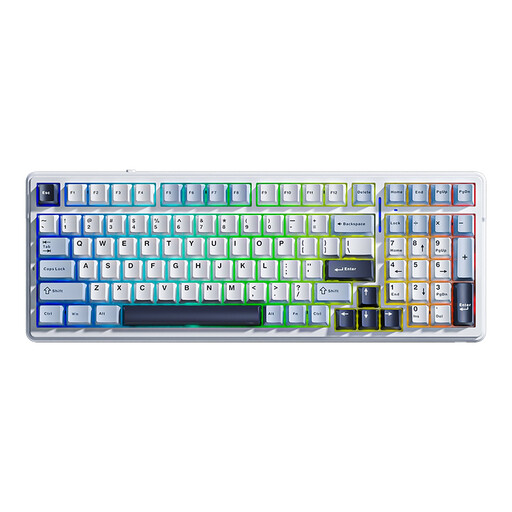
AULA F99, 99 keys, US QWERTY
A tri-mode model for anyone who wants to play wirelessly while also having the option of a wired connection.
The product information lists Bluetooth, 2.4 GHz and wired USB-C, plus a 99-key layout with arrow keys and a number pad.
Joybuy
 No image available
AJAZZ AK820 MAX 75%, US QWERTY
A 75% model for anyone looking for a compact layout with a function row and arrow keys.
The product name lists tri-mode connectivity, 8000mAh and a US QWERTY layout. The stated battery capacity alone doesn’t tell you how long it will last during play.
Joybuy
 No image available
Razer Huntsman Mini, RZ03-03390200-R3M1
A wired 60% option if a very compact layout matters more to you than a dedicated function row.
There’s no separate function row, navigation cluster or number pad; the corresponding functions are accessed using secondary functions and shortcuts.
Joybuy
Frequently asked questions
Does a wireless gaming keyboard mean I don’t need a connection at all?
Not necessarily: the AULA F99 offers Bluetooth, 2.4 GHz and wired USB-C. Check which mode works with your device, whether you need a receiver for 2.4 GHz and how to charge the keyboard.
How do I use function keys on a 60% keyboard?
On the Razer Huntsman Mini, the functions of the missing function row are accessed using secondary functions and shortcuts. Review your key bindings before choosing this layout.
What warranty am I entitled to when buying in the Netherlands?
According to the Dutch government, you’re entitled to a product that works as it should, but the Netherlands has no fixed statutory warranty period. If a product is faulty, the retailer is your point of contact; a manufacturer’s warranty or an extra warranty you’ve bought is separate from this legal right.
Can I return a keyboard bought online?
According to the Dutch government, purchases made remotely from a business often come with a 14-day cooling-off period. Check the terms that apply to your purchase; the rules may differ for purchases from a private seller.


