
Vandaag of morgen in huis

Kwaliteit gegarandeerd

Welkomstaanbiedingen ontgrendelen: GRATIS bezorging | Tot 80% korting | Gratis 30 dagen JoyPlus-proefperiode
Download de app
A gaming keyboard should suit your games, desk and way of working. Yet many models look similar because of terms such as RGB, rapid trigger and mechanical switches. The differences often lie in details you only notice after buying: a missing number pad, a different US layout or software that you need to use features prominently mentioned on the packaging.
With this practical buying guide, you can compare a gaming keyboard by size, switches, connection and compatibility.
A 60% gaming keyboard usually has 61 keys and leaves out the number pad, function row and often the arrow keys. This saves space for your mouse, but means you will use the Fn key more often for everyday functions. A 65% gaming keyboard generally adds arrow keys. With a 75% gaming keyboard, you usually also get a function row, while the keyboard remains compact.
A TKL gaming keyboard has no number pad, but usually retains the function keys and arrow keys. For students, home workers and gamers who type regularly, TKL can be more practical than 60%.
Some affordable models use membrane keys with a mechanical feel. This can be perfectly suitable for basic use, but it is different from a mechanical gaming keyboard with individual mechanical switches. So always check the Key type field. It should state, for example, Mechanical, Membrane, Optical or Hall Effect.
The type of switch also affects the experience:
A keyboard with an 8000 Hz polling rate checks input more frequently than a model with 1000 Hz, according to the product specification. However, the practical difference also depends on your computer, game, settings and personal preference. With a keyboard featuring rapid trigger, you should also check what software is required and how the actuation distance is adjusted.
You should therefore read any claim about response speed or input latency as a specification from the product description, rather than a guaranteed improvement in every situation.
Do not just look at percentages; check the dimensions and number of keys too. A full-size model usually has 104 keys and a number pad. This is useful for spreadsheets, administration and some simulation games. A compact model takes up less space, but requires more key combinations.
A US-layout gaming keyboard often uses an ANSI layout. The Enter key, left Shift key and some punctuation marks may be positioned differently from those on a Dutch ISO keyboard. Also check whether the product page mentions “US International”, “QWERTY US” or another variant.
For example, the Razer Ornata V3 X is described as QWERTY US International, while the specifications also contain ISO information. So check the product images and key layout before buying if the layout is important.
A wired gaming keyboard connects via USB and does not require a battery. This is practical for a permanent desktop setup and for users who do not want to keep track of charging. A wireless keyboard offers more flexibility on a small desk or when used with multiple devices. In that case, check Bluetooth, the USB receiver, battery life and whether you can continue working while it charges.
For use with a console, do not just look at the USB plug. Check whether the model is explicitly compatible with PS5 or Xbox. A keyboard for PC and PS5 may require additional settings or support for a specific game.
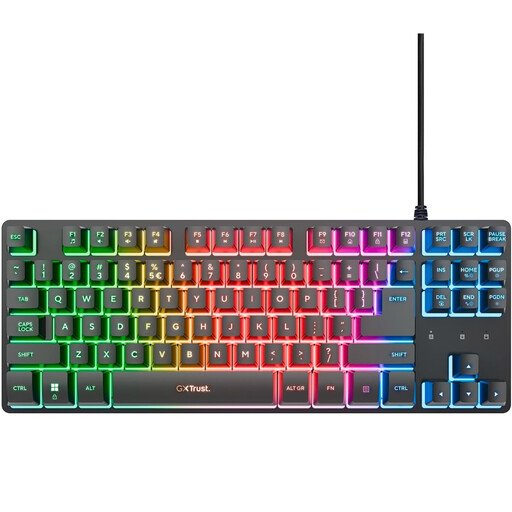
Why it suits this profile: This TKL model is aimed at beginner gamers who want more room for their mouse without switching to a 60% layout. It connects via USB, and the product information lists PC and PS5 as compatible platforms.
The product description clearly states that it uses membrane switches. You therefore will not buy this model assuming that it is mechanical.
83 keys, multi-colour RGB lighting, game mode, media keys and a metal top plate.
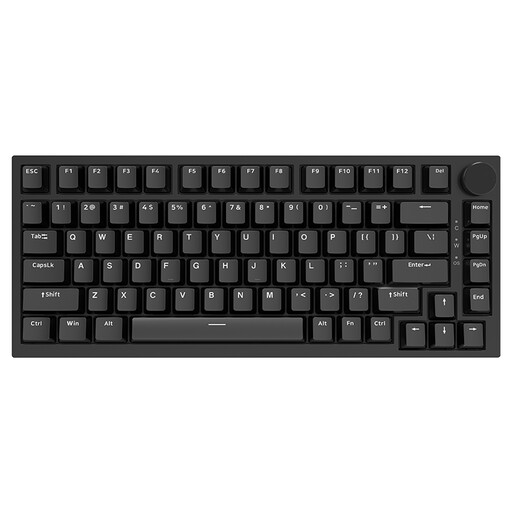
Why it suits this profile: The 75% layout retains many everyday keys while saving space. This makes the model suitable for users who game, type and want to keep their desk tidy.
The specifications list mechanical linear switches and a US layout. However, check the exact key arrangement on the product page before ordering.
Hot-swappable design, PBT keycaps, volume knob, gasket construction and USB-C control.
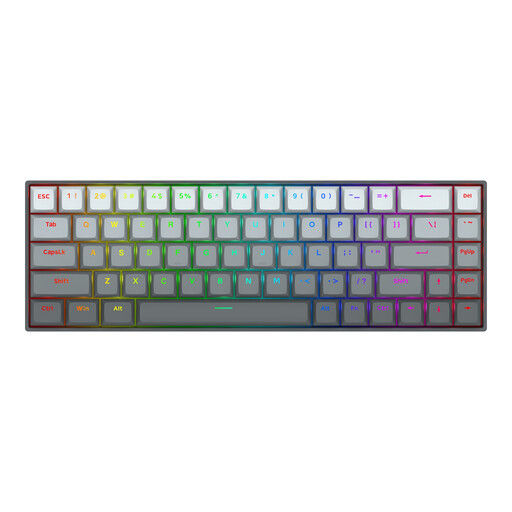
Why it suits this profile: FPS players looking for adjustable actuation can consider this 65% model with Hall Effect magnetic switches. Its compact design leaves extra room for mouse movement.
The stated actuation distance of 0.2 to 4.0 mm and Rapid Trigger are product specifications. The actual experience still depends on the software, game and settings.
68 keys, adjustable magnetic switches, a stated polling rate of 8000 Hz, RGB and a detachable USB-C cable.
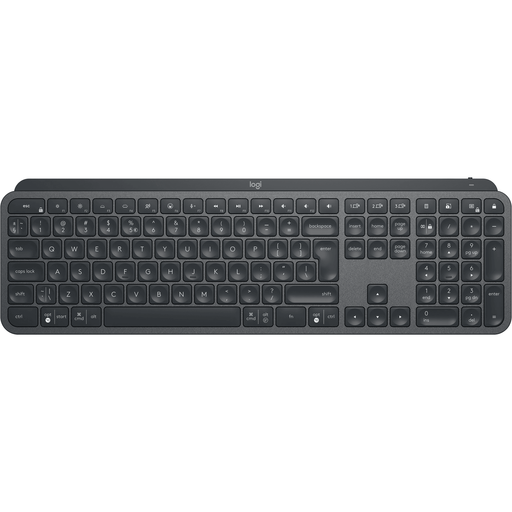
Why it suits this profile: This full-size wireless keyboard is designed for typing, office work and switching between multiple devices. The number pad is useful for figures and administrative tasks.
The connection is specifically described as Bluetooth and wireless radio. Beforehand, check whether you want to use a USB receiver, Bluetooth or both.
Full-size layout, number pad, Easy-Switch for up to three devices and a rechargeable battery.
We have put together a complete, up-to-date list of products that fully meet these strict selection criteria and the applicable European safety regulations.
That depends on the switch, key resistance, keycap shape and your personal preference. Linear switches feel different from clicky switches. Also consider noise levels, wrist position and whether a wrist rest is available. A mechanical model is not automatically quieter or more comfortable than a membrane keyboard.
No. Check the compatibility information for the specific model and game. A USB model such as the Trust GXT 833 Thado is listed in the product information for PC and PS5. With other keyboards, you may need a converter, or certain functions such as macros and RGB settings may only be available through PC software.
Its lifespan depends on use, dirt, moisture, strain on the cable and the type of switch. Manufacturers may state a specific number of keystrokes, but this is not a guarantee for every user. Clean the keyboard with a dry cloth, unplug it before carrying out maintenance and keep liquids away from the USB connection. Also check the statutory warranty that applies to purchases in the EU.
