What should you look for?
First, choose a keyboard that gives you quick access to the game keys you need. Then consider key noise, extra controls and the space available on your desk.
| What to consider |
What should you check? |
Who is this important for? |
| Key noise for others |
Check the exact switch variant and, if possible, listen to the whole keyboard in a similar room. |
If I play with headphones in a shared space, I want to disturb the people I live with as little as possible. Around 31% of consumers prioritise key noise. |
| Easy access to game keys |
Compare your game’s key layout with the keyboard, including the function row, arrow keys and, if relevant, the number pad. Urban Games’ Transport Fever 2 manual lists shortcuts for functions including the camera and game speed. |
If I often control the camera or speed, I want to reach those keys without any extra steps. Around 31% of consumers put easy access to game keys first. |
| Commands and volume |
Check whether the version you’ve chosen has dedicated macro and media keys, and what configuration they require. |
If I use commands often or adjust my headphone volume while playing, easy-to-reach controls are useful. Around 23% of consumers prioritise these features. |
| Connectivity and desk space |
Check the connectivity options, power supply, dimensions and keyboard layout of the exact version. |
If I want to reduce cable clutter or need room for my mouse, I weigh up connectivity against size. Around 15% of consumers put these aspects first. |
Keyboards at Joybuy
This selection includes keyboards with different layouts and options for direct volume, media or macro controls, so you can weigh them against the game keys you want to access.
 No image available
GXTrust Thado wired gaming keyboard, TKL, PC/PS5, QWERTY
The TKL layout and dedicated media controls may suit you if you want to combine extra mouse space with direct volume control.
Membrane keyboard with media keys and volume and playback controls. The product information states that anti-ghosting supports up to 10 simultaneous key presses. The layout is US QWERTY.
View at Joybuy
 No image available
AJAZZ AK980 V2 wireless mechanical keyboard, 98%, QWERTY
The volume knob gives you a direct control option; check whether the 98% layout suits the keys you use in your game.
The product name lists wired, Bluetooth and 2.4G connectivity, a volume knob, TFT display and 10000mAh battery. The product information lists linear switches and five layers of sound-dampening foam. The layout is QWERTY.
View at Joybuy
 No image available
AJAZZ AK820 MAX wireless mechanical gaming keyboard, 75%, US QWERTY
According to the product information, the 75% layout retains the arrow keys and function row; check whether that suits the game commands you use regularly.
The product information lists Flying Fish linear switches, five layers of foam and a volume knob. The product name lists wired, Bluetooth and 2.4G connectivity, and an 8000mAh battery. The layout is US QWERTY.
View at Joybuy
 No image available
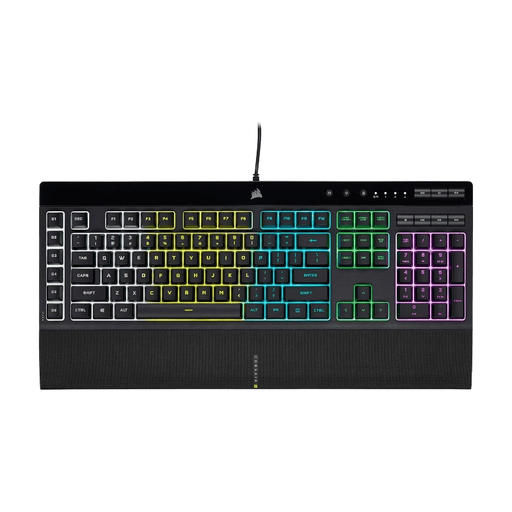
Corsair K55 RGB PRO gaming keyboard, full-size, US QWERTY
This model may suit you if you want direct control of macros and headphone volume, and have room for a full-size keyboard.
Corsair lists six macro keys and dedicated volume and media keys; the manufacturer describes the keys as quiet. The layout is US QWERTY.
View at Joybuy
 No image available
Razer BlackWidow V4 X mechanical gaming keyboard, Yellow Switch, US QWERTY
The programmable macro keys and media controls may come in handy if you want to adjust commands and volume directly.
The product information lists six macro keys, a scroll wheel with media controls, a number pad and a wrist rest. The switch is listed as Yellow Switch; the layout is US QWERTY.
View at Joybuy
Frequently asked questions
Do you need a number pad for Transport Fever 2?
Not for the standard controls listed in the game manual for functions including the camera, pause and game speed: these include W/A/S/D, Space and Tab. Check your own customised key settings and other games too before giving up a number pad.
How do you set up shortcuts for your game?
In Transport Fever 2, you can change the key layout in the settings. Compare it with the keyboard you’re considering; for extra keys or macros, the features of the exact model and its accompanying software may be important.
Should you buy an extended warranty?
Not just to get a legal guarantee: you already have one. According to the Dutch government, there is no fixed statutory guarantee period in the Netherlands; the product’s expected lifespan is taken into account. If you’re considering an extended warranty, compare the additional rights or services it offers. If a product is faulty, contact the seller.
What product safety rules apply to a gaming keyboard in the Netherlands?
An electrical or electronic keyboard covered by the applicable European product rules must meet those requirements and carry the mandatory CE marking. Models with Bluetooth or a radio frequency module must also comply with the applicable rules for radio equipment.


