What should you look for?
First, think about where your PC is. From the sofa, you’ll need a connection that works where you sit. At a desk, a compact layout can leave more room for your mouse. Extra programmable keys are most useful if your game supports the actions you want to assign to them.
| What to consider |
What should you check? |
Who is this important for? |
| Connection from where you sit |
Check whether the model supports 2.4 GHz, Bluetooth and/or wired use, where you can plug in the receiver and whether the connection works where you sit. |
If I play from the sofa, I don’t want an awkward cable running to my seat. Around 33% of consumers prioritise connectivity from where they sit. |
| Room for your mouse |
Compare full-size and TKL layouts, and check which keys your game uses. Don’t assume it supports shortcuts on the number pad. |
At a desk, I want enough room for my mouse and can manage without a separate number pad. Around 27% of consumers prioritise room for their mouse. |
| Shortcuts and customisation |
Check whether the game supports the keys or key assignments you want to use on your device and with the available software. |
If I use the same actions often, I want them to be easy to reach, provided the game supports the controls I want. Around 20% of consumers prioritise easy-to-reach shortcuts. |
| Simple wired setup |
Check the cable routing, available USB port, regional keyboard layout and the type of keys you want. |
When I’m near my PC, I want a suitable wired layout without extra wireless features. Around 20% of consumers prioritise a simple wired setup. |
Joybuy products for this setup
The models below are suited to compact desk setups, switching between connection types and wired use near your PC. Check each model’s layout and connection options to make sure they suit your setup.
 No image available
AULA F75 Pro 75% mechanical gaming keyboard
The 75% layout may suit a desk setup where you want to leave room for your mouse next to the keyboard.
Bluetooth, 2.4 GHz and wired use; hot-swappable; US layout.
Joybuy
 No image available
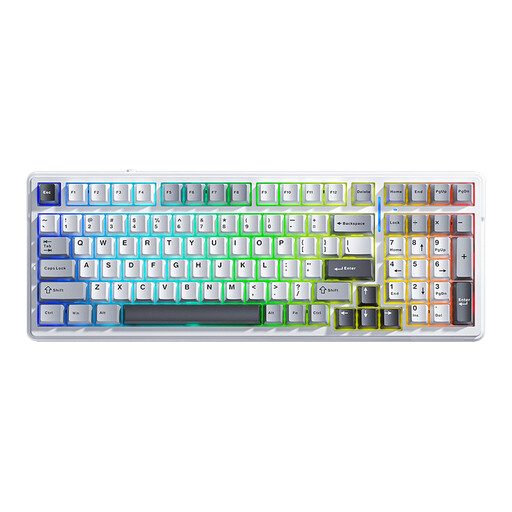
AULA F99 wireless mechanical keyboard, 99 keys
The different connection options may suit you if you want to switch between wireless and wired use. Check that the connection works where you sit.
Bluetooth, 2.4 GHz and wired use; 99 keys; hot-swappable; US QWERTY layout.
Joybuy
 No image available
AULA F75 75% wireless gaming keyboard
The compact 75% layout may suit a desk setup where you want to leave room next to the keyboard.
2.4 GHz, Bluetooth and USB-C; PBT keycaps; US QWERTY layout.
Joybuy
 No image available
AJAZZ AK980 V2 wireless mechanical keyboard, 98%
The 98% layout may suit you if you want a more compact keyboard but still need a number pad.
Bluetooth, 2.4 GHz and wired use; 10,000 mAh; QWERTY layout.
Joybuy
 No image available
REDRAGON wired mechanical keyboard, 94 keys
A wired model may suit you if you play near your PC and don’t need a wireless connection.
94 keys; metal case; detachable wrist rest.
Joybuy
Frequently asked questions
Will a gaming keyboard automatically work with tower defence on my TV?
Not necessarily. First check which device runs the game and which input methods the game supports on it. Steam Support describes Big Picture as a TV interface for PC use, but this doesn’t confirm that every game will work or that a keyboard connected directly to the TV will work.
How do I set up a wireless keyboard by the TV?
Follow your model’s manual for setting up the receiver, pairing via Bluetooth or connecting the USB cable. The Corsair K100 AIR manual describes these three connection methods and how to charge the keyboard. Then test the connection where you play.
Can I make a warranty claim with the manufacturer for a faulty keyboard?
According to the Dutch government, the seller must provide a solution if a product is faulty. A manufacturer’s or extended warranty doesn’t replace your statutory right to a product that meets legal requirements.
Do I have a cooling-off period for a keyboard bought online?
According to the Dutch government, distance purchases are often covered by a 14-day cooling-off period. Check the applicable terms and the seller’s information for your order.
Do I need a number pad for tower defence?
It depends on which keys your game uses. TKL models don’t have a separate number pad, so check the controls for placement and other actions before choosing a layout.


