What should you look for when buying?
First, check that your in-game keys are within easy reach. Then compare key feel, noise and the space available on your desk.
| Buying concern |
What to look for |
Who is this important to? |
| Key feel and setup |
If possible, try the keys and consider the keyboard's height alongside your desk setup. Check whether you can keep your shoulders and wrists relaxed. |
When I play for a long time, I want a key feel and setup that suit my desk and sitting position. Around 36% of consumers say comfort and setup are their main buying concern. |
| In-game keys within easy reach |
Make a note of your game's shortcuts and check that the layout gives you direct access to those keys. TKL keeps separate arrow and navigation keys but leaves out the number pad. |
When I use shortcuts often, I don't want to rely on awkward combinations or find that keys are missing. Around 29% of consumers prioritise direct access to in-game keys. |
| Key noise |
Compare the exact switch variant and, if possible, listen to that version. Don't rely solely on words such as ‘quiet’ in a product name. |
When I play in a shared space, I want to avoid unnecessarily disturbing others with my keyboard. Noise is the main buying concern for around 21% of consumers. |
| Space and connection |
Measure the available desk space and check which keys you need. For the exact model, check whether you want a wired connection, a receiver or Bluetooth. |
When my desk has limited space or I need a specific connection, I want the keyboard to suit my setup. Around 14% of consumers give space and connection top priority. |
Joybuy products
These keyboards offer different trade-offs in layout, key feel and connectivity for long gaming sessions. Check which keys and connection options you need for each version.
 No image available
Redragon wired mechanical keyboard with 94 keys
The 94-key layout and detachable wrist rest may be useful if you want the option of wrist support during long sessions.
Wired keyboard with a metal case, phone stand and detachable wrist rest. The description lists pre-lubricated switches, a hot-swappable PCB and PBT keycaps.
View at Joybuy
 No image available
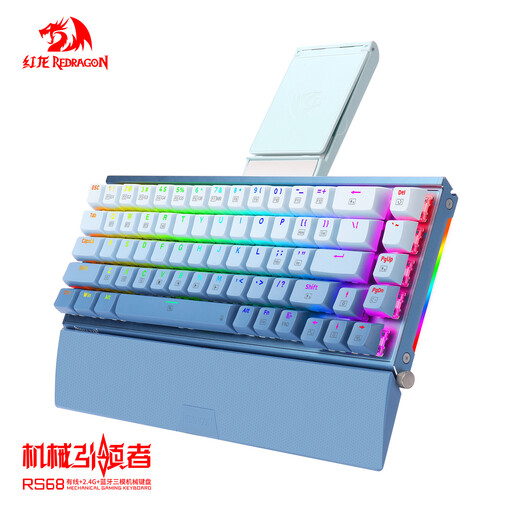
RS68 mechanical keyboard, Gradient Blue
The listed connection modes let you choose between wired and wireless connections; check which mode suits your setup.
68 keys, an aluminium alloy case and wired, 2.4 GHz or Bluetooth connectivity. The description lists a detachable magnetic wrist rest.
View at Joybuy
 No image available
AJAZZ AK820 Pro 75% — Flying Fish Switch Purple
The compact 75% layout may suit you if you want to save desk space while keeping the listed keys.
82 keys, US QWERTY layout and wired, Bluetooth or 2.4 GHz connectivity. The description lists magnetic switches with adjustable actuation points.
View at Joybuy
 No image available
AJAZZ AK820 Pro 75% — Gift Switch Purple
This compact model may suit you if you want to save space and are considering a dampened construction.
82 keys and a US QWERTY layout. The description lists a gasket-mounted design and sound-absorbing foam. Check that the US layout suits your needs.
View at Joybuy
Frequently asked questions
Do you need a keyboard with Rapid Trigger for turn-based tactics?
Not for this type of game alone. RTINGS links the main benefits of adjustable magnetic switches and Rapid Trigger to fast-paced competitive games. First, check which keys and what kind of key feel you need.
How can you make your keyboard setup more comfortable for a long session?
Set up your workstation so that your shoulders, forearms and wrists can stay relaxed, and change your posture regularly. Arboportaal recommends this for working at a screen; it doesn't guarantee that a particular keyboard will prevent discomfort.
How can you set up extra key functions?
It varies by model. Logitech lists G HUB for KEYCONTROL on the G515 TKL; HyperX lists NGENUITY for macros on the Alloy Origins Core. Before buying, check that the feature and software you want work with your system.
What if a keyboard bought online isn't right for you or develops a fault?
According to the Dutch government, online purchases from a business generally come with a 14-day cooling-off period; check the terms and any exceptions that apply to your order. If there's a fault, contact the retailer. The Netherlands doesn't have a fixed statutory warranty period of two years.
Do Dutch rules for working at a screen automatically apply to gaming at home?
No. Arboportaal describes employers' and employees' legal obligations when working at a screen. Advice on posture may be useful during a long gaming session at home, but that doesn't make it a legal requirement for your gaming keyboard.


