What should you look for when choosing?
First, check whether your most important in-game commands fit the layout and the desk space you have available. Then compare the key feel, noise level, connection and your workspace.
| What to consider |
What should you check? |
Who should pay particular attention? |
| Posture during long sessions |
Compare the keyboard’s height and any wrist rest with your workspace; also plan to change posture and take breaks. |
If I play for a long time, I want to position my hands and arms comfortably rather than rely on an accessory alone. Around 28% of consumers put posture first. |
| Your own shortcuts |
Compare dedicated macro keys with reprogrammable keys, and check the software required and the game’s rules. |
When I use lots of my own commands, I want to know whether I can set them up easily and whether they’re allowed in my game. Around 22% of consumers give shortcuts top priority. |
| Layout and desk space |
Check the function row, arrow keys, number pad and the keyboard layout on offer. |
If I want to leave room for my mouse while keeping my usual commands within easy reach, I compare the exact key layout. Around 22% of consumers choose mainly based on layout and space. |
| Key feel and noise |
Check the switch type and try it out if possible; manufacturer terms such as ‘quiet’ aren’t comparative noise measurements. |
In a shared space, I want to take keystroke noise into account and choose a key feel that suits me. Around 17% of consumers put noise and key feel first. |
| Connection |
Check the connection on the exact model and whether a receiver is needed; don’t treat conflicting product descriptions as confirmation. |
If I want to connect my keyboard in different ways, I want to be sure which connections the model on offer has. Around 11% of consumers give connection top priority. |
Gaming keyboards at Joybuy
These keyboards at Joybuy offer different layouts and connection options. Check the keyboard layout, connection and included accessories for each version.
 No image available
AULA F75 75% wireless mechanical gaming keyboard
The 75% layout may suit you if you’re looking for a more compact keyboard; check that US QWERTY matches your preference.
According to the product name, this model has PBT keycaps and three connection options: Bluetooth, 2.4 GHz and wired USB-C.
Joybuy
 No image available
REDRAGON wired mechanical keyboard with 94 keys
The wired 94-key layout may suit you if you want to compare a more compact option with a full-size keyboard and are looking for a wrist rest.
The product name lists a metal casing and wrist rest.
Joybuy
 No image available
Redragon M68 mechanical gaming keyboard
The compact 68-key layout may suit you if you want to free up desk space; check the US layout.
The product name lists magnetic switches, an 8000 Hz polling rate and rapid trigger.
Joybuy
 No image available
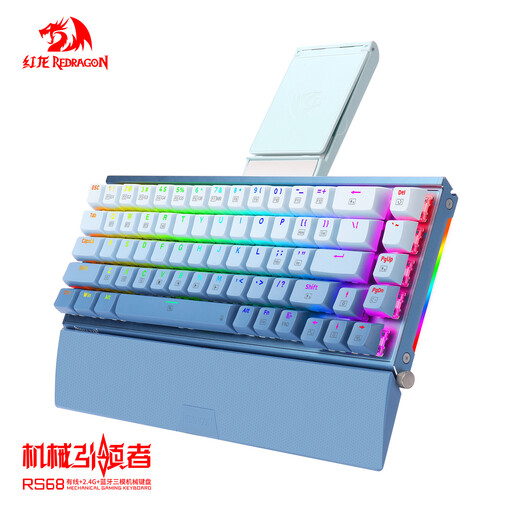
RS68 wireless mechanical keyboard
The compact 68-key layout may suit you if you want to save space; check that the version matches your connection preferences.
The product information lists 2.4 GHz, Bluetooth and wired USB-C, plus a detachable wrist rest.
Joybuy
 No image available
AULA S75 Pro 75% wireless mechanical gaming keyboard
The 75% layout and hot-swappable switches may suit you if you want a compact keyboard and the option to change switches.
The product name lists three connection options, a TFT display and a rotary dial.
Joybuy
Frequently asked questions
Do I need a number pad for tactical RPGs?
Not just because of the game genre. Compare the default controls and your own bindings with the layout of the specific keyboard: Razer lists a function row and arrow keys for the BlackWidow V4 75%, while a TKL layout leaves out the number pad.
Is a wrist rest enough for a long gaming session?
No. A wrist rest is no substitute for a suitable workspace, changing posture or taking breaks. Arboportaal outlines considerations for prolonged screen-based work and recommends varying your activities and taking micro-breaks; this information doesn’t prove that a particular keyboard prevents discomfort.
How can I check that I’m ordering the right keyboard version?
Check the full model name, connection, keyboard layout and what’s included. This is particularly important if a product description lists different connections or if a barebones version is available, as with the Razer BlackWidow V4 75%.
What are my rights when buying online in the Netherlands?
According to ACM ConsuWijzer, the statutory cancellation period for an online product purchase usually ends 14 days after delivery; check for any exceptions before buying. The legal guarantee is separate from a manufacturer’s guarantee. If a product doesn’t meet what you could reasonably expect when used normally, the seller is responsible for providing an appropriate solution.


