
Tactical gamer
You want to fine-tune movement input and leave enough room for your mouse. Check whether each model supports Rapid Trigger and adjustable actuation.


Start by choosing a keyboard that suits the space available for your mouse, the physical layout and the level of key noise you find acceptable at your desk. Adjustable actuation and Rapid Trigger are most relevant if you want to fine-tune input for tactical games. A compact membrane keyboard may be a better fit if everyday typing and ease of use matter more. Always check the exact model and keyboard layout before buying.
You want to fine-tune movement input and leave enough room for your mouse. Check whether each model supports Rapid Trigger and adjustable actuation.
You use the same desk for calls, typing and gaming, so key noise, layout and available desk space all matter.
You want a straightforward TKL layout without actuation settings you don’t plan to use.
When you use the same desk for tactical gaming and work, input settings, sound, mouse space and the physical keyboard layout can all make a difference.
| What to consider | What to look for | Who is it important to? |
|---|---|---|
| Fine-tuning movement input | Check whether the exact model offers adjustable actuation and Rapid Trigger, and how you can configure these features. | If you want to fine-tune repeated movement key presses to suit your preferences, this could be your top priority. Around 33% of consumers say adjustable movement input is their main consideration. |
| Key noise and typing | Compare the switch or membrane type and any sound-dampening layers. A manufacturer’s description is not an independent sound measurement. | If you work at the same desk and want a comfortable typing experience throughout the day, noise matters alongside gaming features. Around 25% of consumers prioritise quiet use for work. |
| Desk space and layout | Check the size and physical language layout, such as US QWERTY or BE AZERTY. | If you need room to move your mouse but also work on the same keyboard, check where the keys and characters are positioned. Around 25% of consumers say desk space and layout are their main considerations. |
| Simplicity or extra features | Compare the features you’ll actually use, the connection type and any software for custom settings. | If you want a compact keyboard without settings you don’t need, simplicity may matter more than extra customisation options. Around 17% of consumers prioritise a straightforward purchase. |
The Logitech G PRO X TKL RAPID and PRO X TKL Wireless are different models. The Corsair K70 CORE TKL version we looked at also has a BE AZERTY layout, rather than US QWERTY.
Compare the full model name, switch type and physical keyboard layout on the product page.
Corsair describes sound-dampening layers on the mechanical K70 CORE TKL and quiet membrane keys on the K55 CORE TKL. These are different designs and manufacturer descriptions, not independent sound measurements.
Choose based on the feel and sound that suit your workspace. Don’t treat these descriptions as a guarantee that a keyboard will be quiet.
A polling or actuation specification alone doesn’t determine your gaming performance or whether a keyboard is suitable for work.
Weigh the input settings you want against sound, layout and how you’ll use the keyboard at your desk every day.
The PRO X TKL RAPID is a wired model with magnetic analogue switches and adjustable actuation. The PRO X TKL Wireless is a separate wireless mechanical model.
The TKL models we looked at offer different options: the K55 CORE TKL has membrane keys, while the K70 CORE TKL has mechanical MLX Red v2 switches.
For the Huntsman V3 Pro Tenkeyless 8KHz, Razer lists analogue optical switches, Rapid Trigger and adjustable actuation.
The Apex Pro Gen 3 is an example of a product range that SteelSeries says includes Rapid Trigger and input customisation features.
Wooting describes the 80HE as an 80% layout keyboard with Hall effect switches and Rapid Trigger.
These models focus on compact gaming layouts and magnetic switches, for anyone weighing input customisation for tactical games against mouse space and everyday use.
 No image available
A compact option for anyone looking for magnetic input features and room to move their mouse.
68 keys; US layout; wired; magnetic Hall effect switches; Rapid Trigger.
 No image available
A good fit if you’re looking for a compact keyboard with magnetic switches for tactical games.
68 keys; US layout; 8000 Hz polling rate; Rapid Trigger.
 No image available
A wired option to consider if you want a compact layout and magnetic switches.
82 keys; wired; magnetic switches; 8000 Hz polling rate.
 No image available
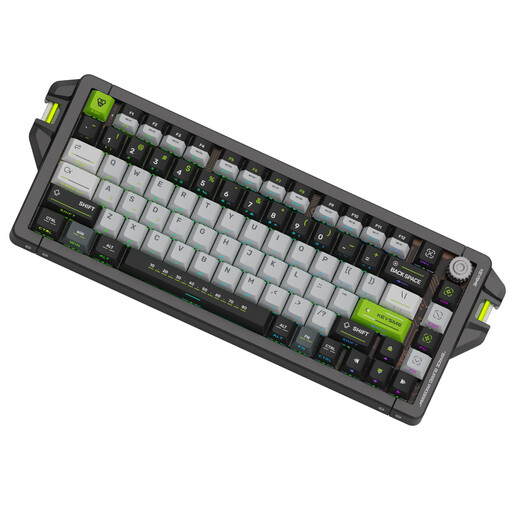
A compact option if you’re looking for magnetic switches and adjustable input features. Check that the 75% layout suits your work.
US QWERTY; 75% layout; 8 kHz polling rate; adjustable trigger range of 0,1–4,0 mm.
 No image available
A compact membrane keyboard for anyone who values everyday typing and a straightforward TKL layout. Corsair describes its keys as quiet.
US ANSI QWERTY; membrane keys; 12-key rollover. According to the model information, this keyboard doesn’t have adjustable analogue actuation.
No, Rapid Trigger isn’t essential for every player. On a supported key, it changes how the key can reactivate after movement. Whether you want to use this setting comes down to personal preference. Check that the exact model version supports the feature.
According to Wooting Support, you can configure Rapid Trigger globally or per key in Wootility. The selected actuation point also plays a part. For another brand, refer to the instructions for the specific model.
Check the connection type, the physical keyboard layout and whether any software is needed for custom features. The Corsair K55 CORE TKL, for example, uses USB Type-A; this connection type doesn’t tell you anything about other models.
For eligible distance purchases, the Dutch government says you’ll often have a 14-day cooling-off period. Check the terms and exceptions that apply to your purchase. A shop’s more generous voluntary returns period is a separate arrangement.