What should you look for?
The percentages give a general indication of the main priorities when choosing a keyboard for this gaming setup. Start by checking whether the keyboard can control your game, then consider connectivity, layout and key feel.
| What to consider |
What to look for |
Who is it important for? |
| Game and platform compatibility |
Check keyboard support in the specific game, as well as the connection options on your device. PlayStation Support and Xbox Support set out different requirements. |
If you play on console or through cloud gaming, you’ll want to know first whether keyboard controls work in your game. Compatibility is the main priority for around 36% of consumers. |
| Connection and seating distance |
Compare a cable, wireless receiver and Bluetooth for your setup. Also check the port, where the receiver will go and how to charge the keyboard. |
If you play from a seat some distance away, the connection needs to suit your PC and setup. Around 29% of consumers are mainly looking for the right connection. |
| Layout and easy-to-reach keys |
Compare the exact version with the keys you need for movement, inventory, function keys and arrow keys. Check the language layout too. |
If you need lots of keys or shortcuts, you’ll want them within reach without choosing a layout that doesn’t suit you. Around 21% of consumers mainly focus on the layout. |
| Key feel and adjustability |
Decide whether you want a consistent, comfortable key feel or the option to set the actuation point yourself. Check the exact switch version. |
This feature matters if you want to adjust key actuation while gaming, but it isn’t essential for everyone. Around 14% of consumers put adjustable actuation top of their list. |
Keyboards for this gaming setup
These keyboards offer compact layouts and a range of wired and wireless connection options for gaming on a big screen. Before choosing, check that the layout and connection suit your device and game.
 No image available
Corsair K65 PLUS WIRELESS, US QWERTY, MLX Fusion Tactile
A good fit if you’re looking for a compact keyboard with several connection options for a PC setup.
The product listing specifies a 75% layout, with wired USB, Bluetooth and 2.4 GHz connectivity. This version has a US QWERTY layout and MLX Fusion Tactile switches.
Joybuy
 No image available
AULA F75 MAX, 75%, US QWERTY, Reaper switch
A compact layout to consider if you want wired use as well as a wireless connection.
The product name specifies a 75% layout, US QWERTY and a Reaper switch. The listed connection options are wired, Bluetooth and 2.4G.
Joybuy
 No image available
AJAZZ AK980 V2, 98%, US QWERTY
A good fit if you want to keep more keys than you would with a smaller board, while still keeping your setup compact.
The product name specifies a 98% layout and wired, Bluetooth and 2.4G connectivity. This version has a US QWERTY layout.
Joybuy
 No image available
AJAZZ AK820 MAX, 75%, US QWERTY, Flying Fish switches
An option to compare if you’re looking for a 75% layout with arrow and function keys.
The product name lists wired, Bluetooth and 2.4G connectivity. The product description says it retains the arrow and function keys. This version has a US QWERTY layout.
Joybuy
 No image available
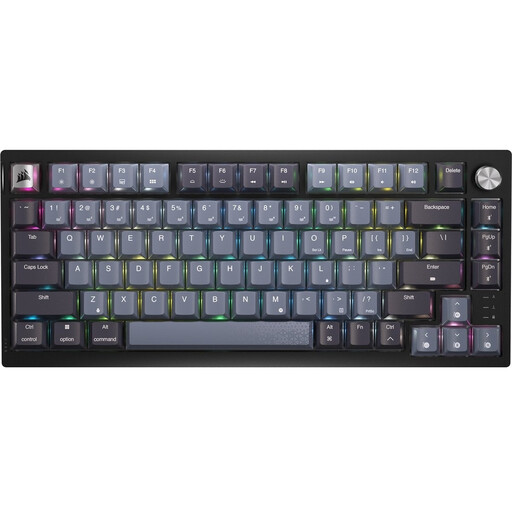
Corsair K65 PLUS WIRELESS, US QWERTY, MLX Red
A good fit if you’re looking for a compact 75% layout and want the option of using the keyboard wirelessly or with a cable.
The product name specifies a US QWERTY layout and MLX Red switches. The product description lists RF wireless and wired USB connectivity.
Joybuy
Frequently asked questions
Can I play a survival game on PS5 or Xbox with any gaming keyboard?
No, not automatically: both device compatibility and in-game support matter. PlayStation Support says that not all devices are compatible, while Xbox Support says the publisher must enable keyboard and mouse controls for the game. Check both before you choose.
How do I connect a Bluetooth keyboard to a PS5?
Put the keyboard into pairing mode, then go to Settings > Accessories > General > Bluetooth Accessories on your PS5. Seeing the device in the list doesn’t, by itself, prove that it’s compatible or that it will work with your game.
Can I play Xbox cloud games on a big screen with a keyboard?
You can play some cloud games on a PC this way, but not all of them. Xbox Support lists the Xbox app and supported browsers, including Edge and Chrome. Check whether the specific game supports keyboard and mouse controls.
What maintenance does a wireless keyboard need?
Check the charge before you play, and keep the right cable or receiver handy. The Corsair manual recommends fully charging the K65 PLUS WIRELESS before first use. For other models, follow the instructions in their manuals.
Who can help if a product is faulty, and do online purchases have a cooling-off period?
According to the Dutch Government, the retailer must provide a solution if a product is faulty; a manufacturer’s warranty doesn’t replace your statutory rights. In many cases, online purchases from a business come with a 14-day cooling-off period, although exceptions depend on the purchase.


