
Support player practising in the dark
You want to spot the relevant ability and communication keys quickly while practising. HyperX and Razer describe models with per-key lighting, while SteelSeries describes the Apex 3 TKL as having zone lighting.


If you want to identify specific ability and communication keys in a dark room, compare models with per-key lighting against keyboards that only light up in zones. Extra control keys can help you create a layout that suits you, but check your game’s rules before using macros. If noise or desk space matters more, compare quieter or more compact models too.
You want to spot the relevant ability and communication keys quickly while practising. HyperX and Razer describe models with per-key lighting, while SteelSeries describes the Apex 3 TKL as having zone lighting.
You want to tailor keys or profiles to your routine. Distinguish between remapping keys and automating in-game actions, and check your game’s rules before using the latter.
You practise somewhere where typing noise or room for your mouse matters. Compare the switch type and keyboard size: a TKL keyboard has no numeric keypad.
Choose this if: you want to identify specific ability or communication keys individually in the dark.
Bear in mind: the software and exact keyboard layout; macro features don’t automatically mean that automation is allowed in your game.
Choose this if: you want to compare a model without a numeric keypad that the manufacturer describes as quieter to type on.
Bear in mind: zone lighting highlights groups of keys, not individual keys.
Choose this if: a low-profile TKL model or clearly visible key legends matters more to you than individual colour settings for each key.
Bear in mind: the wired and wireless G515 are different versions, so check the full model name.
Choose this if: extra physical keys for permitted shortcuts are your priority.
Bear in mind: according to Corsair, the K55 RGB PRO has five lighting zones. Check your game’s rules before using macros.
| What to consider | What should you check? | Who is this important for? |
|---|---|---|
| Finding keys in the dark | Check whether the model has per-key or zone lighting, and what settings are available. | If I want to find my important keys quickly in the dark, I look at how easily I can identify them individually. Around 36% of this group prioritise visibility when choosing a keyboard. |
| Customising controls | Check the programmable keys, the software required and your game’s rules for the intended use. | If I want to arrange ability and communication keys logically, I look at the options available for the controls I want. Around 29% of this group mainly want to customise their controls. |
| Typing noise | Check the specific switch version. A claim about the switch is not an independent measurement of the complete keyboard. | If I practise in a shared space, I want to know which switch version I’m buying and how it sounds on my desk. Around 21% of this group prioritise noise when choosing a keyboard. |
| Space and layout | Measure the space available and check TKL versus full-size, as well as the language and keyboard layout on offer. | If I need room for my mouse or want a familiar layout, I check the size and keys before choosing. Around 14% of this group mainly consider desk space or layout. |
A keyboard with five or eight lighting zones highlights groups of keys. It doesn’t offer the same individual highlighting as per-key lighting.
Check whether the lighting can be configured per key or by zone on the exact version you’re considering.
What the hardware can do doesn’t determine what the rules of a specific game allow.
Check your game’s rules before using a programmable key to automate actions.
Logitech describes the wired G515 and the wireless G515 LIGHTSPEED TKL as different versions.
Check the full model name and connection type on the product listing before ordering.
The BlackWidow V4 X is worth comparing if you’re looking for per-key lighting and dedicated control keys.
The Alloy Origins Core is a compact mechanical model worth comparing if you’re looking for per-key lighting and software settings.
The Apex 3 TKL is worth comparing if compactness and keys that the manufacturer describes as quiet matter more to you than per-key lighting.
The wired G515 TKL and G413 TKL SE are options to compare if you’re looking for a low-profile design or white key lighting respectively.
The K55 RGB PRO is worth comparing if you’re looking for dedicated control keys and zone lighting.
These Joybuy products are gaming keyboards with RGB lighting, available in a range of sizes and versions.
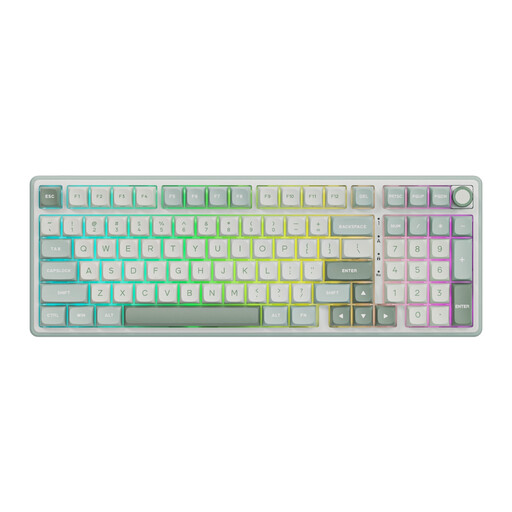 No image available
RGB backlighting and the stated option to remap keys make this a good match if you want to customise your controls.
Wired mechanical model with a numeric keypad and volume knob. The product description lists a quiet linear Beige Switch and a 98% layout.
 No image available
RGB backlighting and the stated option to remap keys make this a good match if you want to customise your controls.
Wired mechanical model with a numeric keypad and volume knob. The product description lists a quiet linear Cream Switch and a 98% layout.
 No image available
RGB lighting modes and the stated QMK and VIA support are worth considering if you want to compare control customisation options.
Mechanical model with a 75% layout and 81 keys, a volume knob and hot-swappable K Silver switches.
 No image available
RGB lighting and the volume knob are useful to consider if you want to compare keyboard lighting and audio controls.
98% QWERTY layout with wired, Bluetooth and 2.4G connections. The product name lists a 10000mAh battery and a TFT screen.
 No image available
The compact layout could suit you if you want to leave more room for your mouse while practising.
Mechanical gaming keyboard with 68 keys, RGB lighting and a metal top plate. The product name lists Rapid Trigger and an 8000 Hz polling rate.
Not necessarily: standard key lighting may be enough if you just want to see the key legends. If you want to highlight specific ability keys individually, check whether the model has per-key lighting. Logitech lists white lighting for the G413 TKL SE, SteelSeries lists eight zones for the Apex 3 TKL, and Razer lists per-key lighting for the BlackWidow V4 X.
There’s no general answer without knowing the game and its current rules. A Blizzard employee warned of action being taken against third-party software that automates gameplay, so check your game’s rules before using this kind of feature.
Check the software and profile storage for the exact version. HyperX describes settings through NGENUITY, while Corsair says the K55 RGB PRO can use saved lighting effects and macros from the device’s onboard memory. Test your settings on the computer you practise on.
According to the Dutch government, a 14-day cooling-off period applies to many distance purchases. You’re also entitled to a product that works as it should; if there’s a defect, the seller must provide a solution. The Netherlands does not have a fixed statutory two-year warranty period for every product.
According to the Dutch Business.gov.nl service, applicable electrical and electronic equipment must meet European safety requirements; manufacturers may also have CE marking obligations. The Radio Equipment Directive may also apply to a Bluetooth or radio module. Check the information for the specific version. These general rules alone do not confirm that a particular product listing is compliant.