Start with a keyboard that puts your in-game actions within easy reach, and practise with its layout before prioritising extra macro keys. If you’re sitting further away from your computer, compare the available connection options and consider charging; if you’re playing at a desk, weigh extra keys against the space you need for your mouse. If you’re using a console, also check whether the game itself supports keyboard input.
Who is this advice for?
Support player with lots of actions
Wants to reach abilities and communication actions easily while practising, so compares the layout with keyboards that have dedicated programmable keys. Logitech G and Razer describe extra assignable keys on specific models; these features don’t tell you whether automated actions are allowed in a particular game.
Player sitting away from the PC
Plays in front of a big screen, with the computer not right next to their seat. In this case, the connection options, receiver placement and charging may matter more than simply choosing a wireless model. Logitech G and Trust describe different connection options for specific models.
Desk player with limited mouse space
Wants to leave room for mouse movement while keeping the keys they need within easy reach, even without a numeric keypad. SteelSeries and Trust describe compact TKL layouts on specific models.
What should you look for?
Start with the actions you want to reach while practising. Then decide whether the distance from your computer or the space available on your desk should guide your choice.
| What to consider |
What should you look for? |
Who is this important for? |
| Reaching support actions |
Make a note of the actions you want to practise and check that the keys or assignments are easy to reach. |
I want to find my support actions quickly while practising, and only choose extra keys I’ll actually use. Around 36% of consumers give easy-to-reach support actions top priority. |
| Wireless connection from a distance |
Check that your device supports the receiver or Bluetooth, and consider the receiver’s position and charging. |
If I play from a distance, the connection needs to suit my device and setup. Around 29% of consumers prioritise the connection between their seat and computer. |
| Room for your mouse and keyboard |
Measure the space available on your desk and check that the keys you use remain within easy reach on a TKL layout. |
I want to move my mouse freely without missing any keys I need in my game. Around 21% of consumers give available mouse space top priority. |
| Key noise and feel |
Check the switch type listed and consider whether you’re looking for a mechanical feel or a model described as quieter. |
In a shared space, I want to consider key noise and choose a feel that suits my preferences. Around 14% of consumers prioritise noise levels and ease of use. |
Things to consider before buying
-
Extra macro keys don’t mean every macro is allowed
Manufacturers describe programmable keys, but these product specifications don’t determine which automated inputs are allowed in a particular game.
Use extra keys for a layout that suits your game, and check the game’s rules before automating sequences of keystrokes.
-
Don’t choose wireless without checking the connection
The wireless models described don’t all use the same connection. PlayStation also warns that not every keyboard works with a PS5.
Before buying, check the required receiver or Bluetooth connection, the available ports, and whether your device and game are compatible.
-
Check the layout before choosing TKL
A TKL model doesn’t have a numeric keypad. This can free up space next to your mouse, but it may not suit you if you need those keys.
Make a note of the actions you use and check that you can reach them comfortably on the more compact layout.
Brands to consider
Logitech G
The G915 X LIGHTSPEED is a wireless option for anyone looking for multiple connection options and extra G-keys.
- Logitech G lists nine G-keys and three connection methods for this model.
- These specifications don’t establish its range in your room or its suitability for a particular game.
Razer
The wired BlackWidow V4 X is designed for players looking for dedicated macro keys and mechanical switches.
- Razer lists six dedicated macro keys for the BlackWidow V4 X, with a choice of Green or Yellow switches.
- Check which switch version you’re choosing, as well as the rules for automated actions in your game. These specifications don’t automatically apply to other Razer models.
SteelSeries
The wired Apex 3 TKL is a compact option for a desk where mouse space and quieter keys matter.
- SteelSeries describes this model as having a TKL layout and Whisper Quiet switches.
- The feel described isn’t mechanical. The stated IP32 rating doesn’t mean spills won’t cause damage.
Trust
According to Trust, the GXT 831 Thado combines a compact layout with a wireless USB-A receiver.
- Trust lists a rechargeable battery for this model.
- Trust warns that some features may be limited on consoles. This doesn’t establish how well the connection will perform in a particular room.
CORSAIR
The wired K55 RGB PRO is a full-size alternative with dedicated macro keys for anyone who isn’t looking for a mechanical keyboard.
- For version CH-9226765-NA, CORSAIR lists six macro keys, rubber dome keys, IP42 and a detachable wrist rest.
- Check the version and layout when buying; these features don’t automatically apply to other CORSAIR models.
Gaming keyboards at Joybuy
These models offer compact keyboard layouts, customisable keys or a wireless setup for practising support actions.
 No image available
GXTrust Thado wired TKL gaming keyboard
The compact layout omits the numeric keypad, which may suit you if you want to leave more room for mouse movement.
Wired via USB; the product description mentions anti-ghosting for up to 10 simultaneous keystrokes and media keys. The product name lists PC/PS5 and QWERTY.
View at Joybuy
 No image available
CORSAIR K55 CORE TKL, US QWERTY
The TKL layout may suit you if you want to leave room on your desk for your mouse and are looking for customisable key functions.
Wired membrane keyboard without a numeric keypad. The product description mentions key remapping, four dedicated media keys and 12-key rollover with anti-ghosting.
View at Joybuy
 No image available
AJAZZ AK820 MAX 75%, US QWERTY
The 75% layout and the listed macro settings may suit you if you’re looking for a compact keyboard with customisable functions.
The product name lists mechanical Flying Fish switches, wired, Bluetooth and 2.4GHz connections, an 8000mAh battery and hot-swappable switches. The description mentions saving custom settings to the built-in memory.
View at Joybuy
 No image available
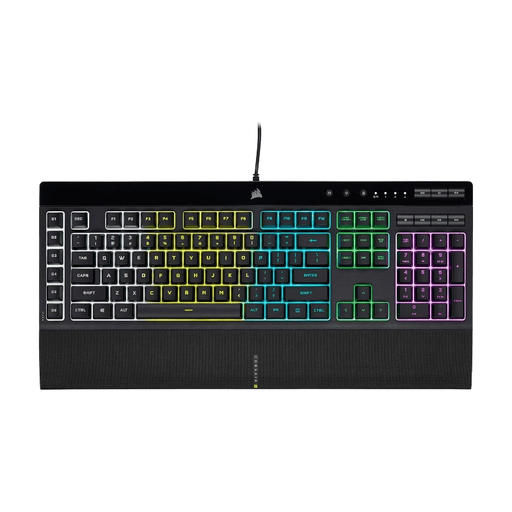
CORSAIR K55 RGB PRO, US QWERTY
This full-size model may suit you if you want dedicated macro keys and have room for a keyboard with a numeric keypad.
Wired membrane keyboard. The product description mentions six macro keys, 12-key rollover with anti-ghosting, media controls and a detachable wrist rest.
View at Joybuy
 No image available
Razer DeathStalker V2 Pro Tenkeyless, US layout
The TKL layout and listed wireless connections may suit you if you’re looking for a compact setup without a permanently attached keyboard cable.
The product description lists HyperSpeed Wireless, Bluetooth 5.0, programmable keys, macro recording and a detachable USB-C cable. Check the game’s rules before using macros.
View at Joybuy
Frequently asked questions
Will a gaming keyboard automatically work in a PS5 game?
No, you can’t assume that it will. PlayStation explains how to connect a USB or Bluetooth keyboard to the PS5, but warns that not every device will work. Also check whether the specific game supports keyboard controls.
What should I check when connecting a wireless keyboard?
Check that your gaming device supports the required receiver or Bluetooth. Logitech G also describes a wired connection for the G915 X LIGHTSPEED; Trust lists a USB-A receiver and rechargeable battery for the GXT 831 Thado. These specifications don’t guarantee the connection’s range in your room.
What are my rights if an online keyboard purchase isn’t suitable or develops a fault?
For a standard online product purchase, ACM ConsuWijzer says you’ll generally have a statutory 14-day cooling-off period after delivery; check whether an exception applies. If a product doesn’t perform as you could reasonably expect under normal use, the seller is responsible for the statutory guarantee. A manufacturer’s guarantee doesn’t replace this right.
Which Dutch product regulations apply to a wireless keyboard?
The Dutch government sets out safety requirements and CE obligations for electrical and electronic equipment. Equipment with Bluetooth or a radio frequency module is also subject to radio equipment rules. These obligations apply to placing products on the market and don’t, in themselves, prove that a specific keyboard has been checked; if in doubt, check the details for the exact version.


