
Student who doesn't want to disturb others
Plays in a shared or noisy room and prioritises a quieter typing experience over a pronounced mechanical feel. RTINGS explains how sound can vary by switch type.


If you mainly want to play quietly and keep the function row and arrow keys, a TKL membrane keyboard is a sensible place to start: RTINGS says membrane keys can be quieter, although they may feel less defined to press. A mechanical 75% model may suit you better if you value a compact layout and customisable keys. Mechanical or dampened does not automatically mean quiet, so check the exact version and which keys your game and study software use.
Plays in a shared or noisy room and prioritises a quieter typing experience over a pronounced mechanical feel. RTINGS explains how sound can vary by switch type.
Wants to leave room for a mouse, but needs to check that the function keys, arrow keys and other frequently used keys remain easy to reach. RTINGS notes that compact layouts may leave out keys.
Uses the same keyboard for studying and gaming, weighing up key feel, layout and customisation against noise and cost.
First decide what level of noise is acceptable in your room and which keys you use most often. Then choose a size and switch type.
| What to consider | What to look for | Who will find this most important? |
|---|---|---|
| Noise for housemates | Check the exact switch type and, if possible, compare a recording or measurement of the same version. | If I play in a shared room, I want keystrokes to be as little of a distraction to others as possible; around 33% of consumers put quiet keyboard noise first. |
| Accessible keys and layout | Compare the physical layout with the keys you use in your games and study software. | I want to use frequently needed keys directly, without awkward combinations; around 25% of consumers prioritise easy access to keys. |
| Desk space | Measure the space available for your keyboard, mouse and any wrist rest; compare the keys included on TKL and 75% models. | On a small desk, I want to leave some space beside the keyboard; around 25% of consumers put desk space first. |
| Cost and customisation | Check which switches and components are included and whether key programming requires software. | If I mainly play tactical RPGs, I don't want to pay for features I won't use; around 17% of consumers give more weight to the overall cost. |
Noise can also depend on the switch, the case and any components that may rattle. A general description won't tell you exactly how the version you choose sounds.
Compare the exact switch variant and, if possible, listen to a recording of the same model.
TKL and 75% are different layouts. A smaller version may make fewer keys directly accessible, which can be inconvenient for a game or study software.
Make a note of the keys you use and compare them with an image of the exact version.
A model may be available in different versions, for example with a different connection, layout or box contents.
Before buying, check the full model name, connection, keyboard layout and included components on the product page.
The Apex 3 TKL is a TKL option for anyone considering noise and desk space.
The K55 CORE TKL is designed for anyone looking for a compact layout with membrane keys.
The wired G515 TKL is a low-profile mechanical TKL model for anyone looking for programmable key functions.
The V1 Max is an example of a customisable mechanical 75% layout with wireless connections and interchangeable switches.
The Ornata V3 X is a full-size model for anyone who wants a number pad and wrist rest.
These models include compact TKL and 75% layouts, as well as a full-size keyboard for gaming and use at a student's desk.
 No image available
The TKL layout may suit you if you want to save desk space and don't need a number pad.
Wired; QWERTY; according to the product name, compatible with PC and PS5.
 No image available
This model may suit a shared room if you're looking for a compact layout with membrane keys.
Corsair describes the membrane keys as quiet; this isn't a directly comparable noise measurement. The product name specifies a US QWERTY layout.
 No image available
A compact mechanical layout may suit you if a smaller size is important and you check the physical key layout in advance.
Wired; 75%; US QWERTY; hot-swappable linear switches; gasket mount.
 No image available
This model may suit you if you're looking for a compact layout with several connection options; check that its physical keys work for your games and studies.
US QWERTY; wired, Bluetooth or 2.4G; TFT display; RGB lighting; hot-swappable switches; Purple switches.
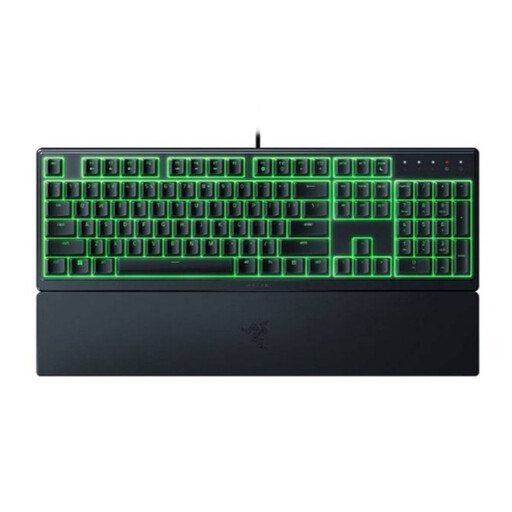 No image available
This model may suit you if you want a number pad and wrist rest and have enough desk space.
Razer describes the membrane keys as quiet. Check the US layout and full-size design before buying.
No, a smaller layout may leave out the function row and arrow keys. First check which keys your games and study software use; the TKL models discussed keep more keys directly accessible.
Check which software the exact model and your operating system require. Logitech describes KEYCONTROL via G HUB for the wired G515 TKL, while Keychron describes key programming for the V1 Max. Then check in your game that a shortcut key doesn't already have another function.
Only if the version you choose supports this. Keychron lists the V1 Max as hot-swappable; check that replacement switches are compatible, and bear in mind that the barebone version comes without keycaps and switches.
For online purchases from a business, you generally have a 14-day cooling-off period, according to the Dutch government; check which terms apply to your purchase. There is no fixed statutory warranty period in the Netherlands: you're entitled to a product that works properly, and the seller is your point of contact if something goes wrong. An additional manufacturer's or paid-for warranty doesn't replace this right.