First, decide which keys you want close to hand for strategy games and other work, then consider how much noise and desk space you can live with. A compact TKL or 75% board can free up space, while dedicated programmable keys take up more room. Before buying, check the exact switch variant, physical layout and software requirements. Manufacturers’ claims about noise levels aren’t measurements of how the keyboard will sound in your home office.
Who is this keyboard for?
Home gamer looking for a quieter keyboard
If you play in a room where housemates or colleagues can hear you, compare the exact switch variant. SteelSeries describes the Apex 3 as whisper-quiet, but that doesn’t tell you how loud the keyboard will sound in your room.
Gamer who wants their own shortcuts
Want to assign functions to dedicated keys, and have room for a larger board? Check how the programmable keys and accompanying software work. Razer lists six macro keys for the BlackWidow V4 X, while Logitech G lists nine G-keys for the full-size G915 X LIGHTSPEED.
Gamer sharing a desk
If you switch between gaming and other computer work, desk space, layout and connectivity may all matter. Compare the keys you need and check that your preferred connection options are available on the specific variant.
What should you consider when choosing?
Start by deciding which buying priority matters most for your home office. Then compare the physical design and how you’ll connect the keyboard.
| What to consider |
What should you check before buying? |
Who is this most important for? |
| Noise |
Check the exact switch variant and, if possible, try the keyboard out to hear how it sounds. |
If I play or work with other people nearby, I want to know how loud the keys are. Around 33% of consumers say noise is their top priority. |
| Custom shortcuts |
Check how many dedicated keys there are and how you can configure them for your game. |
If you want to assign functions to dedicated keys in grand strategy games, consider both the key layout and the software you’ll need. Around 27% of consumers put shortcuts first. |
| Layout and desk space |
Compare the number pad, arrow keys, navigation keys and the key legends printed on the board. |
If I need room for my mouse but still want to keep essential keys, I compare the actual layout with how I use my keyboard every day. Around 20% of consumers say layout and desk space are their top priorities. |
| Connectivity |
Check which connection options are available on the model and which ones will work with your computer. |
If I use the same desk for gaming and other work, I want a connection that suits both. Around 20% of consumers prioritise ease of connectivity. |
Pitfalls to avoid
-
Treating a manufacturer’s description as a noise measurement
Descriptions such as ‘quiet’ or ‘whisper-quiet’ don’t tell you how the entire keyboard will sound in your home office. Switch variants can also differ within the same model.
Check which switches are included and, if possible, listen to a sound demo or try the keyboard yourself.
-
Assuming TKL and 75% layouts are the same
Compact models save space in different ways, so keys you use often may be in different places.
Compare the layout of the exact variant with how you use the arrow keys, navigation keys and any dedicated key legends.
-
Mistaking a barebone version for a complete keyboard
Keychron says the barebone version of the V1 Max doesn’t include switches or keycaps. You need both to use the keys.
Before buying, check whether your chosen version is assembled and which parts are included in the box.
With a barebone version, you may need to buy switches and keycaps separately.
Brands to compare
SteelSeries
The Apex 3 is worth comparing if you’re looking for a keyboard the manufacturer describes as whisper-quiet.
- SteelSeries lists water and dust resistance, as well as media controls.
- The noise description isn’t a measurement of how the keyboard will sound in your room. Also check whether you’re choosing the full-size or TKL version.
Razer
The BlackWidow V4 X is worth considering if you want dedicated macro keys.
- Razer specifies six macro keys.
- According to Razer, the Green and Yellow switches differ in sound and feel. Check which variant you’re buying.
Logitech G
The G915 X LIGHTSPEED and G915 X LIGHTSPEED TKL offer different sizes and features.
- Logitech G lists nine G-keys for the full-size version and three connection options for the TKL version.
- Features of the full-size and TKL models aren’t interchangeable.
Corsair
The K65 PLUS WIRELESS TACTILE is a 75% option worth comparing if you’re looking for a compact size and customisable switches.
- Corsair lists hot-swap switches and two layers of internal sound dampening.
- These features aren’t a comparative measurement of noise levels. Also check that the version sold by the UK retailer matches the one you’re looking for.
Trust
The wired GXT 833 Thado is a TKL option worth comparing if you don’t need a wireless connection.
- Trust specifies an 80% layout and media keys.
- The stated layout doesn’t prove that the keys are particularly quiet.
Keychron
The V1 Max is a 75% option for anyone who wants to customise its features and switches.
- Keychron lists hot-swap switches and remapping.
- The version described has an ANSI layout. Check the exact variant and what’s included in the box.
Joybuy products
These products focus on compact keyboards for desks where space, layout and everyday use matter alongside gaming.
 No image available
GXTrust Thado TKL gaming keyboard
The wired TKL version is an option if you don’t need a number pad.
Wired; TKL; US QWERTY.
View at Joybuy
 No image available
Corsair K55 CORE TKL
The TKL layout suits anyone looking for a compact size who doesn’t need a number pad.
US QWERTY.
View at Joybuy
 No image available
AULA F75 MAX 75%
The 75% version is an option if you’re looking for a more compact keyboard with several connection options.
Mechanical; 75%; wired, Bluetooth and 2,4 GHz; US QWERTY; Reaper Switch.
View at Joybuy
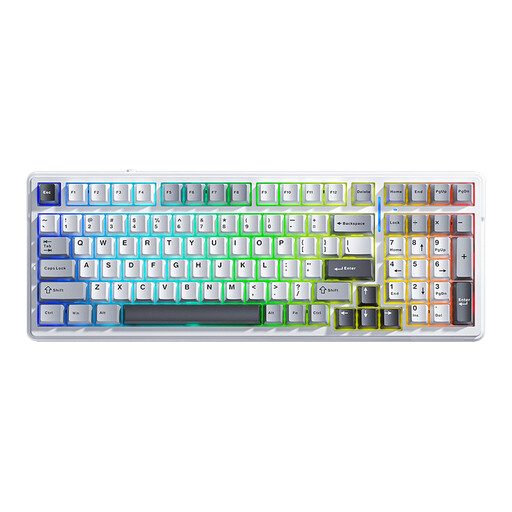 No image available
AULA F99 99-key
The 99-key version may suit you if you’re looking for a keyboard with more keys and several connection options.
Mechanical; 99 keys; hot-swappable; wired, Bluetooth and 2,4 GHz; US QWERTY.
View at Joybuy
 No image available
Royalaxe E75 75% Hall Effect
The 75% layout is an option if you’re looking for a more compact wired keyboard with Hall Effect switches.
Mechanical; 75%; TTC Magnetic HE switches; hot-swappable; wired; Rapid Trigger.
View at Joybuy
Frequently asked questions
Do I need a keyboard with macro keys for grand strategy games?
Only if you want to assign functions to dedicated keys. Razer lists six macro keys for the BlackWidow V4 X, while Logitech G lists nine G-keys for the full-size G915 X LIGHTSPEED. Check how to configure the keys for your game.
How can I stop the wrong characters from appearing?
Compare the key legends and layout of your chosen version with your computer’s keyboard language. A compact size and a US or other physical layout are separate features.
Can I replace the switches later?
It depends on the exact version. Corsair describes the K65 PLUS WIRELESS TACTILE as hot-swappable, and Keychron says the same of the V1 Max. Check which version you’re buying and which switches are compatible. Hot-swap doesn’t mean replacement switches are included.
What are my rights when buying online in the Netherlands?
For eligible online consumer purchases, you generally have a 14-day cooling-off period after delivery, as explained by ACM ConsuWijzer. You’re also entitled to a legal guarantee if a product doesn’t perform as you could reasonably expect under normal use; the retailer is responsible for addressing this. A legal guarantee is different from a voluntary manufacturer’s warranty.
What should I check when buying a customisable keyboard?
Check the exact version and what’s included in the box. Keychron says the barebone version of the V1 Max doesn’t include switches or keycaps; this doesn’t automatically apply to an assembled version.


