
Ranked player with limited ports
Wants to play without using an extra mains socket and needs to consider whether a USB port is available for a cable or wireless receiver, or whether Bluetooth is an option.


First, choose a keyboard based on the ports available on your computer: a wired USB connection doesn’t need a separate mains socket, while a 2.4GHz wireless connection usually needs a USB receiver. Then check that your strategy-game hotkeys are easily accessible; magnetic switches aren’t an automatic priority if layout and reliable input matter more.
Wants to play without using an extra mains socket and needs to consider whether a USB port is available for a cable or wireless receiver, or whether Bluetooth is an option.
Uses lots of direct-access keys and wants to check that their own keys and combinations remain accessible before choosing a compact keyboard.
Doesn’t want to switch connection modes or think about charging during a match, and weighs this up against having a cable on the desk.
Choose this if: you have a suitable USB port available and don’t want to manage a battery or charging. Connecting the keyboard to your computer by USB means it doesn’t need a separate mains socket.
Bear in mind: the cable stays on your desk and uses a USB port; check that the plug is compatible with your computer.
Choose this if: you don’t want a keyboard cable getting in the way during a ranked match and have a USB port available for the receiver. RTINGS describes a wireless receiver as a more suitable gaming connection than Bluetooth.
Bear in mind: the receiver uses a USB port and the battery needs charging.
Choose this if: your computer supports Bluetooth and saving a USB port or switching between devices matters more to you than the lowest input latency.
Bear in mind: RTINGS notes that latency is higher than with a wired connection or wireless receiver; Bluetooth models also need battery management.
| What to consider | What to check before buying | Who is this important for? |
|---|---|---|
| Connection without an extra mains socket | Check available USB ports, connection type and Bluetooth support separately. | If I don’t want to use a separate mains socket for my keyboard, I first check which connection my computer has available. Around 36% of consumers give connection type the highest priority. |
| Strategy hotkeys within easy reach | Compare your own key layout with the exact model; check the function row, arrow keys and any Fn combinations. | If I use lots of custom hotkeys, I want to know which ones remain directly accessible on the compact layout. Around 29% of consumers put accessibility first. |
| Predictable input during ranked matches | Compare the connection options and key registration of the exact model. | If I value predictable input more than extra features during ranked matches, I check the connection mode and how multiple key presses are registered. Around 21% of consumers give input the highest priority. |
| Battery management and everyday use | Check whether you can keep playing while charging, how the mode switch works and which lighting setting the battery life figure applies to. | If I want to limit charging and switching modes, I weigh up having a cable against the battery upkeep involved in wireless use. Around 14% of consumers give ease of maintenance the highest priority. |
A compact TKL or 75% model can save space, but that doesn’t automatically make it the right layout for your game. Check your own key combinations against the exact model. Adjustable magnetic actuation can offer extra customisation, but it isn’t essential for every strategy player.
A 2.4GHz connection uses a USB receiver; with wireless use, you’ll also need to think about charging.
Count mains sockets and USB ports separately, and decide in advance where you’ll plug in a receiver and how you’ll charge the keyboard.
On a smaller layout, some keys may be missing or accessible only through an Fn combination.
Compare your own game key bindings with the exact layout before choosing a TKL, 75% or smaller model.
Corsair quotes 266 hours for the K65 PLUS WIRELESS with the backlighting off, so that figure doesn’t necessarily apply when the lighting is on.
Only compare battery life claims when the stated usage conditions, including the lighting setting, are the same.
According to Corsair, the K65 PLUS WIRELESS combines a 75% layout with 2.4GHz, Bluetooth and wired USB modes.
According to Logitech, the G915 X LIGHTSPEED TKL is a wireless TKL model with 2.4GHz, Bluetooth and wired modes.
The Apex Pro TKL Gen 3 is a wired TKL model with magnetic switches.
The BlackWidow V4 X has six dedicated programmable keys in addition to the regular gaming keys.
The wired 80HE is an 80% model with magnetic switches.
This selection includes wired USB keyboards and models with wired and wireless connection options, in compact TKL or 75% layouts. For ranked strategy games, check that your own hotkeys are accessible on the exact layout.
 Image unavailable
A wired option if you don’t want to manage a battery and are looking for a compact TKL layout.
Wired USB connection; registers up to 10 simultaneous key presses, according to the product description.
 Image unavailable
A good fit if you want a compact layout and the option to choose between wired and wireless use.
The product description lists USB-C, 2.4GHz and Bluetooth. Check that your hotkeys remain accessible on the 75% layout.
 Image unavailable
A compact option if you want to be able to switch between wired and wireless use while gaming.
The product description lists USB-C, 2.4GHz and Bluetooth. The product name specifies an 8000 mAh battery; check how the layout suits your hotkeys.
 Image unavailable
A good fit if you want a wired connection and compact layout without having to manage a battery.
The product description lists USB-C and adjustable actuation points; check that the 82-key layout supports your game key bindings.
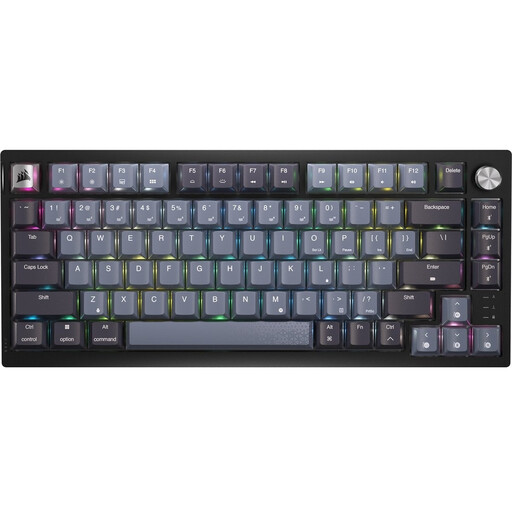 Image unavailable
A good fit if you want a 75% layout and the choice of a 2.4GHz receiver or USB cable while gaming.
The product description lists full N-key rollover. To play in wired mode while charging, the mode switch must be set to off; plugging in a charging cable won’t switch to that mode automatically.
No, not for the keyboard itself if you connect it to a suitable USB port on your computer. Check that the port is available, though; a 2.4GHz model may also use a USB port for its receiver.
No. According to Corsair’s manual, the keyboard continues to work wirelessly if the switch is set to a wireless mode, even while the cable is charging it. To use wired mode, the mode switch must be set to off.
Compare your own hotkey assignments with the physical layout and any Fn combinations. Then test your chosen connection mode and, if using wireless, check the battery level; some keys may not be directly accessible on a smaller layout.
According to ACM ConsuWijzer, online purchases generally come with a statutory 14-day cooling-off period from delivery, subject to exceptions. This is separate from your rights if a product used normally doesn’t perform as you could reasonably expect: in that case, the seller is responsible for providing an appropriate solution.