Start by checking the keys and shortcuts your game uses, then consider how much space you have and how much noise is suitable for a shared workspace. A compact TKL keyboard can free up space beside it, while a full-size model with a number pad or extra controls may suit you if you genuinely need those keys. Before buying, check the layout, connection and exact switch variant.
Who are these keyboards for?
Strategy gamer who uses lots of shortcuts
Wants to use game commands quickly and choose which keys to assign to them. Age of Empires Support explains that shortcuts in Age of Empires IV can be reassigned individually; Razer lists six dedicated macro keys on the BlackWidow V4 X.
Someone who works from home and also games
Uses the same desk for typing, meetings and gaming, so pays attention to key feel and noise. Corsair and SteelSeries describe the keys on specific models as quiet; Logitech G offers the G515 with linear and tactile options.
Gamer with a small desk
Wants to keep space free beside the keyboard without losing keys needed for work or gaming. TKL models have no number pad, while the Keychron V6 is full-size and includes one.
What should you consider when choosing?
First, check the shortcuts for the game you play, then decide how much space you have and what type of key feel suits your workspace. Age of Empires Support explains that you can reassign shortcuts individually in Age of Empires IV; settings may vary from game to game.
| What to consider |
What should you check? |
Who is this important to? |
| Game commands |
Check your game's shortcut settings and decide whether you need extra macro keys. |
If I use the same commands often during strategy games, I want to know whether I can change them in the game itself before choosing extra keys; around 33% of consumers give game commands top priority. |
| Noise and key feel |
Check the key or switch type on the exact version. |
At a shared desk, I want to choose a key feel that suits typing, meetings and gaming; around 27% of consumers prioritise a quiet working environment. |
| Desk space and keys |
Measure the available width and check whether you need a number pad. |
If I want to keep space free beside my keyboard but also enter figures for work, I want to weigh up the options beforehand; around 20% of consumers put desk space at the top of their list. |
| Connection and layout |
Check the connection, keyboard layout and included accessories for the version. |
If I want to use my keyboard for both work and gaming, I want to make sure the connection and key positions suit my devices and habits; around 20% of consumers give device compatibility top priority. |
Things to check before buying
-
Choosing a TKL keyboard without considering the number pad
TKL models leave out the number pad. This can be inconvenient if you use one for work.
Think about the tasks you do for work as well as your game's shortcuts before choosing a compact model.
-
Assuming every switch variant sounds equally quiet
Razer describes the Green switch as clicky and the Yellow switch as quiet. This is the manufacturer's description, not an independent sound comparison.
Check the switch name for the version on offer, not just the model name.
-
Mistaking a barebone version for a complete keyboard
According to Keychron, the barebone version of the Keychron V6 does not include switches or keycaps.
Check what is included with the exact version.
To use it, you will need to source the missing switches and keycaps separately.
-
Confusing the manufacturer's warranty with all your legal rights
According to the Government of the Netherlands, a manufacturer's warranty is in addition to your right to a product that is fit for purpose. The Netherlands has no fixed statutory warranty period.
If there is a fault, contact the seller; the appropriate solution depends on the product and the circumstances.
Brands to consider as a guide
Corsair
The K55 CORE TKL is a wired TKL model with membrane keys, designed for a compact workspace for work and gaming.
- Corsair lists quiet keys, 12-key rollover and iCUE support for this model.
- The model has no number pad; features of other K55 versions do not necessarily apply.
SteelSeries
The Apex 3 TKL is a compact version whose keys SteelSeries describes as quiet.
- SteelSeries lists anti-ghosting and an IP32 rating for this model.
- The version reviewed has a US layout; check the layout of the one you are considering.
Razer
The BlackWidow V4 X is worth considering if you want dedicated physical keys for commands of your choice.
- Razer lists six dedicated macro keys.
- Razer describes the Green switch as clicky and the Yellow switch as quiet; check which version is on offer.
Logitech G
The G515 LIGHTSPEED TKL is a compact mechanical model with several connection options.
- Logitech lists LIGHTSPEED, Bluetooth and wired data transfer, with linear and tactile options.
- The product description does not state that every connection mode offers the same performance in practice.
Keychron
The V6 is a full-size wired keyboard for anyone who wants a number pad and customisable keys.
- Keychron lists QMK, hot-swap sockets and an ANSI layout.
- The barebone version does not include switches or keycaps; the full-size layout takes up more desk space.
Joybuy products for this workspace
These product options range from compact TKL and 75% models to keyboards with a number pad. Compare the layout, connection and exact version with your workspace and the keys you use in your game.
 No image available
GXTrust Thado TKL gaming keyboard, US QWERTY
Suited to a desk where you want a compact TKL layout and use game commands that require multiple simultaneous key presses.
The product description lists membrane keys, a wired USB connection, media keys, Game Mode and anti-ghosting for up to 10 simultaneous keys. The title specifies a US QWERTY layout.
View at Joybuy
 No image available
Corsair K55 CORE TKL, US QWERTY
Suited to a shared desk where a compact wired keyboard with membrane keys fits the way you work.
Corsair lists quiet membrane keys, 12-key rollover, a USB connection, four media keys and iCUE customisation. The title specifies a US QWERTY layout.
View at Joybuy
 No image available
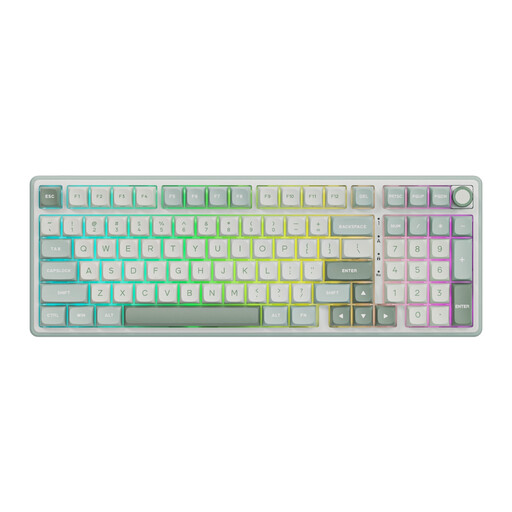
RK ROYAL KLUDGE R98 Pro, Sky Cyan, Beige Switch
Suited to a workspace where you want to keep a number pad and are looking for a wired mechanical keyboard.
The product description lists Beige linear switches, hot-swap sockets, a volume knob and a number pad.
View at Joybuy
 No image available
AULA F75 wireless gaming keyboard, 75%, US QWERTY
Suited to a desk where you want a compact layout and the option to choose between different connection methods.
The product description lists Bluetooth, 2.4 GHz and a wired USB-C connection, PBT keycaps and RGB lighting. The title specifies a US QWERTY layout.
View at Joybuy
 No image available
Redragon M68 with magnetic switches, 68 keys, US layout
Suited to anyone specifically looking for a 68-key keyboard and wanting to explore the listed key-feel settings.
The product title lists magnetic switches, Rapid Trigger and a metal top plate; the product description mentions adjustable actuation. The title specifies a US layout.
View at Joybuy
Frequently asked questions
Do I need dedicated macro keys for Age of Empires IV?
Not necessarily: according to Age of Empires Support, you can reassign shortcuts individually in Age of Empires IV. Start by checking which commands you use; dedicated macro keys are an extra option.
What can I do if my shortcuts conflict?
Check the selected shortcut profile and any conflict notifications in Age of Empires IV. Age of Empires Support explains that if two available commands use the same key at the same time, only one can be activated.
How do I maintain my keyboard, and what should I do with my old one?
Follow the cleaning instructions provided by the manufacturer for your exact version. Milieu Centraal lists free drop-off for broken electrical appliances and collection bins for small appliances.
What are my rights when I buy a keyboard online in the Netherlands?
For online purchases from a business, you usually have a 14-day cooling-off period, according to the Government of the Netherlands; this is separate from your rights if the product is faulty. You are entitled to a product that is fit for purpose, but the Netherlands has no fixed statutory warranty period. If there is a fault, contact the seller; the appropriate solution depends on the product and the circumstances.


