
Gamer with limited desk space
You want enough room beside your keyboard to move your mouse. So compare the models’ actual widths, rather than relying on their size labels alone.


Choose based on the space available on your desk and the keys your game uses. A 75% keyboard usually retains the arrow keys and function row, while a TKL model keeps more of the standard layout. A 60% model takes up less space, but you’ll often need to use key combinations or alternative controls. Also check the exact layout, sound and connectivity of the model you’re considering.
You want enough room beside your keyboard to move your mouse. So compare the models’ actual widths, rather than relying on their size labels alone.
You want to control objects and the camera without constantly searching for hidden key layers. The keys you need depend on your game and platform.
As well as size, you’ll want to consider how the keys feel and sound. A specified switch type or dampening feature doesn’t guarantee that others will find the keyboard quiet.
Start with the keys you want to be able to use directly while building. Then measure the space for your keyboard and mouse, and compare connectivity and sound.
| What to consider | What to look for | Who is this most important for? |
|---|---|---|
| Desk space | Measure the usable width of your desk and compare the model’s dimensions, allowing for the cable or receiver too. Hardware Info describes 75% as a more compact version of TKL, although exact dimensions vary between keyboards. | I want enough room to move my mouse without giving up more keys than necessary. Around 36% of consumers in this decision-making context give desk space top priority. |
| Keys within easy reach | Compare your game’s control scheme with photos and specifications of the exact layout, such as ANSI or ISO. For example, EA Help describes using the comma and full stop keys in The Sims 4; this doesn’t automatically apply to other games. | If I often use keys or combinations while building, I want them within easy reach. Around 29% of consumers in this decision-making context give direct access to controls top priority. |
| Key feel and sound | Check the switch type of the exact model. A manufacturer’s description mentioning dampening isn’t an independent sound test. | I want to consider the sound when using the keyboard in a shared space. Around 21% of consumers in this decision-making context give key feel and sound top priority. |
| Connectivity and cable space | Compare the connection options and any included receiver with your computer or other equipment. Also check that a cable will sit comfortably on your desk. | I don’t want a cable getting in the way, so I check the connection options in advance. Around 14% of consumers in this decision-making context give cable space top priority. |
A 60% model usually omits separate arrow keys and a function row. A 75% or TKL model retains a different number of keys within easy reach, and the exact layout varies between models.
Check the dimensions and an image of the exact layout alongside your game’s control scheme.
Versions can differ in connectivity, key layout and included parts. A barebone version, for example, may come without switches and keycaps.
Check the full product specification and what’s in the box, not just the series name.
According to the Dutch Government, the Netherlands has no fixed statutory warranty period. An additional warranty is separate from your statutory rights if a product is faulty or doesn’t meet expectations.
Before choosing an extended warranty, check what cover it actually adds.
The BlackWidow V4 75% is an example of a compact layout with arrow keys and a function row. Razer says the model has replaceable switches.
According to CORSAIR, the K65 PLUS WIRELESS is a 75% model that can be used wirelessly or wired.
The G515 TKL Wired is a wired TKL option without a number pad. Logitech G gives the model’s height as 22 mm.
The V1 Max is a 75% option for anyone who wants to customise features and choose between connection methods.
The wired Apex Pro Mini represents the 60% layout, for those who value a compact size more than separate arrow keys and a function row.
The product picks below focus on compact 75% keyboards for anyone who wants to leave room for their mouse.
 No image available
The 75% layout suits anyone looking to free up desk space; check that the key positions work for your game.
US QWERTY layout; tri-mode connectivity with wired, Bluetooth and 2.4 GHz options.
 No image available
A wireless 75% model for anyone looking to free up desk space for a cable; check that the key layout works for your game.
Mechanical; hot-swappable switches, TFT screen and dial listed in the product name.
 No image available
The 75% layout may suit anyone looking for a compact keyboard; check that the German QWERTZ layout works for your needs.
German QWERTZ layout; wireless and described as tri-mode.
 No image available
A 75% model for anyone looking to free up desk space; check that the US QWERTY layout suits your game and typing needs.
Wired, Bluetooth and 2.4 GHz; hot-swappable switches according to the product name.
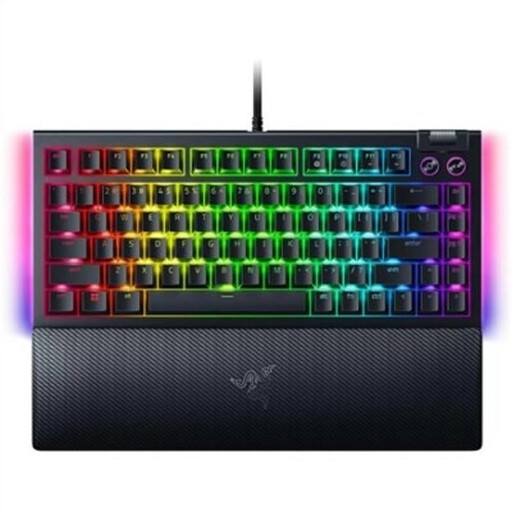 No image available
A 75% model for anyone looking for a compact layout; Razer lists arrow keys and a function row for this model.
Mechanical and hot-swappable; US QWERTY layout.
Not as a general rule; check the controls for your game. For example, EA Help describes rotating objects in The Sims 4 on PC using the comma and full stop keys, and enlarging an object with Shift plus the right square bracket. This doesn’t determine how other games work or where those characters appear on every keyboard layout.
Before you buy, compare the layout with your current keyboard. Once connected, test the most important actions in your own game. For hidden functions, check the manual for the Fn layer or key remapping; available options vary by model.
Check whether switches and keycaps are included with your chosen version, and what any additional warranty covers. The Dutch Government says the Netherlands has no fixed statutory warranty period; your statutory rights if a product doesn’t meet expectations are separate from an optional extended warranty.
For many online distance purchases from a business, you have a 14-day cooling-off period, according to the Dutch Government. The cooling-off period depends on the applicable terms and conditions; according to the Government’s guidance, purchases from private sellers aren’t covered by the distance-selling rules. Your statutory rights if a product doesn’t meet expectations are separate from an optional extended warranty.