
Players short on mouse space
Your desk is small, so you need to balance the keyboard’s width against the space left for your mouse.


For a small desk, TKL or 75% is a sensible place to start if you want your most-used keys within easy reach. Choose 65% or 60% when every centimetre counts and you’re happy to use a second key layer for some functions. Measure the space you have for both your keyboard and mouse, then check that the exact layout suits the keys you use in your strategy game.
Your desk is small, so you need to balance the keyboard’s width against the space left for your mouse.
You want to reach commands during campaigns or battles without relying on awkward key layers. The keys you need will depend on your game and settings.
You use the same space for other tasks too, so you’ll want to consider the typing feel, layout and whether you can move the keyboard or remap its keys.
Choose this if: you can do without the number pad but don’t want a heavily reduced layout.
Bear in mind: it’s wider than a 65% keyboard, so check the dimensions of the specific model you’re considering.
Choose this if: you want more room for your mouse while keeping the arrow and function keys directly accessible.
Bear in mind: other keys are arranged more compactly, so check that the layout works for you.
Choose this if: every centimetre counts and you can manage with fewer keys within immediate reach.
Bear in mind: which game functions will move to a second key layer. Keychron lists the K7 Pro ISO’s dimensions as 306 × 97,5 mm.
Choose this if: maximising mouse space matters more than having more keys directly accessible.
Bear in mind: whether you’re willing to adapt your controls for keys that aren’t directly available. Razer highlights rapid repeated input on the Huntsman V3 Pro Mini, but this is not a proven advantage for historical strategy games.
| Consideration | What should you check? | Who is this important to? |
|---|---|---|
| Desk space for your keyboard and mouse | Measure the available width, including the space for your mouse, and compare it with the dimensions of the exact model. Keychron lists the K7 Pro ISO as 306 × 97,5 mm. | On a narrow desk, I want enough room left for my mouse; around 36% of consumers put this first. |
| Direct access to gaming keys | Make a note of your shortcuts and check whether the arrow keys, function row and navigation keys are directly accessible. Also check how key layers and remapping work. | During campaigns and battles, I want to reach commands without awkward key layers; around 29% of consumers prioritise direct access to gaming keys. |
| Sound and typing feel | Check the switch type on the exact model and consider whether its feel and sound will suit the people you share the space with. | At a shared desk, I want a typing feel and sound level that suit the space; around 21% of consumers put this consideration first. |
| Connectivity and portability | Check which USB connection or wireless options the model supports. For wireless models, also check the conditions under which the battery life is measured. | If I want to be able to change my desk setup, I look at the connection options; around 14% of consumers prioritise this flexibility. |
Corsair lists a maximum battery life of 266 hours for the K65 PLUS WIRELESS TACTILE with the LEDs off. That figure doesn’t apply when the lighting is on.
Check the test conditions for the exact model, and factor in charging if you play wirelessly with the lighting on.
With the LEDs on, battery life may differ from the stated maximum, so you may need to charge more often.
These layouts differ in width and in which keys remain directly accessible. With a more compact layout, you may need to adapt your controls to use key layers.
Before choosing, compare the keys you use most in your game with an image of the exact layout.
A layout that doesn’t suit your controls can take time to get used to.
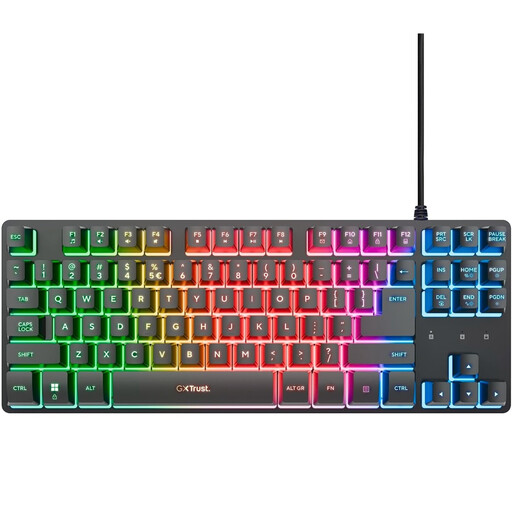
Trust lists anti-ghosting for up to 10 simultaneous key presses on the GXT 833 Thado. This is the specification to rely on for this model.
Check the manufacturer’s specifications for the exact model rather than treating a different retailer description as a confirmed product specification.
The models reviewed here offer different trade-offs in size, direct access to keys, typing feel and connectivity. The features listed apply to these models, not every keyboard from each brand.
The K7 Pro ISO reviewed here is a 65% model; the K8 Pro ISO is TKL and supports key remapping.
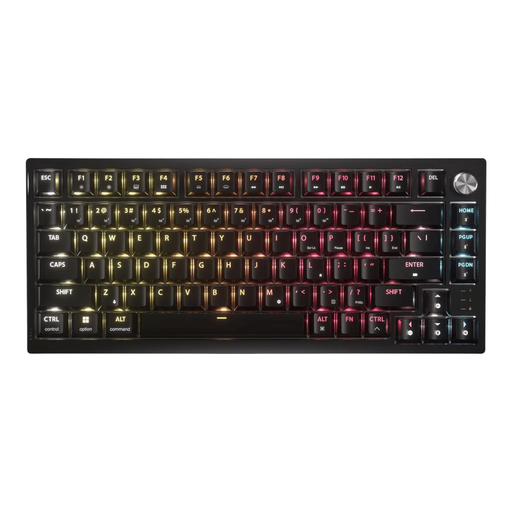
The K65 PLUS WIRELESS TACTILE reviewed here has a 75% layout, tactile mechanical switches and several connectivity options.
The GXT 833 Thado reviewed here is a wired TKL keyboard with membrane switches.
The Huntsman V3 Pro Mini is a 60% model with adjustable analogue optical switches.
This selection includes compact TKL and 75% keyboards for a small desk, with both wired and wireless models.
 No image available
The TKL layout leaves out the number pad, giving you more room for your mouse.
Wired USB connection and membrane switches. Trust lists anti-ghosting for up to 10 simultaneous key presses. The US QWERTY layout may differ from the key legends you’re looking for.
 No image available
The 75% layout is a good option if you want more mouse space while keeping the arrow and function keys directly accessible.
Tactile mechanical switches; supports 2.4 GHz, Bluetooth and USB. Corsair lists a maximum battery life of 266 hours with the LEDs off. The title specifies US QWERTY.
 No image available
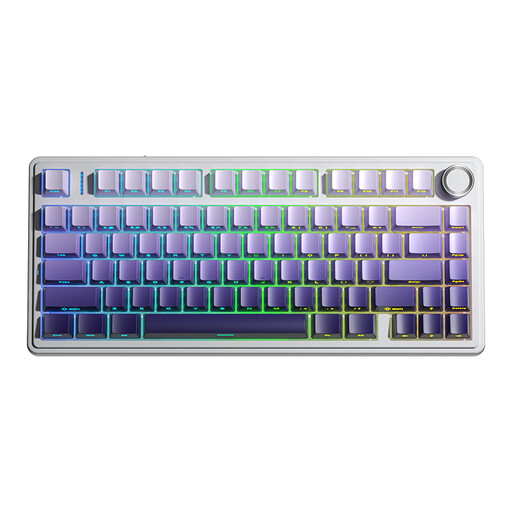
The 75% layout is designed for a compact setup where you want to keep the arrow keys directly accessible.
The product title specifies US QWERTY and wired, Bluetooth and 2.4 GHz connectivity. If you use it wirelessly, remember that it will need charging.
 No image available
The TKL layout leaves out the number pad, making it a good fit for a wired setup where you want to keep space free for your mouse.
Wired USB connection, membrane switches and four dedicated media keys. The title specifies US QWERTY, which may differ from your preferred key legends.
 No image available
The TKL layout is a good option if you can do without the number pad and want to leave more room for your mouse.
The product description lists optical switches, programmable keys and macro recording. The title specifies a US layout, so check that it suits your preferences.
No. A 60% keyboard leaves plenty of room, but first check which keys you need to access directly in your game. TKL or 75% may be a better fit if you want to use fewer key layers.
Check which USB connection or wireless options the exact model supports. Remap keys once you’ve checked how you control your game; the Keychron K8 Pro ISO reviewed here supports key remapping.
Read the conditions attached to the stated battery life. Corsair lists a maximum of 266 hours for the K65 PLUS WIRELESS TACTILE with the LEDs off; remember to factor in charging if you play with the lighting on.
When you buy as a consumer, you’re entitled to a product that works properly. According to the Dutch government, there’s no fixed statutory guarantee period in the Netherlands; if a product is faulty, contact the seller to find a solution. A manufacturer’s guarantee doesn’t replace these rights.
For eligible distance purchases, the Dutch government generally provides a 14-day cooling-off period. There are exceptions, including purchases from a private seller, so check which terms apply to your order.