
Gamer with limited mouse space
If you game at a narrow desk, compare the keyboard’s width with the space you want to leave for your mouse. Point-and-click games put the mouse centre stage, as Armor Games explains.


Start by deciding how much space you want to leave beside your keyboard for your mouse. Then choose the smallest layout that still gives you comfortable access to the game keys you need. A 75% board keeps the arrow and function keys within a compact design, while TKL gives you more dedicated keys but takes up more width. Choose quiet switches or a wireless connection only if they suit your room and desk.
If you game at a narrow desk, compare the keyboard’s width with the space you want to leave for your mouse. Point-and-click games put the mouse centre stage, as Armor Games explains.
If other people share your space, the sound of your keystrokes may be a factor. Compare the switch type and any sound-dampening features of the exact version; manufacturers’ descriptions are not independent sound measurements.
If you use the same desk for gaming and everyday typing, check which keys are directly accessible and whether the connection suits your needs. A smaller layout may move some keys to a key combination.
Choose this if: you have limited width but want arrow and function keys readily available.
Bear in mind: the keys are closer together than on a TKL board; layouts and features vary between versions.
Choose this if: you can do without a number pad and dedicated keys matter to you.
Bear in mind: TKL is not necessarily the narrowest layout; check the actual width and switch type.
Choose this if: every centimetre counts and your games are easy to control with the available keys and Fn combinations.
Bear in mind: some keys may not be directly accessible; check the controls for the games you play.
| What to consider | What should you check? | Who should pay particular attention? |
|---|---|---|
| Space for your mouse | Compare the board’s width with the usable width of your desk and the space you want to leave for your mouse. | If I play point-and-click games at a narrow desk, I want to be able to move my mouse comfortably beside the keyboard. Around 40% of consumers prioritise mouse space. |
| Keystroke noise | Check the switch type and any sound-dampening features of the exact version; don’t treat a description such as ‘quiet’ as a sound measurement. | In a shared room, quieter keystrokes may matter more than a particular key feel. Around 23% of consumers prioritise quietness. |
| Keys that are readily accessible | Check the layout of the exact version and which keys your games use. | If I also use the same space for typing, I want the keys I need to be easy to reach. Around 22% of consumers prioritise key access and typing feel. |
| Connection and cable space | Check whether the version is wired or wireless, and which connection or connection mode your device needs. | If cables get in the way on my small desk, I want to know which connection options the keyboard offers. Around 15% of consumers prioritise connectivity and cable management. |
75%, TKL and smaller layouts don’t all give you the same keys directly. A compact keyboard may therefore be less suitable if you use certain keys frequently.
Measure the available desk width, compare the dimensions of the exact version and check which keys your games require.
A model name alone doesn’t always tell you which layout or connection version you’re looking at. These differences can affect the space and connection you need.
Before buying, compare the full model name, physical layout and connection details with the manufacturer’s information.
According to the Dutch government, there is no fixed statutory guarantee period in the Netherlands. For a consumer purchase, your protection depends on what you could reasonably expect from the product.
Check what additional rights an extended warranty offers. If the product is faulty, contact the seller.
The Apex 3 TKL is an option if you’re looking for a TKL layout with switches the manufacturer describes as quiet.
The wired G515 TKL combines a TKL layout with low-profile mechanical switches.
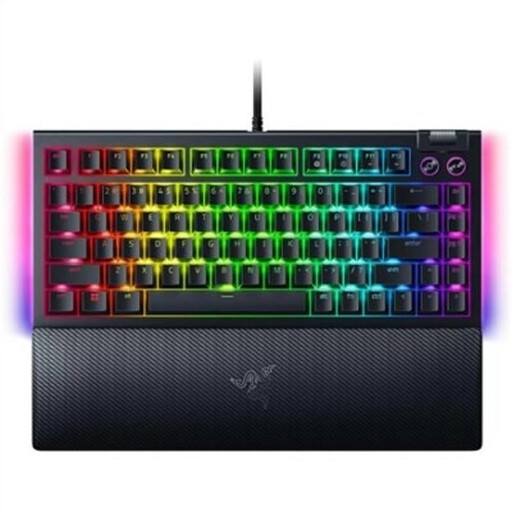
The BlackWidow V4 75% is worth considering if you’re looking for a compact mechanical keyboard with replaceable switches.
The K2 Version 2 hot-swappable is an option if you want to combine a 75% layout with Bluetooth and a wired mode.
The GXT 833 Thado is a wired TKL option with readily accessible media keys.
This selection includes TKL and 75% keyboards for anyone who wants to leave room for a mouse on a small desk.
 No image available
The TKL layout suits anyone who can do without a number pad and wants to leave space beside the keyboard.
The product name specifies PC/PS5, QWERTY and black.
 No image available
The TKL layout is worth considering if you don’t need a number pad and want to keep space free beside the board.
The product name specifies a gaming keyboard with a US QWERTY layout.
 No image available
The 75% layout suits anyone looking for a compact keyboard that keeps the arrow keys.
The product name specifies Bluetooth, 2.4G and a wired mode, hot-swappable switches and a US layout.
 No image available
A 75% layout could suit you if you want a compact board with readily accessible arrow keys.
The product name specifies tri-mode connectivity, Flying Fish switches, a volume knob, an 8000mAh battery and US QWERTY.
 No image available
The 75% layout is an option if you’re looking for a compact keyboard that keeps the keys you need within a smaller layout.
The product name specifies mechanical hot-swappable switches and US QWERTY; check which physical keyboard version you need.
Not just because of the game genre: point-and-click games put the mouse centre stage, as Armor Games explains. Check which keys your games use before prioritising rapid actuation over a suitable size and layout.
The G515 TKL reviewed here is a wired version. Logitech lists G HUB for programming keys; check that the software is available for the device you play on before installing it.
Don’t submerge the SteelSeries Apex 3 TKL because it has an IP32 rating. Keep liquids away and consult the manual for the exact version before cleaning it.
Not automatically. According to the Dutch government, for a consumer purchase your protection depends on what you could reasonably expect from the product; there is no fixed two-year statutory guarantee period. Check whether paid-for additional cover really offers extra rights.
For eligible online consumer purchases, the Dutch government generally provides a 14-day cooling-off period, with some exceptions. Check the seller and the terms that apply to your specific purchase.