
Gamers short on mouse space
You want to fit your keyboard and mouse side by side, and you’re weighing up the extra space against the keys that are removed or moved around.


Start by working out how much room you need for your mouse alongside your keyboard, then decide which keys you want to reach directly while gaming. A 75% keyboard can combine a compact footprint with a separate function row and arrow keys. A TKL model does away with the number pad, while a 60% keyboard is even more compact but relies more on key combinations for extra functions. Check the layout, switch type and any connection or software requirements for the exact version you’re considering.
You want to fit your keyboard and mouse side by side, and you’re weighing up the extra space against the keys that are removed or moved around.
You want quick access to function, arrow or custom-assigned keys while gaming, and are comparing that with the space saved by a smaller keyboard.
You’re considering key noise and feel as well as size. The keyboards reviewed here also use different types of switches.
Choose this if: you’re looking for a compact keyboard but want to keep a separate function row and arrow keys. The Razer BlackWidow V4 75% reviewed here has both.
Look out for: layouts vary by model, so check the position of the navigation keys and the switch type.
Choose this if: you can do without a number pad and want a less cramped layout. SteelSeries describes the Apex 3 TKL as having quiet keys and multimedia controls.
Look out for: TKL is larger than 60%; the Apex 3 TKL is a membrane keyboard, not a mechanical one.
Choose this if: every centimetre counts and you’re happy to access functions through a secondary key layer or key combinations. Razer says the Huntsman Mini has no separate function row, navigation cluster or number pad.
Look out for: frequently used functions may require extra key combinations. The available version may also vary in switch type and layout.
Choose this if: a physical number pad or extra keys matter more to you than having as much room as possible for your mouse.
Look out for: measure the available width before ordering, as the number pad takes up desk space.
| What to consider | What should you check? | Who is this most important for? |
|---|---|---|
| Room for your keyboard and mouse | Measure the available width and compare it with the dimensions of the exact version, rather than relying on the size label alone. | If I want enough room to move my mouse around on a small desk, width is a key factor. Around 36% of consumers put desk space first. |
| Gaming keys within easy reach | Make a note of the commands you use most often, then check which keys are physically present and whether you can remap them. | If I want to press function or arrow keys directly while gaming, the layout matters. Around 29% of consumers give direct access to keys top priority. |
| Key noise and feel | Check the switch type; don’t judge noise by terms such as ‘gaming’ or ‘mechanical’ alone. | If I game in a shared space, I want to know which switch version I’m getting and how the manufacturer describes it. Around 21% of consumers focus most on noise and feel. |
| Connectivity and customisation | Check whether each model connects by cable, 2.4 GHz or Bluetooth, and whether the configuration software works with your version. | If I want to remap my keys or need a specific connection, I check this before buying. Around 14% of consumers put connectivity or customisation first. |
According to Razer, the Huntsman Mini has no separate function row, navigation cluster or number pad. This means frequently used functions may require extra key combinations.
Compare the game commands you use most with the physical keys and secondary key layer on the exact version.
Switches, layout and software support can vary between versions. For example, Corsair Support lists certain K65 PLUS versions as incompatible with iCUE.
Check the full model and version name, as well as software compatibility, before ordering.
The Dutch government explains that the retailer must provide a solution if a product is faulty. An extended warranty does not replace your statutory rights.
Check what extra cover a warranty product provides and compare it with your statutory rights.
The Apex 3 TKL is a compact membrane option without a number pad.
The BlackWidow V4 75% keeps a function row and arrow keys, while the Huntsman Mini is a 60% option.
The GXT 864 Cada is a mechanical TKL model.
The K2 Max is a 75% option with several listed connectivity options and key settings.
This selection includes TKL, 75% and 60% keyboards for anyone weighing up desk space against having keys within easy reach.
 No image available
The TKL version could suit you if you can do without a number pad and want to keep some room free beside your keyboard.
 No image available
The 75% layout could suit you if you’re looking for a compact keyboard that takes up less room than a TKL model.
The product name lists tri-mode connectivity, Bluetooth, 2.4G and wired use, hot-swappable keys and a US layout.
 No image available
The 60% form factor could suit you if you want to dedicate as little desk space as possible to your keyboard and are happy to use extra key layers.
The product name lists Hall Effect switches and Rapid Trigger, an 8K polling rate and adjustable actuation of 0.01 mm.
 No image available
The 75% layout could suit you if you’re looking for a compact keyboard and the connectivity options on this version work with your setup.
The product name lists wired, Bluetooth and 2.4G connectivity, a TFT display and hot-swappable keys.
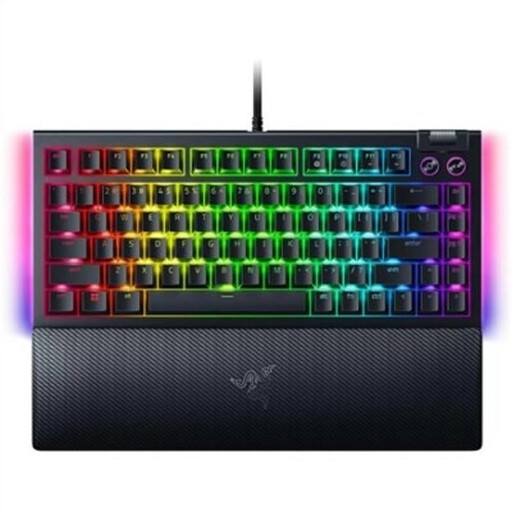 No image available
The 75% layout could suit you if you want a compact keyboard with separate function keys and arrow keys; Razer lists both for this model.
The product name lists hot-swappable mechanical switches and a US QWERTY layout.
Check which function, arrow and navigation keys you use most often. The Huntsman Mini does not have these as separate keys; choose a layout with dedicated keys if you don’t want to use a secondary key layer.
Follow the instructions for the exact model and check that the configuration method works on your computer. Keychron says you can remap keys and set up macros on the K2 Max using Keychron Launcher.
Unplug your keyboard before cleaning it. SteelSeries recommends disconnecting the keyboard and cleaning it carefully; you should also follow the instructions for your own model.
According to the Dutch government, the retailer must provide a solution if a product is faulty. An extended warranty provides extra cover and does not replace your statutory rights.
For eligible distance purchases from a business, the Dutch government says you generally have 14 days to change your mind. There are exceptions, and the government also distinguishes between buying from a business and buying from a private individual.