
Gamer with limited mouse space
You’re mainly looking for a narrower keyboard to give your mouse room to move, and are happy to use key combinations for keys that aren’t present. Razer’s and Wooting’s compact models are examples of this approach.


Start with the space your mouse needs and the keys you want to reach without using a function layer. A 60% keyboard takes up little desk space, while a 75% or TKL model can keep more keys directly accessible. Choose adjustable actuation or rapid trigger only if you want to configure and use these features—not because of an unproven promise of better gaming performance.
You’re mainly looking for a narrower keyboard to give your mouse room to move, and are happy to use key combinations for keys that aren’t present. Razer’s and Wooting’s compact models are examples of this approach.
You want to adjust how movement and action keys activate, and are prepared to check profiles and game rules. Razer, Wooting and Logitech G describe these kinds of customisation options for specific models.
You play tactical games, but want arrow or navigation keys to remain easy to reach for other tasks. The Keychron Q1 HE’s 75% layout is an example of this compromise.
Choose this if: mouse space is your top priority and you’re happy to use a function layer for missing keys.
Trade-off: fewer keys are directly accessible; check the layout and which function keys you need.
Choose this if: you want a compact keyboard for gaming and everyday use, with arrow keys or some navigation keys directly accessible.
Trade-off: check the overall dimensions and exact layout; the Keychron Q1 HE specifications mentioned here are for an ANSI version.
Choose this if: you can do without the number pad but want to keep the other familiar groups of keys.
Trade-off: a TKL model takes up more width than a 60% keyboard, and not every TKL keyboard has adjustable actuation.
| Priority | What to look for | Who does this matter to most? |
|---|---|---|
| Space for mouse movement | Measure the available desk width and leave room for your mouse and cable; compare the overall dimensions of the exact version. | If I need plenty of mouse space on a small desk, I’m happy to use key combinations for keys that aren’t there. Around 36% of consumers put mouse space first. |
| Customisable input | Check whether the version you want offers actuation or rapid trigger, how profiles are saved, and which input features your game or tournament allows. | If I want to adjust actuation and key reset myself, I also look at profiles and game rules. Around 29% of consumers prioritise customisable input. |
| Keys that are directly accessible | Decide which arrow, function and navigation keys you want to use without a function layer; also check whether the layout is ANSI or ISO. | I also use my keyboard for other tasks and want important keys to be directly accessible. Around 21% of consumers name direct access as their top priority. |
| Sound and simplicity | Compare the switch type, your noise requirements and the features of the specific model; don’t assume anything based on the word ‘gaming’. | If I’m mainly looking for straightforward operation, I weigh up the switch type and sound against extra features. Around 14% of consumers prioritise simple or quiet operation. |
A layout shows which groups of keys are included, but it doesn’t tell you whether the keyboard, cable and the mouse space you need will all fit on your desk.
Measure the available space and check the overall dimensions and cable outlet for the exact version.
They are separate features. On 19 August 2024, Valve reported that certain forms of automated movement or firing input could result in removal from a match on official Counter-Strike 2 servers.
Assess features separately and check the current rules for the game or tournament you play in.
The Dutch government states that there is no fixed statutory guarantee period for all products in the Netherlands. If a product is faulty, the retailer is your point of contact.
Before deciding, compare the cover and exclusions of any plan offered with your statutory rights.
The Huntsman V3 Pro Mini is a 60% option for anyone looking for a smaller desk footprint and customisable input.
The 60HE+ is a compact option with Hall effect switches and customisable input.
The PRO X TKL RAPID is a TKL option for anyone looking to combine directly accessible keys with customisable input.
According to Keychron, the Q1 HE combines a 75% layout with customisable magnetic input and wireless options.
The K55 CORE TKL is a TKL option with membrane switches, rather than the customisable magnetic input found on some other models.
The GXT 833 Thado is a TKL option for anyone who can do without a number pad.
The Joybuy selection below includes compact keyboards that can free up space on a small desk. Check the layout, connection and input features you want for each model.
 No image available
Suitable for anyone looking for a compact layout and the ability to adjust key actuation.
The product name lists Hall effect magnetic switches, rapid trigger, an 8K polling rate, adjustable actuation from 0.01 mm and a wired connection.
 No image available
A compact option for anyone wanting to free up mouse space and looking for the listed magnetic input.
The product name lists 68 keys, a US layout, a wired connection, Gateron HE magnetic switches and rapid trigger.
 No image available
Suitable for anyone looking for a compact keyboard with the rapid trigger feature listed in the product name.
The product name lists Hall effect magnetic switches, rapid trigger, 68 keys, a US layout, a wired connection and an 8000 Hz polling rate.
 No image available
Suitable for anyone looking for a compact layout and customisable input, and who is happy to use modifier keys.
Razer describes this model as offering analogue optical input and adjustable actuation. The product title specifies the white version with a US QWERTY layout.
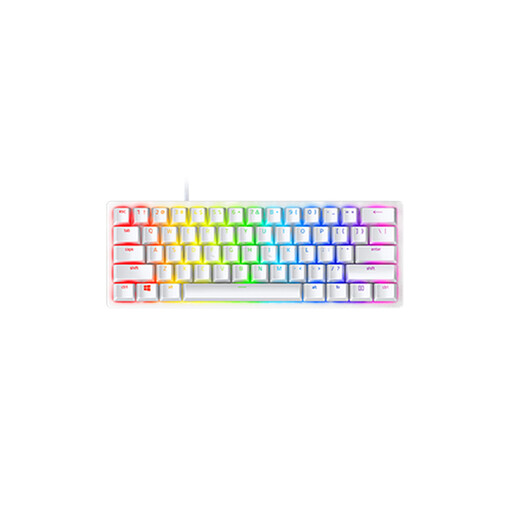 No image available
An option for anyone specifically looking for the listed Linear Optical Switch and US version.
The product title specifies the switch variant, US version and Mercury colour.
For basic use, the Trust GXT 833 Thado we reviewed works through a USB port without any extra drivers. Advanced features vary by model: Wooting describes configuration through Wootility, while Razer describes settings on the keyboard and through Synapse. Check the manual for the exact version.
Keep your keyboard clean and dry, and follow the instructions for your specific model. The Joybuy product information for the Huntsman V3 Pro Mini recommends regular cleaning and avoiding exposure to moisture; this isn’t a general cleaning instruction for every keyboard.
According to the Dutch government, distance purchases are often covered by a 14-day cooling-off period. You also have a statutory guarantee: if a product is faulty, the retailer is your point of contact, and there is no fixed statutory guarantee period for all products in the Netherlands. Check your purchase terms and distinguish your statutory rights from any additional manufacturer’s guarantee.
That depends on the rules of the game and the environment you play in. On 19 August 2024, Valve reported that certain forms of automated movement or firing could result in removal from a match on official Counter-Strike 2 servers. This statement isn’t a general ruling on every game or keyboard feature; check the current rules before switching on a feature like this.