
Reviewer with limited desk space
Wants to leave room for a mouse while still being able to use the keys required by their review software. OSHA recommends positioning the keyboard directly in front of you and keeping your shoulders relaxed.


Choose a size based on the shortcuts your video software uses and the space you need for your mouse. A 75% model is a practical starting point if you want a compact keyboard with separate navigation keys. TKL gives you more keys within easy reach, while 60% takes up less desk space but may require you to use layers or customise shortcuts more often. Before buying, check the layout and features of the exact version.
Wants to leave room for a mouse while still being able to use the keys required by their review software. OSHA recommends positioning the keyboard directly in front of you and keeping your shoulders relaxed.
Often navigates through footage and wants to check before buying whether the required keys are within easy reach or can be reassigned. Adobe describes using the J and L keys to play backwards and forwards in Premiere.
Wants to use the same keyboard for gaming and reviewing footage, and weighs gaming features against the keys required by their review software.
Choose this if: you want a compact keyboard while keeping separate navigation keys. Keychron describes the V1 Max as a 75% layout.
Trade-off: a 75% layout usually has fewer separate navigation keys than TKL; check the specific version and layout.
Choose this if: you often use the function row and separate navigation keys, and have room for a larger layout without a number pad.
Trade-off: measure whether you’ll still have enough space for your mouse beside the keyboard.
Choose this if: keeping the width to a minimum is your priority and you can customise shortcuts in your software. Coolblue describes this size as having no separate arrow or function keys.
Trade-off: keys you use often may take extra steps to access if they’re on a keyboard layer.
For a small desk where you also review tournament footage, the key considerations are space, shortcut access, typing feel and gaming controls.
| What to consider | What to look for | Who is it important for? |
|---|---|---|
| Space for your keyboard and mouse | Measure the available desk width with your mouse beside the keyboard, then compare it with the dimensions of the exact version. | If I use a keyboard and mouse side by side on a small desk, I want to know how much room will be left. Around 36% of consumers put space first. |
| Keys for navigating footage | Check the shortcuts in your own software and see whether the required arrow and function keys are within easy reach or can be reassigned. | If I often navigate through footage, I want to carry out my usual commands quickly. Around 29% of consumers prioritise shortcuts. |
| Typing feel and positioning | Check the switch type and whether you can position the keyboard with your shoulders and wrists relaxed. | During longer review sessions, I pay attention to typing noise and to having a workspace where I don’t need to reach unnecessarily for my keyboard or mouse. Around 21% of consumers prioritise a quiet workspace. |
| Gaming controls alongside review work | Decide which features you use when gaming, then check the connectivity and settings of the exact version. | If I use the same keyboard for games and reviewing footage, I want to choose features that suit my gaming controls without treating them as an advantage for video review. Around 14% of consumers prioritise gaming controls. |
The 60% layout described here has no separate arrow or function keys. This can be inconvenient if your review software uses them.
First, note down the keys you use in your software and check whether they’re available directly on the layout or can be reassigned.
Setting up keyboard layers or custom shortcuts may take extra time.
A product range may include different physical layouts or switches. So versions with the same model name don’t necessarily have the same features.
Before ordering, check the exact layout, switch type and variant on the product page.
According to ACM ConsuWijzer, your statutory rights exist alongside any manufacturer’s or retailer’s warranty. If a product breaks too soon during normal use, contact the retailer.
Compare what any additional cover offers, and keep it separate from your statutory rights.
The V1 Max is an example of a 75% model with programmable keys.
The BlackWidow V4 75% is a compact wired model that Razer describes as having interchangeable mechanical switches.
The PRO X TKL Wireless is a TKL option for those looking for a separate function row and navigation keys.
The 60HE+ is a 60% option for those looking for a narrow layout and gaming settings.
The K65 PLUS WIRELESS is a 75% option with wireless connectivity and programming features.
These product picks focus on 75% keyboards for a small desk, with consideration for navigation keys, programmability and different connectivity options.
 No image available
The 75% layout is designed for a compact workspace; the product description mentions navigation keys.
The title specifies a US QWERTY layout and tri-mode connectivity: wired, Bluetooth and 2.4 GHz.
 No image available
The 75% layout suits a compact workspace; the product description mentions arrow keys and programmable keys.
The description also mentions macros. The title specifies tri-mode connectivity via wired, Bluetooth and 2.4 GHz, as well as hot-swappable switches.
 No image available
The 75% layout is a compact option for a small desk; hot-swappable switches may be useful if you want to be able to change them.
The title specifies tri-mode connectivity via wired, Bluetooth and 2.4 GHz. The product name mentions compatibility with Win, Mac and PC.
 No image available
The 75% layout is designed for a compact workspace; the wired connection suits anyone who doesn’t need wireless connectivity.
The title specifies a US layout, linear switches, white backlighting and 83 keys. This model has a wired USB connection.
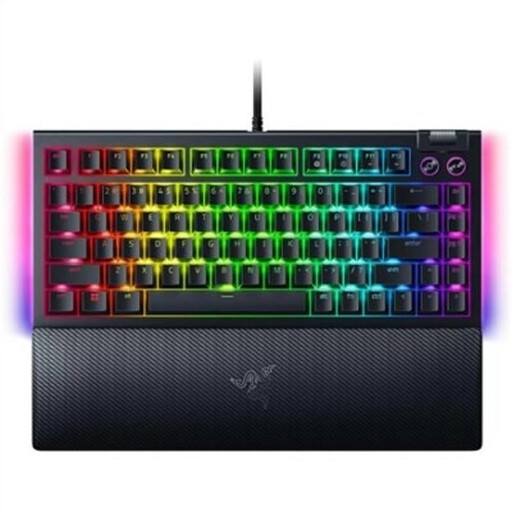 No image available
The 75% layout suits anyone looking for a compact workspace who still wants to keep separate navigation keys.
The product name specifies hot-swappable mechanical switches and a US QWERTY layout. This version has a wired USB connection.
Not for this use case alone. Check which commands you use in your own software, and only choose a larger layout if you need the extra keys within easy reach.
Position your keyboard and mouse so you can use them without reaching unnecessarily and keep your shoulders relaxed. Also check that the connection suits your setup; a compact size alone doesn’t guarantee a comfortable working posture.
Contact the retailer. According to ACM ConsuWijzer, your statutory rights exist alongside any manufacturer’s or retailer’s warranty; what you can expect in terms of a product’s lifespan depends on the product and the circumstances.
According to ACM ConsuWijzer, online consumer purchases generally come with a statutory cooling-off period that ends 14 days after delivery. Check whether a legal exception applies; a shop’s voluntary returns policy is separate.
Possibly. Arboportaal outlines rules for employers and employees who work with display screen equipment; if you work at a screen for more than 2 hours a day, the screen and keyboard must not be attached to each other. This isn’t a general requirement for every private buyer.