Who is this keyboard for?

Shooter trainer who makes wide mouse movements

This user wants to leave room beside the keyboard without losing keys needed for training or everyday use. RTINGS.com describes the trade-off between compact keyboards and models with more dedicated keys.

Player practising strafing

This user repeats quick movement and stop inputs and wants to adjust how they activate and reset. Wooting explains Rapid Trigger as a feature that activates and resets keys based on their movement.

Evening gamer who wants to see the keys

This user mainly wants to read the key labels and adjust the lighting to suit the room, without necessarily needing advanced switches. RTINGS.com discusses the legible backlit keys on the Corsair K70 CORE it tested.

What should you look for when choosing?

What to consider What should you check? Who is it important for?
Mouse space and layout Measure the space available and check which arrow and function keys you need to have separately. If you want to make wide mouse movements but need certain keys during training or everyday use, the layout matters a lot. Around 34% of consumers put mouse space first.
Legible keys Check whether the labels on the exact keycaps are backlit and whether you can adjust the brightness. If you want to find keys in a dark room, look at the lettering itself, not just the lighting effects. Around 33% of consumers put visibility first.
Quick movement input Check whether the exact model has Rapid Trigger and adjustable actuation; set sensitive keys carefully to avoid accidental presses. If you repeatedly practise strafing and stop inputs, adjusting key actuation may matter to you. Around 25% of consumers prioritise movement input.
Use beyond training Compare the regional keyboard layout and check whether you want dedicated arrow and function keys. If you also use the same keyboard often for typing or navigation, you may not want to rely on key combinations unnecessarily. Around 8% of consumers prioritise everyday use above all else.

Common buying mistakes

  • Assuming RGB guarantees legible lettering

    Lighting around the keys doesn’t automatically mean the labels will be easy to see in a dark room.

    Check the exact version to see whether the letters let light through and whether you can adjust the brightness.

  • Buying Rapid Trigger as if it replaces mouse accuracy

    Rapid Trigger changes how a key activates and resets. It’s most useful if you repeatedly practise quick movement input, and says nothing in itself about your aiming accuracy.

    Choose this feature if you want to adjust that specific key input; don’t judge aim training on this specification alone.

  • Assuming a different regional layout is the same version

    The Corsair K70 CORE TKL version mentioned here has a BE AZERTY layout. That’s not the same as US QWERTY.

    Check the layout of the specific version before you order.

Brands to compare when choosing a model

Wooting

The Wooting 80HE is a wired model with an 80% layout and magnetic switches.

  • RTINGS.com reports low, consistent latency for the 80HE it tested.
  • That finding applies to the model tested; check the exact version and the product information for the one you’re considering.

Razer

The Huntsman V3 Pro Mini is a 60% model with analogue optical switches and adjustable actuation.

  • Razer says this model supports Rapid Trigger.
  • A 60% layout leaves out dedicated keys found on larger keyboards; you’ll use key combinations for some functions.

SteelSeries

The Apex Pro TKL Gen 3 combines a TKL layout with magnetic switches.

  • According to SteelSeries, this model supports Rapid Trigger, per-key RGB and adjustable actuation from 0.1 to 4.0 mm.
  • It isn’t a 60% keyboard; check the language variant and software compatibility too.

Corsair

The K70 CORE range includes conventional mechanical models in both full-size and TKL formats.

  • RTINGS.com describes the K70 CORE it tested as responsive, with legible backlit keys.
  • This model’s conventional switches don’t offer Rapid Trigger. The TKL version mentioned has a BE AZERTY layout.

Logitech G

The PRO X TKL RAPID is a wired TKL model with magnetic analogue switches and LIGHTSYNC RGB.

  • Logitech G says that Rapid Trigger and actuation can be adjusted for each key.
  • Adjustability is a manufacturer claim; check the features and compatibility of the exact version.

Gaming keyboards at Joybuy

This selection includes TKL and compact keyboards that leave room for your mouse, as well as models with lighting or Rapid Trigger to suit different training needs. The Government of the Netherlands states that electronic devices on the EU market must carry a CE mark; check the mark and product information for the specific version.

Turtle Beach Vulcan TKL gaming keyboard, BE AZERTY

Turtle Beach Vulcan Mechanical Gaming Keyboard, TKL, Linear Titan, BE AZERTY, Black

The TKL layout is an option if you want room for mouse movements and this regional layout suits you.

Wired, with linear TITAN mechanical switches and per-key RGB lighting. This version has a BE AZERTY layout.

View at Joybuy
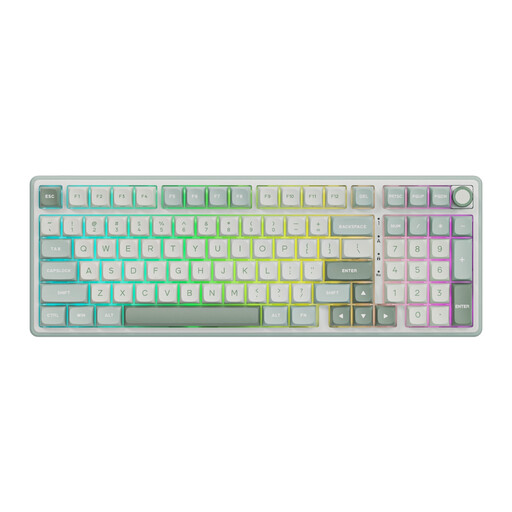
RK Royal Kludge R98 Pro with RGB lighting and Beige switches

RK Royal Kludge R98 Pro, Beige Switch, Number Pad, Sky Cyan

This model suits anyone who wants lighting and needs a number pad too.

Wired mechanical keyboard with RGB lighting modes, Beige switches and hot-swappable keys.

View at Joybuy

AULA WIN60HE 60% keyboard with Hall Effect switches

AULA WIN60HE 60%, Hall Effect, Rapid Trigger

This compact layout may suit you if mouse space is important and you’re happy to use key combinations for missing keys.

Wired, with Hall Effect magnetic switches, Rapid Trigger, RGB and adjustable actuation of 0.01 mm, according to the product name.

View at Joybuy

Royalaxe X68 65% keyboard with Gateron HE switches and US layout

Royalaxe X68 Full Aluminum, 65%, Gateron HE, 68-Key US Layout

This compact model is an option if you want more mouse space and the US layout suits you.

Wired, with Gateron HE magnetic switches, Rapid Trigger and RGB lighting.

View at Joybuy

Redragon M68 compact keyboard with magnetic switches and US layout

Redragon M68, 68 Keys, Magnetic Switch, US Layout

This compact layout is designed for anyone who wants to free up desk space and adjust fast key input.

With magnetic switches, Rapid Trigger, adjustable actuation and RGB lighting. The product name lists an 8000 Hz polling rate.

View at Joybuy

Frequently asked questions

Does Rapid Trigger make your aim more accurate?

No, Rapid Trigger doesn’t directly change how accurately you aim. It changes how key movements are registered and reset, which can be useful for strafing; it won’t automatically improve your aiming accuracy.

How should you set up a sensitive keyboard for training?

Start with a setting that registers your movements reliably without accidental presses. Then adjust actuation and, if available, Rapid Trigger for each key. The options available vary by model.

Which keyboard layout is best for shooter training?

Choose a compact layout if mouse space is a priority and you’re happy to use key combinations for missing keys. If you want to keep dedicated arrow and function keys, compare a TKL model; also check that the regional keyboard layout suits you.

What product safety checks are needed?

The Government of the Netherlands states that electronic devices on the EU market must carry a CE mark. Check the mark and product information for the specific keyboard before you buy it.

What are my rights when buying online in the Netherlands?

For a standard online consumer purchase, you generally have a 14-day cooling-off period from delivery, subject to legal exceptions. The Netherlands Authority for Consumers and Markets’ ConsuWijzer explains this cooling-off period. You’re also entitled to a product that meets legal requirements if something is faulty, and the seller is your point of contact. According to the Government of the Netherlands, there is no general fixed statutory warranty period.
