Start with the sound of the keystrokes: a quiet membrane or rubber-dome model is a sensible first comparison, but the whole keyboard determines how audible it is. Choose a TKL model if desk space matters more to you than a numeric keypad, and check the physical key layout and lighting controls too. Manufacturers’ claims about quietness are not directly comparable sound measurements.
Who is this buying guide for?
Night-time gamer sharing a bedroom
You play while someone else is sleeping in the same bedroom. In that case, the sound of the keys matters more than a pronounced click. RTINGS describes clicky switches as a louder option and discusses internal dampening in quiet mechanical switches.
Gamer with a small desk
You share your workspace or have limited room, and can manage without a numeric keypad. A TKL layout leaves it out, freeing up space beside the keyboard.
Gamer who uses the same space during the day
You want keys that are easy to see in the evening, but also a layout that suits everyday computer use. So check the physical keys and your computer’s input language settings.
What should you look for when choosing?
First compare the feel and sound of the whole keyboard. Then check whether its size, lighting and physical layout suit your space and everyday use.
| What to consider |
What to look for |
Who should pay particular attention? |
| Key noise |
Check the switch type and, if possible, listen to the complete keyboard in a quiet room. The case and stabilisers also affect how it sounds. |
If you play next to someone who is resting, you’ll want to keep keystrokes as quiet as possible. Around 42% of consumers rank noise as their top priority. |
| Desk space |
Measure the available space and consider whether you need a numeric keypad. TKL models leave it out. |
If you have a small or shared workspace, extra room beside the keyboard may matter more than a numeric keypad. Around 25% of consumers put desk space first. |
| Evening lighting |
Check whether the lighting on the version you’re considering can be dimmed or switched off, and how to control it. |
If you play in the evening and want to see the keys without having to use the same brightness all the time, check the model’s lighting settings. Around 17% of consumers make adjustable lighting a top priority. |
| Layout and connection |
Compare the physical key layout with your preference and check the input language on your computer. If you’re choosing a wired model, make sure you have a suitable USB-A port too. |
If you also use the same keyboard for typing, you’ll want the characters you type to match your keys and settings. Around 16% of consumers prioritise familiar controls and connectivity. |
Things to check before you buy
-
Assuming the switch type tells you everything about the sound
Even with mechanical keyboards, the switch type, case and stabilisers can all affect the sound. According to RTINGS, clicky switches are different from mechanical switches with internal dampening.
Compare the exact version and, if possible, listen to the complete keyboard rather than relying on the terms mechanical or membrane alone.
-
Assuming all Razer Ornata V3 versions are the same model
Razer describes the Ornata V3 X as a keyboard with quiet membrane switches. That description doesn’t automatically apply to a different Ornata V3 version.
Check the full model name and switch type before buying.
-
Not checking the physical key layout
A US QWERTY layout may differ from the keys you’re used to. The input language set on your computer also affects which characters appear.
Compare the layout of the product variant with your preference, and check the input language on your computer.
-
Confusing a manufacturer’s warranty with your full statutory rights
The Dutch government explains that there is no fixed statutory warranty period in the Netherlands, and that a product must meet the standard you could reasonably expect. An additional manufacturer’s warranty doesn’t replace your rights against the seller.
Check exactly what any additional warranty covers, and contact the seller if there’s a fault.
Brands to consider
Razer
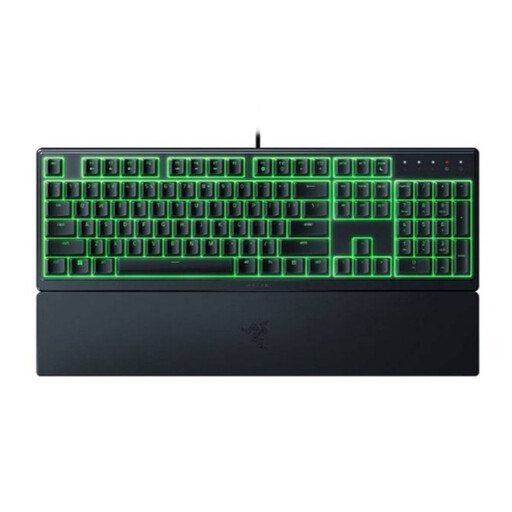
The Ornata V3 X is a low-profile gaming keyboard with membrane switches, designed for those looking for a cushioned keystroke.
- Razer lists a wrist rest and describes the keystroke as soft and cushioned.
- The description of the sound is a manufacturer’s claim, not an independent comparison. Check that you’re looking at the V3 X.
SteelSeries
The Apex 3 TKL combines a compact layout with switches that SteelSeries describes as whisper-quiet.
- The manufacturer lists features including IP32 protection and media controls.
- The TKL version doesn’t have a numeric keypad. The noise and lifespan claims come from the manufacturer.
Logitech G
The G213 Prodigy is a full-size keyboard with Mech-Dome keys and an integrated palm rest.
- Logitech G lists a 4 mm key travel distance.
- The description of the keystroke as quiet is a manufacturer’s claim, not an independent sound comparison. The full-size design takes up more desk space than TKL.
Trust
The GXT 833 Thado is a wired TKL option for anyone looking to save space.
- Trust lists an 80% layout and anti-ghosting for up to 10 simultaneous keystrokes.
- These features don’t tell you how noisy the keyboard is. Check the exact version.
Corsair
The K55 RGB PRO is a full-size keyboard with rubber-dome keys and dedicated macro and media keys.
- Corsair lists six macro keys.
- The description of the keys as quiet is a manufacturer’s claim. The technical specification quoted applies to the NA version; check the layout of the variant you’re considering.
Joybuy products
These keyboards are relevant if you’re comparing compact layouts, quiet keystrokes and lighting for use in a shared bedroom.
 No image available
GXTrust Thado TKL wired gaming keyboard, QWERTY, black
The compact TKL layout leaves out the numeric keypad; the lighting described can be controlled using the keys.
Wired; the product name lists PC/PS5 and QWERTY. The description mentions membrane switches and adjustable multicolour lighting.
Joybuy
 No image available
Corsair K70 PRO TKL Magnetic-Mechanical, US QWERTY, MGX v2
The TKL layout leaves out the numeric keypad. The product description mentions sound-dampening foam and pre-lubricated stabilisers; this isn’t an independent sound measurement.
Magnetic-mechanical; the product name lists US QWERTY and MGX v2.
Joybuy
 No image available
Corsair K55 CORE TKL, US QWERTY
The TKL layout leaves out the numeric keypad and may suit a smaller desk. The description mentions quiet membrane switches; this isn’t an independent sound comparison.
The description lists RGB lighting with brightness controls and four dedicated media keys. The product name lists US QWERTY.
Joybuy
 No image available
AJAZZ AK820 75% wired mechanical keyboard, US QWERTY, grey-white
The 75% layout is a compact option for a desk with limited space. The product description mentions five layers of sound-reducing pads; this is a product claim, not an independent measurement.
The product name lists interchangeable linear switches, 83 keys and compatibility with PC/Win/Mac. The description mentions several RGB lighting modes.
Joybuy
 No image available
Razer Ornata V3 X low-profile gaming keyboard, US layout
Razer describes the Ornata V3 X as having quiet membrane switches; this is a manufacturer’s claim, not an independent sound measurement.
The product name lists a low-profile design and US layout. The product description mentions RGB lighting and a wrist rest.
Joybuy
Frequently asked questions
Is a mechanical keyboard always too loud for a shared bedroom?
No, mechanical keyboards vary in how noisy they are. RTINGS describes clicky switches as a louder option and mentions internal dampening in quiet mechanical switches; the case and stabilisers also play a part.
What can I do if the keys produce different characters?
Check that the input language set on your computer matches the physical key layout. Trust recommends this check in its support information for the Thado.
How do I adjust the Thado’s lighting?
According to Trust’s manual, you can use the key with the light symbol to switch the lighting on or off and adjust the brightness. Check that your product number matches one of the versions described.
What are the cancellation period and warranty for an online purchase in the Netherlands?
When you buy online from a business, you generally have 14 days to change your mind. The Dutch government explains that a product must also meet what you could reasonably expect, and that there is no fixed statutory two-year warranty period. If there’s a fault, contact the seller.
Does a CE mark prove that a keyboard is quiet?
No. A CE mark relates to the product rules that apply to that particular product; it doesn’t assess how noisy a keyboard is in a shared bedroom.


