
Watching footage while someone is resting
You’re watching or discussing match footage in a shared bedroom and want to consider keyboard noise because your roommate is resting.


When choosing a gaming keyboard for a shared bedroom, start by considering how noisy the keys are and which controls you need while watching footage. A membrane model with dedicated media controls may suit you if pausing and adjusting the volume are your priorities. A dampened mechanical TKL model is another option if you also want a mechanical typing feel and room for your mouse. A manufacturer’s claims about quiet operation don’t guarantee that a keyboard will be inaudible in your room.
You’re watching or discussing match footage in a shared bedroom and want to consider keyboard noise because your roommate is resting.
You regularly pause, rewind or adjust the volume, and want controls that are easy to reach.
You use the same desk for watching footage and gaming, and are weighing up mouse space against having the keys you need close to hand.
Start by deciding what level of noise you can live with in the bedroom, then work out which controls and keys you need direct access to while watching footage.
A good fit if: you mainly pause, skip or adjust the volume, and the manufacturer describes the membrane keys as quiet.
Trade-off: layouts vary, so check whether the keys you need are available separately.
A good fit if: you also type or game as well as watch footage, and want a mechanical feel with room to move your mouse.
Trade-off: noise-dampening features don’t prove how loud the keyboard will be in your room.
A good fit if: a small desk or an easy-to-carry keyboard matters more to you than having direct access to lots of keys.
Trade-off: function and navigation keys may only be available via key combinations.
| Concern | What to check before buying | Who is this important to? |
|---|---|---|
| Key noise | Check the exact switch type and, if possible, how larger keys such as the space bar sound. | If someone is resting next to me, I want repeated typing to be as unobtrusive as possible. Around 36% of consumers prioritise key noise when making this choice. |
| Controlling footage | Check whether the media and volume controls are dedicated keys or accessed via a key combination. | When watching footage, I want to pause and adjust the volume without having to search for the controls. Around 29% of consumers give direct control of footage top priority. |
| Size and accessible keys | Consider whether you need direct access to function keys, arrow keys, navigation keys or a number pad. | At a shared desk, I want to keep room for my mouse while still being able to reach the keys I use. Around 21% of consumers focus mainly on balancing size with direct access. |
| Gaming and watching footage | Compare the available connections and check whether saved functions work without software running. | I use the same keyboard for both activities and want to know in advance which connections and features will suit me. Around 14% of consumers prioritise this dual use. |
A manufacturer’s description won’t tell you how loud a keyboard will sound in your bedroom. SteelSeries, HyperX and Logitech describe features of specific models, but their descriptions aren’t directly comparable sound measurements.
Check the switch type you’re considering and, if possible, try the larger keys in a quiet setting too.
The Razer Huntsman Mini, as described by Razer, has no separate function row or navigation cluster; those functions are still available via key combinations.
Before you buy, check which keys you need to pause and navigate footage or control the timeline.
A model name can cover several versions. For example, the Huntsman Mini Mercury version mentioned here has purple switches, so the specific version matters when you’re choosing.
Check the switch type, keyboard layout and current availability on the product page before ordering.
According to SteelSeries, the Apex 3 range includes both a TKL version and a full-size version. The TKL version has a volume wheel and media keys.
The Alloy Core RGB is a membrane keyboard with dedicated media controls, designed for gaming and multimedia use.
According to Corsair, the K55 RGB PRO has membrane keys, dedicated media and volume keys, and macro keys.
The G515 TKL range includes a wired version and a LIGHTSPEED version, both with low-profile mechanical keys.
The Huntsman Mini is a 60% model for anyone looking for a particularly compact keyboard.
This selection includes wired TKL keyboards and compact or larger mechanical models. Compare the controls, size and exact version with how you plan to use the keyboard in a shared bedroom.
 No image available
The wired TKL layout leaves out the number pad, which may suit you if you want to keep room for mouse movements.
QWERTY layout; according to the product description, media functions are accessed via Fn key combinations. Listed for PC and PS5.
 No image available
The TKL layout leaves out the number pad; the product description mentions dedicated media keys for control without software.
Corsair describes the membrane keys as quiet and lists four dedicated media and volume keys. This version has a US QWERTY layout.
 No image available
This compact 66-key model with a volume knob may suit you if desk space and direct volume control matter.
The product name mentions a Chartreuse Switch, hot-swappable keys and a green version. Check that the compact layout includes the keys you need while watching footage.
 No image available
According to the product description, the 75% layout retains essential navigation keys in a more compact design.
QWERTY US; Reaper Switch. The product information lists wired, Bluetooth and 2.4 GHz connections, as well as secondary function key legends.
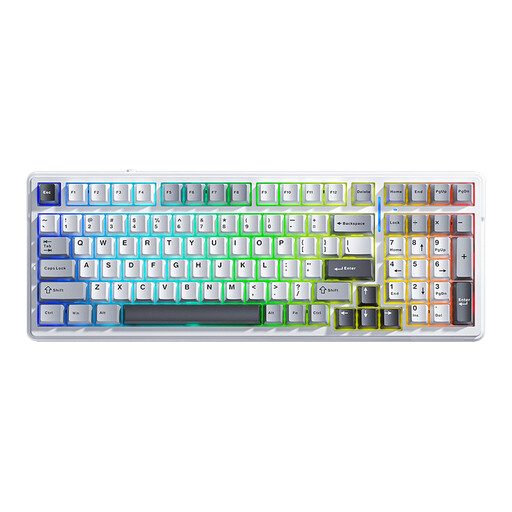 No image available
This model has 99 keys and may suit you if you want a mechanical keyboard with plenty of keys directly available.
QWERTY US; Bluetooth, 2.4 GHz and wired connections. The product description calls the keystrokes soft and quiet, but also mentions audible, poppy sounds. Decide for yourself whether that suits a shared bedroom.
No. Don’t assume that from a product description. SteelSeries, HyperX and Corsair describe specific keys as quiet, but those descriptions aren’t directly comparable measurements of how the keyboard will sound in your room.
Not if you don’t need the number pad. Do check your shortcuts, though: on the Huntsman Mini described by Razer, functions for the missing function row and navigation cluster are accessed via key combinations.
It depends on the model. Corsair says the K55 RGB PRO can run saved macros in hardware mode when iCUE isn’t active. For other models, check separately which functions are stored on the keyboard.
For an online consumer purchase in the Netherlands, ACM ConsuWijzer says you’ll generally have a statutory cooling-off period that ends 14 days after the product is delivered. Exceptions may apply, so check which terms apply to your purchase. If you buy from a physical shop, you don’t automatically have the same right to return an item just because you’ve changed your mind.
According to the Netherlands Authority for Consumers and Markets, the seller is responsible for the statutory guarantee. Any commercial manufacturer’s warranty is separate.