Brands to compare
These brand names refer to the product ranges and features mentioned; they aren’t a general assessment of every product from each brand.
Razer
According to Razer, the Ornata V3 X is a low-profile gaming keyboard with quiet membrane switches.
- Razer lists a wrist rest and spill-resistant design for the Ornata V3 X.
- The manufacturer’s description doesn’t prove that the keyboard will be quiet enough in every shared bedroom. The Ornata V3 has a different switch description.
SteelSeries
According to SteelSeries, the Apex 3 TKL combines a layout without a number pad with Whisper Quiet switches.
- SteelSeries lists media controls and IP32 resistance for this TKL version.
- You’ll give up the separate number pad. The ‘quiet’ label isn’t a sound comparison with other models.
Logitech G
The G213 Prodigy is a larger gaming keyboard with Mech-Dome keys and an integrated wrist rest.
- Logitech lists customisable lighting and media controls, and describes the keystrokes as whisper-quiet.
- The sound description is a manufacturer’s claim; the larger size is less convenient if desk space is a priority.
Corsair
The K55 RGB PRO is designed for players who want six dedicated macro keys alongside rubber-dome keys.
- Corsair lists media controls, a detachable wrist rest and IP42 resistance.
- Its larger size takes up more room. The Joybuy listing checked was out of stock; this doesn’t say anything about the availability of other versions.
Joybuy products
These products offer different layouts and switch types for gaming in a shared bedroom. Compare their noise descriptions, space requirements and the keys you use yourself.
 Image unavailable
Corsair K55 CORE TKL, US QWERTY
The TKL layout may suit you if you want to free up desk space and don’t need a number pad.
The product description mentions quiet membrane switches; this isn’t a sound measurement and doesn’t guarantee that keystrokes will be inaudible.
TKL layout without a number pad; four dedicated media keys; customisable RGB lighting.
Joybuy
 Image unavailable
Ticktype DP104, full-size, Silent Tactile Switches
This full-size version may suit you if you want tactile mechanical keys and have enough desk space.
The product description mentions quiet keystrokes; this doesn’t guarantee that the keyboard will be inaudible to someone next to you.
108 keys; hot-swappable switches; tri-mode connection; US layout; 8000mAh; RGB; Powder White.
Joybuy
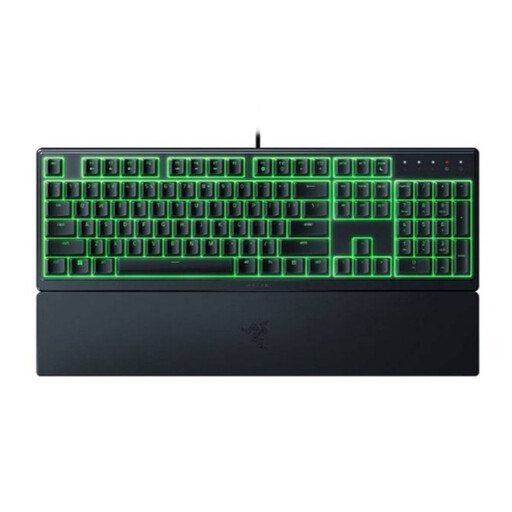 Image unavailable
Razer Ornata V3 X, low-profile, US layout
This version may suit you if you’re looking for quiet membrane switches and a low-profile design.
Razer describes the switches as quiet; this isn’t an independent sound measurement and doesn’t guarantee that keystrokes will be inaudible.
Low profile; integrated wrist rest; spill-resistant design, according to the product information.
Joybuy
 Image unavailable
Razer BlackWidow V4, Yellow Switch, US layout
This version may suit you if you’re looking for mechanical keys and dedicated programmable macro keys.
The product description calls the Yellow switches quiet; this isn’t a like-for-like sound measurement and doesn’t guarantee inaudible keystrokes.
Mechanical Yellow switches; six programmable macro keys; multifunction wheel; wrist rest; US layout.
Joybuy
 Image unavailable
RK ROYAL KLUDGE RK61, 60%, Quiet Red Switches, black
The compact layout may suit you if desk space is limited and you can manage with fewer keys.
The title and product description mention Quiet Red Switches; this isn’t a sound measurement and doesn’t promise that keystrokes will be inaudible.
61 keys; tri-mode connection; RGB lighting; hot-swappable switches.
Joybuy
Frequently asked questions
Is a mechanical gaming keyboard always too loud for a shared bedroom?
No. Clicky switches can be loud, but specifically dampened mechanical switches may be quieter. The casing and dampening also play a part, so check the exact version and don’t rely on the word ‘mechanical’ alone.
How do I set up the lighting and macro keys on a Corsair K55 RGB PRO without the iCUE software running?
According to Corsair, the keyboard can use its onboard memory to run saved lighting and macros in hardware mode. Corsair describes using Fn combinations and recording a macro to a G key; check the instructions for the exact version.
What can I do if my keyboard develops a fault after the manufacturer’s warranty has expired?
If a product is faulty, contact the seller. According to the Dutch government, there is no fixed statutory warranty period in the Netherlands; what you can expect from a product depends, among other things, on the product and normal use. A manufacturer’s warranty doesn’t replace this statutory right.
Do I have a cooling-off period when buying a keyboard online?
When you buy online as a consumer from a business, you’ll often have a 14-day cooling-off period. The Dutch government lists exceptions and distinguishes between buying from a business and buying from a private individual; check what applies to your order.


