
Gamer with a sleeping flatmate
Wants to control a virtual aquarium with as little disturbance from keystrokes or lighting as possible. So compare the key mechanism and lighting settings, not just the gaming features.


Start with a keyboard whose key noise is suitable for a shared bedroom. Quiet membrane keys are a sensible starting point, while a dampened mechanical model may suit you better if the feel of mechanical keys matters more. Also check whether you can dim or switch off the lighting, whether the layout has enough useful keys and whether the connection works with your device. Manufacturers’ descriptions such as ‘quiet’ are not comparable sound measurements.
Wants to control a virtual aquarium with as little disturbance from keystrokes or lighting as possible. So compare the key mechanism and lighting settings, not just the gaming features.
Has limited space and wants to check whether a TKL layout still has enough keys for the aquarium programme and other tasks. A TKL model has no separate number pad.
Wants a key feel that suits other tasks and weighs this up against the sound of keystrokes in a shared room.
| What to consider | What to look for | Who is this important for? |
|---|---|---|
| Keystroke noise | Compare membrane and mechanical keys and, if possible, assess the actual sound with the way you type. | If my flatmate is asleep, I want to minimise noise from keystrokes. Around 33% of consumers put keystroke noise first. |
| Lighting | Check whether you can adjust the brightness and how the lighting responds when the screen is off, the computer is locked or it goes into sleep mode. | In a dark room, I want to be able to dim or switch off the LEDs without disturbing my flatmate. Lighting is the main concern for around 27% of consumers. |
| Desk space | Compare TKL with a full-size layout and check whether you can do without the number pad and other keys. | With limited space at a shared desk, I want to know whether I can manage without a number pad. Around 20% of consumers prioritise desk space. |
| Key feel and layout | Check the type of keys, the exact variant and the layout. Also check which keys your software needs. | If I also use the keyboard for typing or other tasks, I want a suitable feel and layout. These factors matter most to around 13% of consumers. |
| Connection | Check which connection you need and whether your device and aquarium software support the keyboard. | I want to know which connection my device needs before I choose. Around 7% of consumers put the connection first. |
Manufacturers use descriptions such as ‘Whisper-Quiet’, ‘quiet’ and ‘noise-dampening’. These terms don’t provide comparable sound measurements, and the noise in your room also depends on how you type.
First compare the type of keys and, if possible, assess the keystroke noise with your own typing style.
According to Razer, automatic switch-off via Synapse depends on the circumstances, including sleep mode after a timeout and Synapse running in the background. Turning off the screen, locking the computer and entering sleep mode are not always the same thing.
Check the settings for the exact model and test what happens when it’s inactive, when you lock the computer and when you switch off the screen manually.
A TKL keyboard saves space because it has no separate number pad. This could be a problem if you need those keys for the aquarium programme or other tasks.
Check which keys your software and everyday tasks require before choosing a layout.
The Apex 3 TKL may suit you if you’re looking for a compact layout with switches the manufacturer describes as quiet.
The Ornata V3 X may suit you if soft membrane keys are important to you and you have room for a full-size layout.
The Alloy Core RGB is a membrane keyboard with dedicated media controls and adjustable lighting.
The wired G515 TKL may suit you if you’re looking for mechanical keys and a compact layout.
The GXT 833 Thado is a wired TKL model with multi-colour lighting and dedicated media keys.
This selection includes compact TKL models, membrane and mechanical keyboards, as well as a full-size model. Check the layout, lighting and keystroke noise for each version.
 No image available
May suit you if you’re looking for a wired TKL model with adjustable lighting and can do without a number pad.
The product information lists membrane keys, media keys and adjustable multi-colour lighting. The layout is US QWERTY; there is no comparable sound measurement or explicit claim that this model is quiet.
 No image available
May suit you if you’re looking for a compact layout, customisable lighting and membrane keys.
Corsair describes the membrane keys as quiet, but this is not a comparative sound measurement. The product information lists eight customisable RGB zones and brightness control. TKL models have no separate number pad.
 No image available
May suit you if you want mechanical keys and a TKL layout, and the Belgian AZERTY layout works for you.
The product description mentions sound-dampening foam and lubricated stabilisers; this is not an independent sound measurement. Some lighting effects may flash or strobe.
 No image available
May suit you if you’re looking for a wired mechanical keyboard with a 75% layout and customisable lighting.
The product information lists linear hot-swappable switches, twenty lighting modes and five layers of sound-dampening material; this is not a comparative sound measurement. Listed compatibility includes PC, Windows and Mac. According to the product description, a converter is needed for PS4, PS5 or Xbox; it is not included.
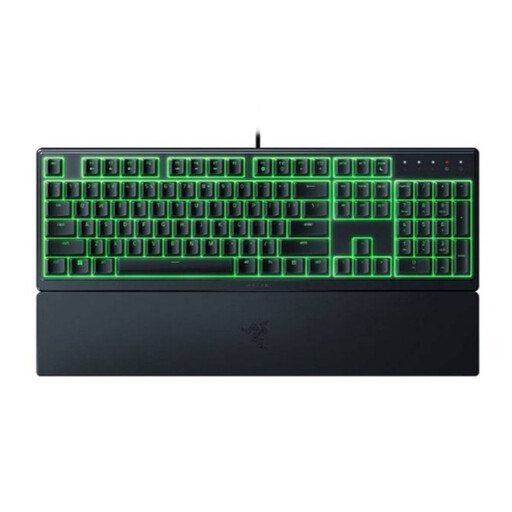 No image available
May suit you if you’re looking for soft membrane keys and have room for a full-size layout with a number pad.
Razer describes the membrane keys as quiet; this is not an independent sound measurement. The product information lists adjustable RGB lighting and programmable keys. Automatic LED switch-off in sleep mode depends, among other things, on Synapse running in the background.
No, lighting is not required for aquarium software. Choose based on what you can see and what your flatmate finds comfortable, and check how you can adjust the brightness or switch off the LEDs on the exact version.
Not necessarily. According to Razer, switching off via Synapse works under certain conditions, including sleep mode after a timeout and Synapse running in the background. Test this with your keyboard and computer; manually turning off the screen or locking the computer may work differently.
Follow the instructions for your model. For its devices, Logitech recommends unplugging or switching off the device first, not applying liquid directly and cleaning it carefully with a soft, slightly damp cloth. Logitech also lists compressed air as an option for removing dust between the keys.
For many online purchases made as a consumer in the Netherlands, there is a 14-day cooling-off period; exceptions may apply. Products must also be of satisfactory quality. According to the Dutch government, there is no fixed statutory two-year guarantee period in the Netherlands; if a product is faulty, the retailer is your point of contact.