
Gamer with a sleeping roommate
Wants to play fantasy games in the evening and prioritises key noise over extra features. RTINGS.com generally describes membrane switches as a quieter option, although the sound of the whole keyboard still matters.


If your roommate needs to sleep, a quiet membrane keyboard is a sensible first choice. If you prefer mechanical keys, consider a dampened model. Also choose a layout that suits the keys you use in your games: TKL keeps the function row but does away with the number pad. No ‘quiet’ label can guarantee that keystrokes will be inaudible in your room.
Wants to play fantasy games in the evening and prioritises key noise over extra features. RTINGS.com generally describes membrane switches as a quieter option, although the sound of the whole keyboard still matters.
Wants to know in advance whether their game will be easy to control using their preferred function keys, arrow keys, number pad or dedicated macro keys.
Wants to leave room for the mouse without losing keys needed in the game. RTINGS.com notes that more compact layouts sometimes omit the number pad, function row or dedicated arrow keys.
Start by deciding what level of noise is acceptable in the room, then check that the layout, lighting and connection suit the way you plan to use it.
| Buying concern | What to look for | Who is this important to? |
|---|---|---|
| Key noise | Check the exact switch type and listen out for the sound of larger keys, such as the space bar. | When my roommate is asleep, I want to know how much noise my keys make. Around 29% of consumers prioritise key noise above all else. |
| Easy-to-reach gaming keys | Check the function row, arrow keys, number pad and any macro keys on the exact model. | I want to reach skills and menus directly without awkward key combinations. Around 24% of consumers prioritise easy-to-reach gaming keys. |
| Desk space | Measure the available space and consider whether you can do without the number pad. | At a small shared desk, I want to leave enough room for my mouse. Around 18% of consumers choose mainly based on the desk space available. |
| Lighting | Check whether you can lower the brightness and switch off effects. | I want to see the key legends in the evening without disturbing my roommate with bright lights. Around 12% of consumers prioritise adjustable lighting. |
| Cost and everyday use | Compare the exact connection, layout and feel of the keys with what you need for gaming and other tasks. | If I use the same keyboard every day, I want a suitable feel and connection without extra features I won’t use. Around 17% of consumers focus mainly on cost and how practical it is outside gaming. |
The type of keys and the sound of the whole keyboard both affect how suitable it is for a shared room; not everyone needs extra gaming features.
First choose a layout and noise level you’re happy with. Only pay for features you’ll actually use.
A TKL keyboard has no number pad; smaller layouts may also leave out the function row or dedicated arrow keys.
Check your game controls and the layout of the exact model before choosing a more compact size.
If keys you use regularly are missing, you may need a different layout or keyboard.
The Logitech G515 LIGHTSPEED TKL and the wired G515 TKL are different versions. The Razer Ornata V3 and V3 X also have different descriptions of their keys.
Check the full model name, connection, switch type and layout. If descriptions conflict, don’t assume they refer to the same version.
The Apex 3 TKL is an option if you’re looking for a TKL layout with rubber dome keys and zone lighting.
The K55 RGB PRO is a full-size option with dedicated macro keys for players who need direct control.
According to Logitech, the G515 LIGHTSPEED TKL combines a low-profile mechanical design with a sound-dampening build.
The Ornata V3 X is a low-profile membrane option if you’re not specifically looking for a mechanical feel.
The GXT 833 Thado is a wired TKL option with lighting and direct media controls.
This selection includes compact and full-size keyboard layouts, with both wired and wireless models. Check the exact version of each product and make sure it has the keys you need.
 Image unavailable
The wired TKL layout may suit you if you want to leave room for your mouse and don’t need a number pad.
The product title lists PC/PS5 and QWERTY. Check that this layout suits your preferences and how you plan to use it.
 Image unavailable
This TKL version may suit you if you’re looking for a compact size; check whether you can do without a number pad.
The product title lists US QWERTY. Check that this layout matches what you’re used to.
 Image unavailable
The 75% layout may suit you if you’re looking for a compact mechanical keyboard, but check in advance that it has the keys you use in your games.
The product title lists Tri-Mode Connectivity, Flying Fish Switches and US Layout QWERTY. Check that this version matches your preferences for the keys and layout.
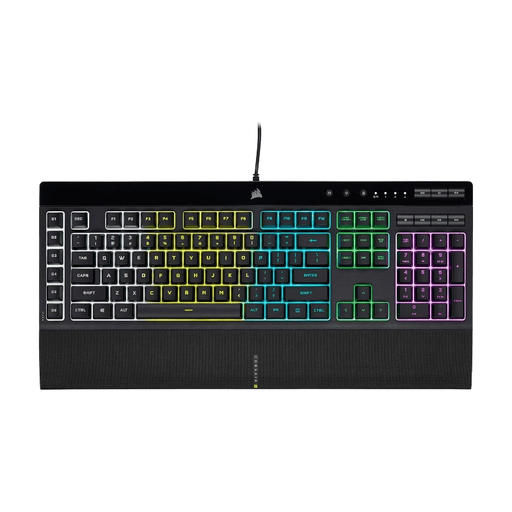 Image unavailable
This model may suit you if you want dedicated macro keys and have room for a full-size keyboard.
A 2021 RTINGS.com test describes the K55 RGB PRO’s rubber dome keys as very quiet, but also says they feel relatively heavy. The test does not guarantee how it will sound in your room.
The product title lists US QWERTY; check that this layout suits your preferences.
 Image unavailable
The mechanical TKL layout may suit you if you’re looking for a compact size and don’t need a number pad. Mechanical keys aren’t automatically quiet, so bear your roommate in mind.
The product title lists BE AZERTY and MLX Red. Check that this specific layout and switch type are right for you.
No. Noise varies by switch and keyboard. Quiet switches and dampening can reduce the sound, but they can’t guarantee that a model will be inaudible. Compare the exact version and remember that larger keys can make a difference too.
It depends on the model. The Trust manual for the Thado item numbers listed in it describes connecting via USB-A and controlling the lighting using keys on the keyboard. For a different version, check its accompanying manual and unplug the USB connector before cleaning the keyboard.
According to ACM ConsuWijzer, a typical online consumer purchase usually comes with a cooling-off period of up to 14 days after delivery, subject to exceptions. Separately, your statutory rights apply if a product used normally does not meet what you could reasonably expect; ACM ConsuWijzer does not specify a standard general period of two years for this. Check the applicable returns information before you order.
According to the Dutch government, as a private individual you can hand in an old, similar electrical appliance free of charge when buying a new one, including with an online purchase. There are also collection points and local authority schemes.