
RPG player who games late
You play while someone else in the same room is resting, and keeping keyboard noise down matters more to you than an emphatic click.


A membrane keyboard is a sensible starting point if you want to keep the sound of your keystrokes down for your roommate. Choose a dampened mechanical model if the feel of mechanical keys matters more to you. Also consider the exact version, the number of shortcut keys and how much desk space you have. A quiet switch alone won’t tell you how noisy the whole keyboard will be.
You play while someone else in the same room is resting, and keeping keyboard noise down matters more to you than an emphatic click.
You want to perform actions quickly and are weighing up programmable keys against the extra space dedicated macro keys can take up.
You have limited space for your keyboard and mouse, and want to keep useful keys and lighting without automatically opting for a large model.
Choose this if: you want to keep the full layout and quieter keystrokes are important to you. RTINGS rated the SteelSeries Apex 3’s typing noise as minimal; Corsair lists dedicated macro keys on the K55 RGB PRO.
Bear in mind: membrane keys can feel less defined. The information about noise and macros also refers to different models.
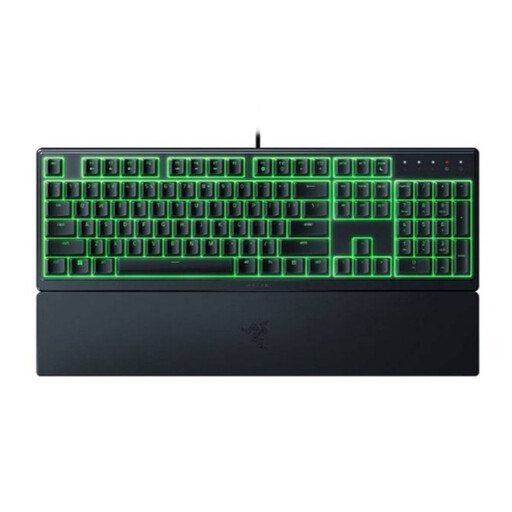
Choose this if: you prefer a low profile and quieter keystrokes to a pronounced mechanical click. Razer describes the Ornata V3 X as having quiet membrane switches and a wrist rest.
Bear in mind: the Ornata V3 without the X is a different version, which Razer describes as clicky. Check the full model name.
Choose this if: desk space is more important and you can do without a number pad. The Corsair K55 CORE TKL is a TKL model.
Bear in mind: a compact layout has fewer keys than a full-size model, and features vary between K55 versions.
Choose this if: you want a mechanical typing feel and the specific version explicitly has dampened switches.
Bear in mind: a switch specification doesn’t prove how quiet the whole keyboard will sound on your desk; the case and stabilisers also play a part.
| What to consider | What to look for when buying | Who should prioritise this? |
|---|---|---|
| Keyboard noise | Check the exact switch type and, if possible, look for a review of the complete model, not just the switch. | If I’m gaming while my roommate is resting, I want to keep keystroke noise down without relying on a product label alone. Around 36% of consumers put noise for their roommate first. |
| RPG shortcuts | Check how many dedicated macro keys there are and whether the way they’re assigned suits your game and device. | If I want to trigger lots of actions quickly, I look for accessible keys and check the exact model version. Around 29% of consumers prioritise RPG key assignments. |
| Desk space | Decide whether you need a number pad, and remember to allow space for your mouse and any wrist rest when checking the dimensions. | If I’m sharing a small desk for my keyboard and mouse, I want to save space without losing keys I use. Around 21% of consumers prioritise the desk space available. |
| Comfort and lighting | Check whether a wrist rest is included and how to adjust the brightness or lighting effects. | If I’m gaming in a dark room, I want to be able to see the keys and check whether the wrist rest suits my setup. Around 14% of consumers put comfort or lighting ahead of the other considerations. |
Razer describes the V3 as clicky and the V3 X as having quiet membrane switches. The suffix therefore changes which version you’re choosing.
Before buying, check the full model name and the switch description.
Corsair lists G-keys for the K55 RGB PRO, but the K55 CORE doesn’t have dedicated macro keys. Features aren’t necessarily interchangeable between versions.
Compare the exact model with the number of actions you want to assign.
The case and stabilisers can also contribute to the noise of the whole keyboard.
Look for information about the exact model and, if possible, assess it in similar conditions to your own setup.
ACM ConsuWijzer distinguishes between a manufacturer’s warranty and your legal rights against the seller.
Keep your proof of purchase and contact the seller if the product is faulty.
According to SteelSeries, the Apex 3 range includes full-size and TKL membrane models.
The K55 family includes membrane models with different layouts and features.
Razer describes the Ornata V3 X as a low-profile model with quiet membrane switches and a wrist rest.
The G213 Prodigy is a full-size model with Mech-Dome keys, lighting, an integrated palm rest and media controls.
These models let you compare a compact membrane keyboard, a low-profile keyboard and a mechanical option for RPG gaming. Check the exact layout and the description of the typing noise for each model.
 No image available
The TKL layout leaves out the number pad; the product description lists membrane switches with quiet keystrokes.
The description also mentions RGB lighting and four media keys. Check whether the compact layout suits the way you play RPGs.
 No image available
The product description lists a 75% layout, linear switches and sound-dampening layers. These features don’t prove how quiet the whole keyboard will sound in your room.
The product name also lists 83 keys, a wired connection and white backlighting.
 No image available
The product name lists Silent Tactile Switches and a full-size layout with 108 keys. The manufacturer’s description of the switches alone doesn’t tell you how quiet the whole keyboard will sound.
The product name also mentions wireless use, hot-swappable switches and RGB lighting. Bear in mind the extra space needed for the full-size layout.
 No image available
Razer describes this model as having quiet membrane switches. The low profile and wrist rest may suit you if you prefer this version; the product description also lists programmable keys.
Check the full model name: the Ornata V3 without the X is a different version.
 No image available
The product description calls the Yellow switches quiet and lists six programmable macro keys. If you’re gaming in a shared bedroom, consider how noisy the complete model is.
The full-size layout takes up more space than a compact keyboard; check whether you need the extra keys.
No, not all mechanical keyboards sound the same. An explicitly dampened switch can sound different from a clicky one, but the case and stabilisers also make a difference. So assess the whole model, not just the switch name.
For the K55 RGB PRO, Corsair describes a hardware mode that can run stored macros when iCUE isn’t active. Whether a macro is allowed in your game depends on that game’s rules; the keyboard feature doesn’t give you permission to use one.
Corsair says to connect the keyboard to an available USB 2.0 or better Type-A port on a compatible device. Corsair describes adjusting the lighting with key combinations and accessing additional settings through iCUE; check which features are available on your device.
According to ACM ConsuWijzer, ordinary online purchases generally come with a statutory cooling-off period of up to 14 days after delivery; check the applicable exceptions and returns policy. Your statutory warranty rights are separate from any manufacturer’s warranty. If a product used normally doesn’t meet what you could reasonably expect, you can contact the seller.