
Practising repeated inputs
If you practise fast sequences of pressing and releasing keys, look for adjustable actuation and a reset point you can fine-tune. RTINGS describes Rapid Trigger as a feature that can reset a key again as it rises.


For fast, repeated key presses, adjustable actuation and Rapid Trigger are useful features to consider; on their own, they do not prove that a person will react faster to an audio cue. If you train using sound, keep your headphone connection and other conditions consistent, and choose a layout based on the keys you need outside your practice sessions.
If you practise fast sequences of pressing and releasing keys, look for adjustable actuation and a reset point you can fine-tune. RTINGS describes Rapid Trigger as a feature that can reset a key again as it rises.
If you use headphones for audio cues, keep the audio connection the same between sessions. Sound delay can affect your perceived timing, independently of how quickly the keyboard registers a key press.
If you use the same desk for gaming and other tasks, weigh the space you need for your mouse against the keys you need. RTINGS and Corsair respectively discuss the trade-off around keyboard size and the full-size K70 MAX.
| What to consider | What should you look for? | Who is this important for? |
|---|---|---|
| Repeated inputs and reset | Check whether the exact model offers Rapid Trigger and per-key adjustable actuation; set the sensitivity to avoid accidental presses. | If you practise fast sequences of pressing and releasing keys, you’ll want to adjust the reset point. Around 33% of consumers give repeated inputs their highest priority. |
| Audio timing | Check the audio connection and keep it consistent between sessions; a suitable wired connection or 2.4 GHz dongle may be a better choice than standard Bluetooth audio. | If you respond to an audio cue, you’ll want it to reach you in the same way during every session. Around 27% of consumers prioritise reliable audio cues. |
| Layout and desk space | Compare the arrow, function and number keys available, and check the physical key layout. | If you need room to move your mouse but also need keys for other tasks, choose based on that trade-off. Around 20% of consumers make layout and mouse space their top priority. |
| Features versus usability | Decide whether you practise repeated key resets. If not, compare comfort, layout and measurements for the exact model rather than relying on its stated polling rate alone. | If you don’t want settings you won’t use during practice, focus on what you actually need. Around 20% of consumers prioritise usability when weighing up features. |
A stated polling rate alone doesn’t tell you how quickly the entire training setup responds: your computer, game, display and audio all play a part.
Compare measurements for the exact model and keep the rest of your training setup consistent.
Wooting lists differences in switches and plate between the 80HE and 80HE+. The full model name and physical layout may also matter.
Before buying, check the full model name, version and layout on the product page.
A different layout or switch may mean you don’t get the version that suits your training.
When you’re practising with sound, your headphone connection can affect when you hear the cue; changing your keyboard won’t solve that.
Check the audio connection first, and use the same settings for every comparison session.
The 80HE is a wired analogue keyboard with an 80% layout. The 80HE+ is a separate version.
The Apex Pro TKL Gen 3 is a TKL model with adjustable magnetic switches.
The Huntsman V3 Pro Tenkeyless 8KHz is an analogue optical TKL option.
The PRO X TKL RAPID is a wired TKL option with magnetic analogue switches.
The K70 MAX is a full-size option for anyone who also uses a number pad.
These Joybuy products are suited to repeated key presses, with Rapid Trigger or adjustable actuation. The stated polling rate is not a measurement of the entire response chain.
 No image available
Its compact layout and stated Hall Effect Rapid Trigger make it suitable for practising repeated key presses.
The product name lists Gateron HE Magnetic Switches, a wired connection and 68 keys.
 No image available
The product description lists Rapid Trigger and adjustable actuation for repeated key sequences.
The product name mentions magnetic switches and 8,000 Hz polling. RTINGS points out that polling rate alone doesn’t measure the entire input and training chain.
 No image available
The product name lists Rapid Trigger and a compact layout for anyone practising repeated key presses and looking for a smaller keyboard.
The product name mentions Hall Effect magnetic switches and 8K polling; this polling rate alone doesn’t provide a complete latency measurement.
 No image available
The product name describes a wired gaming keyboard with magnetic switches and adjustable RT for repeated inputs.
The name lists 8,000 Hz polling; that figure alone doesn’t describe the entire response chain.
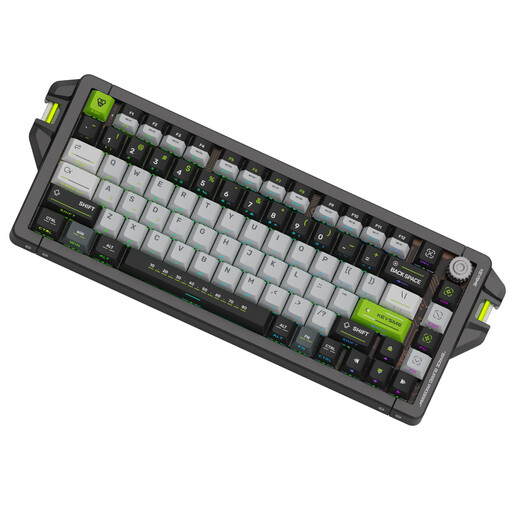 No image available
The product description lists Rapid Trigger and per-key adjustable actuation for repeated key sequences.
The product name lists Magnetic Jade Switch Pro switches and adjustable actuation from 0.1–4.0 mm. The product description also mentions SOCD and Last-Key Priority; Valve warns that certain hardware-assisted movement or firing automation can result in removal from a match on official Counter-Strike 2 servers.
That doesn’t follow from the keyboard feature alone. Rapid Trigger changes how a key resets when you release and press it again; keep your audio connection and other training conditions consistent too.
Start with a profile that prevents accidental presses, then adjust the keys you use if the model supports it. For the Corsair K70 MAX, check that the firmware includes the Rapid Trigger feature.
Check your headphone connection before blaming the keyboard. RTINGS says a suitable wired connection or 2.4 GHz gaming dongle will generally offer lower latency than standard Bluetooth audio; actual latency depends on the device and connection.
According to ACM ConsuWijzer, online consumer purchases generally come with a 14-day cooling-off period after delivery. Statutory guarantees also apply for as long as the product should last under normal use; in the Netherlands, this is not automatically limited to two years. The specific application and remedy depend on the purchase and the fault.
On official servers, Valve can detect hardware-assisted movement or firing automation and remove players from a match. This is not a general Dutch ban on keyboards or Rapid Trigger; check the rules for the game and server you use.