
Ranked player fine-tuning movement
This player wants to adjust actuation and key reset for quick movement corrections, without accidentally hitting keys. RTINGS.com describes adjustable actuation and Rapid Trigger as features worth comparing.


Start by choosing a layout that leaves enough room for your mouse, along with lighting that helps you identify the keys you need. Then consider whether adjustable actuation and Rapid Trigger suit the way you move; sensitive settings can also cause accidental keypresses. Finally, check the exact keyboard layout and your game’s rules on input features.
This player wants to adjust actuation and key reset for quick movement corrections, without accidentally hitting keys. RTINGS.com describes adjustable actuation and Rapid Trigger as features worth comparing.
This player wants to identify the keys they need and adjust the brightness without the lighting becoming a distraction during play. RTINGS.com describes translucent legends and per-key lighting on the Wooting 80HE it tested.
This player is looking for a more compact keyboard, but wants to check which function and navigation keys are retained. The layout of a TKL or smaller keyboard determines which keys are available.
Best for: adjusting key actuation and reset yourself for quick movement corrections.
Trade-off: a highly sensitive profile can cause accidental keypresses; input automation features may also breach game rules.
Best for: prioritising mouse space, easy-to-read keys or quieter typing over adjustable actuation.
Trade-off: according to SteelSeries, the Apex 3 TKL has quiet switches and eight-zone lighting, but not the per-key adjustable actuation found on the analogue models mentioned.
| What to consider | What to check before buying | Who is this important to? |
|---|---|---|
| Actuation and key reset | Check whether the exact model has adjustable actuation and Rapid Trigger, and whether settings can be saved per key or profile. | If I want to fine-tune movement corrections, I look at how actuation and reset can be adjusted. Around 31% of players in this situation consider this their top priority. |
| Readability in the dark | Compare per-key lighting with zone lighting; also check whether the legends on the exact keycaps are translucent and how you adjust the brightness. | If I play in a dark room, I want to quickly identify the keys I need and dim the lighting. Around 25% of these players prioritise being able to see their keys. |
| Mouse space | Compare the physical width and layout; check which navigation and function keys are missing on smaller keyboards. | If my desk has limited space, I want to leave room for mouse movements without losing keys I use every day. Around 19% of these players are mainly looking for more mouse space. |
| Key noise | Check the exact switch type and any sound-dampening features; don’t judge the noise level by the word ‘gaming’ alone. | If I don’t want to disturb others during long gaming sessions, quieter typing matters to me. Around 13% of these players put noise first when choosing. |
| Features versus cost | Decide which layout, lighting and switch features you need, then compare the exact versions. | If I don’t want to pay for settings I won’t use, I want to work out which features I really need first. Around 12% of these players prioritise the purchase price. |
A specification on its own doesn’t predict how a keyboard will feel or perform in a match. RTINGS.com also discusses game type, layout and settings in its coverage of competitive gaming.
Start by choosing a layout and input settings that suit the way you play. Consider the polling rate in the context of the exact model.
Per-key lighting and zone lighting are not the same. The keycaps and layout of the specific version also affect what you can see.
Check the images and specifications for the exact version, including the legends and how you control the lighting.
A keyboard feature isn’t automatically allowed in every game or competition. On 19 August 2024, Valve reported that certain forms of movement and shooting input automation could result in removal from a match on official Counter-Strike 2 servers.
Check the rules for your game and playing environment, and disable any features that aren’t allowed.
According to the Dutch government, there is no fixed statutory two-year guarantee period in the Netherlands. An additional manufacturer’s guarantee does not replace your rights to a product that is fit for purpose.
Keep your proof of purchase and contact the seller if your product is faulty.
The Wooting 80HE is aimed at players who want to adjust analogue input and Rapid Trigger.
The Apex Pro TKL Gen 3 has adjustable magnetic switches, while the Apex 3 TKL offers a different option with quiet switches.
The Huntsman V3 Pro Tenkeyless is a TKL model with analogue optical switches and adjustable actuation.
According to the Dutch product information, the PRO X TKL RAPID is a wired TKL keyboard with magnetic analogue switches.
The K70 PRO TKL is worth considering if you want to compare magnetic switches and per-key lighting.
This Joybuy selection includes compact gaming keyboards, including models with magnetic input settings and a Razer version with optical switches. Compare the layout, lighting and switch features of each model.
 No image available
A compact layout worth comparing if you want to leave room for mouse movements.
Gateron HE magnetic switches, Hall Effect, Rapid Trigger and a wired connection.
The product name specifies a US layout.
 No image available
The compact layout is worth comparing if you want to free up desk space.
The product name lists Rapid Trigger, an 8000 Hz polling rate and a US layout.
 No image available
The 75% layout is worth comparing if you want a compact keyboard with more keys than a 68-key model.
The product name lists magnetic switches, RGB, Rapid Trigger and an 8000 Hz polling rate.
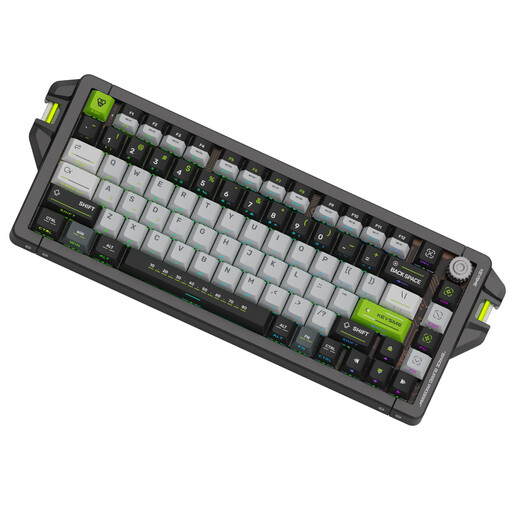 No image available
A 75% model worth comparing if you’re looking for a compact layout with illuminated keys.
The product name lists Jade magnetic switches, an 8 kHz polling rate and adjustable actuation from 0.1–4.0 mm.
The product name specifies a US layout.
 No image available
This Mini version is worth comparing if you want a compact keyboard with individually illuminated keys.
Linear optical switches; the product name specifies the US version in Mercury.
No, don’t automatically set Rapid Trigger to its most sensitive setting. A shallow actuation point can support faster input, while a deeper setting may help prevent accidental keypresses. Start with a manageable setting and adjust only the keys where you want to make a difference.
First, check whether the legends on your version are illuminated. Then set the brightness to a level that feels comfortable; per-key and zone lighting offer different options.
It depends on the game and server. On 19 August 2024, Valve reported that certain forms of movement and shooting input automation could be detected on official Counter-Strike 2 servers and lead to removal from a match. This isn’t a general rule for other games, so check their current competition rules.
According to the Dutch government, online distance purchases from a business generally come with a 14-day cooling-off period, subject to exceptions. You’re also entitled to a product that is fit for purpose; there is no fixed statutory two-year guarantee period in the Netherlands. If your product is faulty, contact the seller.