
Railway builders who use lots of shortcuts
You want quick access to in-game commands, so compare your game’s controls with the keyboard’s physical layout.


First, choose a layout that keeps the keys you need for your railway game and everyday work within easy reach. If you share your home office, the sound of the keys may also matter. Then decide whether you need a number pad, extra room for your mouse or programmable keys. Controls vary from game to game: the Transport Fever 2 manual describes both mouse controls and keyboard shortcuts.
You want quick access to in-game commands, so compare your game’s controls with the keyboard’s physical layout.
You use the same desk for work and play, so the sound of the keys is part of your decision. A manufacturer’s description of quiet keys isn’t a measurement of how loud they’ll be in your room.
You want to leave room for your mouse and need to weigh this against keeping a number pad, whether you choose a full-size or more compact keyboard.
The Transport Fever 2 manual describes mouse controls and keyboard shortcuts. Check which keys you use most in your own game and whether you can customise them.
| What to consider | What to look for | Who is this important for? |
|---|---|---|
| Easy-to-reach gaming and work keys | Compare the physical layout with your game’s key list and the keys you use for work. | If you want to access game commands and work keys without awkward key combinations, focus on the layout; around 33% of consumers prioritise this as their main requirement. |
| Key noise | Check the exact switch type and assess the sound of the complete keyboard, not just its model name. | If you use the same workspace for work and play and want to be considerate of others in the room, how the keys feel and sound may matter more than extra features; around 27% of consumers prioritise quieter keys. |
| Desk space and number pad | A TKL layout leaves out the number pad; check whether you need those separate number keys for work. | If you want room beside your keyboard for your mouse and can manage without a separate number pad, a compact layout may suit your desk better; around 20% of consumers choose with this need for space in mind. |
| Custom key layout | First check which keys you can customise in the game itself and whether the language layout suits you. | If you want to customise your game or work commands, check whether the game settings or keyboard software support the key mappings you need; around 20% of consumers prioritise this option. |
A TKL layout doesn’t have a separate number pad. This may be less practical if you regularly enter numbers for work.
Before choosing TKL, check which keys you use for both work and gaming.
Entering numbers may be less convenient if you’re used to having a separate number pad.
ISO alone doesn’t tell you which language variant is printed on the keys; the V1 Max ISO is available in German and British versions, among others.
Check the language variant and the images of the keys on the product page for the version you want to buy.
Razer describes the BlackWidow V4 as available with both a clicky Green switch and a Yellow switch described as quiet. These descriptions don’t tell you how loud the complete keyboard will be in your home office.
Compare the full switch specification and, if possible, listen to the complete keyboard.
The Dutch government states that the Netherlands has no fixed statutory guarantee period and that the seller is responsible for faulty products.
Compare any additional warranty with your statutory rights and check who you can contact as the seller if something goes wrong.
The Apex 3 is available in a full-size layout, while the Apex 3 TKL is a more compact version.
The wired G515 TKL is a low-profile mechanical keyboard without a number pad. The G515 LIGHTSPEED TKL is a separate wireless model.
According to Razer, the BlackWidow V4 has six dedicated programmable macro keys.
The V1 Max ISO is a programmable wireless keyboard with a 75% layout and replaceable switches.
The Alloy Origins Core is a wired mechanical TKL model with a detachable USB-C cable.
This selection includes compact keyboards without a number pad, as well as versions with a number pad and different layouts. Compare the key legends and layout with your work and gaming needs.
 No image available
The TKL layout suits anyone who wants to leave room beside their keyboard; check whether doing without a separate number pad works for you.
Layout: US QWERTY.
 No image available
This wireless mechanical version may suit you if you want to keep a number pad; check whether the US QWERTY layout matches your preference.
Layout in the product name: US QWERTY. Colour: black.
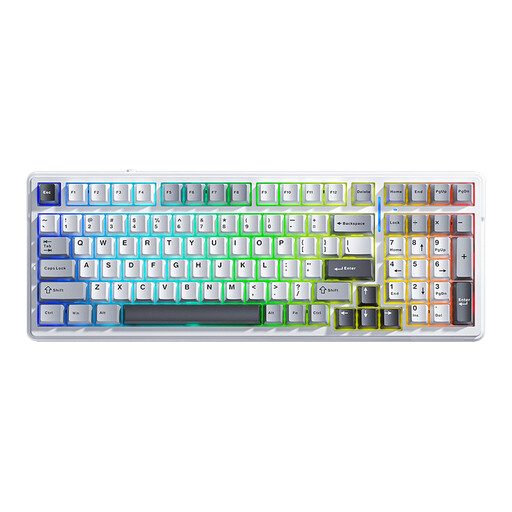 No image available
The product name describes a wireless mechanical keyboard with 99 keys. It may be worth considering if you want to keep a number pad without choosing a standard full-size layout.
Connectivity according to the product name: Bluetooth, 2.4 G and wired. Layout: QWERTY US.
 No image available
The TKL layout may suit you if desk space beside the keyboard matters more than having a separate number pad. Check that the Belgian AZERTY key legends work for you.
Switch variant according to the product name: MLX Red.
 No image available
The 75% layout may suit you if you’re looking for a more compact keyboard; check that the key placement works for your games and work.
Connectivity according to the product name: wired. Layout: QWERTY US.
Not necessarily: Transport Fever 2 supports mouse controls and keyboard shortcuts, and lets you customise key settings. First, compare the controls in your own game with the keys you use most; other railway games may work differently.
First, check the in-game key settings. In Transport Fever 2, you can customise keys through the settings menu. Keyboard-mapping software is another option, provided the software and the feature you want are compatible with your system.
Switch off or unplug the keyboard before cleaning it. Logitech gives this as its own cleaning advice; for cleaning products and any removable keycaps, also follow the instructions for your specific model.
For a consumer purchase in the Netherlands, you’re entitled to a product that works properly, and the seller is your point of contact. The Dutch government states that there’s no fixed statutory guarantee period; a manufacturer’s warranty isn’t the same as your statutory rights.
When you buy from a business at a distance, the seller must give you information including details of your cooling-off period. According to the Dutch government, this is usually 14 days; check the terms for your purchase and don’t assume the same rules apply when buying from a private seller.