
Railway builder who uses lots of shortcuts
Wants quick access to the keys used in their game, so is comparing a full-size keyboard with a TKL layout.


Start with the keys your game uses: a full-size keyboard has a number pad, while a TKL keyboard leaves it out, giving you more room beside your mouse. If you play some distance from your PC, wireless may be more practical, but check the receiver, power requirements and connections. For relaxed building, layout and sound are often more relevant than features designed for competitive gaming; RTINGS.com also distinguishes between casual and competitive use in its general gaming guide.
Wants quick access to the keys used in their game, so is comparing a full-size keyboard with a TKL layout.
Uses a big screen from a spot where a cable could get in the way, and pays attention to the connection, receiver and power requirements.
Plays long, laid-back sessions and may care more about key feel and sound than features designed for fast, competitive input.
First, consider which keys you need and how much room you want beside your mouse. Then decide whether the connection suits the distance between your playing spot and PC.
| What to consider | What to look for | Who it matters to |
|---|---|---|
| Keys and size | Compare your game's controls with the physical layout; check whether you need a number pad. | If I want extra keys close to hand for game commands or other tasks, a full-size keyboard may suit me better. Around 31% of consumers put key access at the top of their list. |
| Distance and connection | For wireless models, check the receiver and available connections; for wired models, make sure the cable will reach your playing spot. | If my PC is further away, I don't want a cable to restrict where I play, so I also check the receiver and power requirements. Around 31% of consumers make distance and connection their top priority. |
| Sound and feel | Compare the sound and key feel of the exact version; manufacturers' descriptions are not independent sound measurements. | For long, relaxed building sessions, I want a key feel and sound level that are comfortable in my space. Around 23% of consumers give this top priority. |
| Customisable keys | Check whether your game supports the commands you want and whether the configuration suits you. | If I use the same commands often, I want to check whether I can assign them to keys or profiles. Around 15% of consumers choose customisable controls as their first priority. |
A compact layout may leave out the number pad or other keys you use for your game or other PC tasks.
Before choosing, compare your game's controls with the physical layout of the exact version you are considering.
Connection options vary by model. A receiver needs a compatible port, while a cable could be inconvenient if your PC is further away.
Check the distance, available connections and which accessories come with the version. Also consider how you will manage its power supply.
Features designed for fast-paced competitive games are not automatically useful for relaxed railway building. RTINGS.com notes in its general gaming guide that casual players may have different preferences, such as comfort.
Choose these features only if they are useful for the games and tasks you play.
The G915 X LIGHTSPEED and G915 X TKL are examples of a full-size model and a version without a number pad, respectively.
The wired Apex 3 is a full-size keyboard to compare if you are looking for a model the manufacturer describes as quiet to type on.
The wired K70 CORE is a full-size keyboard to compare if you want configurable controls for a PC.
The Q6 Max is an example to compare if you want a full-size layout, several connection options and customisable keys.
These keyboards offer examples of different layouts and wired or wireless setups for building on a big screen. Before buying, check the connection, layout and marking on the exact version being offered. The Dutch Authority for Digital Infrastructure (RDI) states that equipment must meet the applicable European requirements and carry the correct CE marking.
 No image available
A wired TKL version to consider if you want more room beside your mouse and don't need a number pad.
The product description lists membrane keys, anti-ghosting for up to 10 keys, Game Mode, media keys and a 1.8-metre USB cable.
There is no number pad. Check that the QWERTY layout and cable length suit your playing spot.
 No image available
A wired TKL option to compare if you are looking for a more compact layout and membrane keys.
The product description lists quiet membrane switches, four media keys, 12-key rollover, key remapping via iCUE and a 1.82-metre USB Type-A cable.
There is no number pad. Check that the US QWERTY layout, connection and configuration suit you.
 No image available
A compact layout to consider if you want wireless connection options while keeping the arrow and function keys.
The product description lists 82 keys, Bluetooth, 2.4 GHz and USB-C, hot-swappable switches, a volume knob and built-in memory for macros and lighting profiles.
Check that the US layout and your preferred connection method work with your PC.
 No image available
A 98-key keyboard to consider if you want a compact layout with several connection options.
The product title lists Bluetooth, 2.4 GHz and USB-C, a display, a dial and hot-swappable switches.
Check the exact layout and which connection method you want to use.
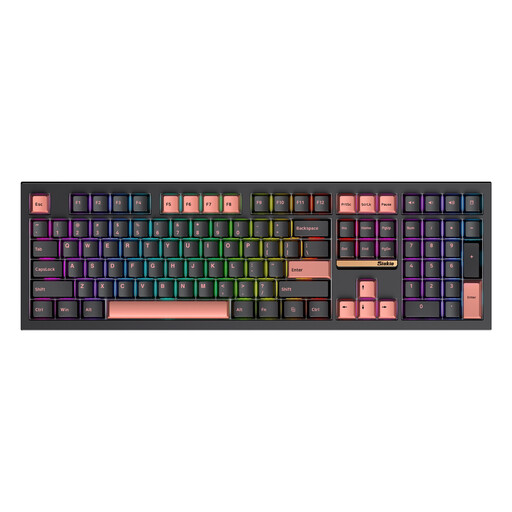 No image available
A full-size keyboard to consider if you want a number pad and several connection modes.
The product title lists 108 keys and three connection modes; the product description mentions a number pad and wired and wireless connections.
Check which connection modes the version on offer supports and whether the layout suits you.
Not necessarily. Check your game's key controls and consider whether you enter numbers outside the game. A full-size keyboard has a number pad, while a TKL keyboard leaves it out.
First, check where your PC and playing spot are. The CORSAIR K70 CORE manual describes a USB Type-A connection; Logitech also lists receiver and Bluetooth modes for the G915 X LIGHTSPEED. Check that the connections suit your PC and playing spot.
First, check which commands the game itself supports. Logitech describes reprogrammable keys for the G915 X LIGHTSPEED; the CORSAIR K70 CORE manual describes configuration with iCUE and saved hardware profiles. This does not mean that every in-game action can be set up as a macro.
When you buy as a consumer, you are entitled to a product that is fit for purpose; according to the Dutch government, the Netherlands has no fixed statutory warranty period. For distance purchases from a business, you usually have a 14-day cooling-off period. Check the terms and exceptions that apply to your purchase.
The Dutch Authority for Digital Infrastructure states that electrical and electronic equipment must carry the correct CE marking and meet the applicable European requirements. Wireless equipment is also subject to rules for radio equipment; stricter requirements for wireless devices have applied since 1 August 2025. A model name or product listing alone does not confirm that the version on offer meets these requirements.