
Racers with few power sockets
If you don’t want to use an extra mains adapter, consider a wired USB connection instead of going wireless. Keep track of available power sockets and USB ports separately.


A wired USB keyboard is a sensible choice if you want to play without relying on a keyboard battery and have a suitable USB port available; having few power sockets doesn’t automatically mean you have few USB ports. A wireless keyboard can reduce desk cables, but you’ll need to think about charging and may also need a USB receiver. If you’re looking for proportional steering or acceleration, first check whether your racing game supports analogue input and your chosen controller mode.
If you don’t want to use an extra mains adapter, consider a wired USB connection instead of going wireless. Keep track of available power sockets and USB ports separately.
If you want proportional control from your keys, first check whether your racing game supports the controller mode you’ve chosen.
If you want to leave room for a mouse or other controls, consider a compact layout and check that the racing keys you need are still easy to reach.
First, count your available power sockets and suitable USB ports separately. Then check how the keyboard connects and whether its input works with your racing game.
| What to consider | What should you check? | Who is this important to? |
|---|---|---|
| Connecting without an extra mains plug | Check which USB port is needed and whether a wireless model uses a receiver. | If I don’t want to plug another device into a power socket, I focus on the connection type and available USB ports. Around 36% of consumers prioritise keeping mains sockets free. |
| Steering and acceleration | Check whether your racing game supports analogue controller input and, if relevant, simultaneous input. | If you want proportional steering, analogue input is most useful when your game handles it well. Around 29% of consumers prioritise this type of control. |
| Keyboard layout and desk space | Compare the layout and check that the arrow and function keys you need are within easy reach. | At a small desk, I want to leave room for my mouse without losing access to important racing keys. Around 21% of consumers focus on layout and available desk space. |
| Playing without charging breaks | Check whether the model can be used while charging and how to switch to wired mode. | If I don’t want to think about a battery while gaming, a wired connection matters more to me than a tidy desk. Around 14% of consumers prioritise playing without charging breaks. |
A wired keyboard uses a USB port; a wireless USB receiver may take up one too. So the number of available power sockets doesn’t tell you how many USB ports are free.
Count both types of connection separately and check which ones the exact model needs.
A game may handle keyboard and controller signals differently, or may not support both well at the same time.
Check your game’s input support and the controller mode you’ve chosen before opting for analogue control.
A wireless keyboard with a battery needs charging. According to its manual, the Corsair K65 PLUS WIRELESS stays in wireless mode if you only connect the charging cable.
Read the manual for the exact model and check how to switch between wireless and wired modes.
Colour, layout, connection and switches can vary between versions; a matching model name doesn’t confirm that it’s the same variant.
Compare the full model number and the details on the product page with the version you’re looking for.
The GXT 833 Thado and GXT 836 Evocx are wired options with different key features and layouts.
This version of the G915 X LIGHTSPEED TKL offers Bluetooth, 2.4 GHz LIGHTSPEED and wired connectivity.
Worth considering if analogue keys and configurable gamepad output matter to you, as well as the connection type.
The K65 PLUS WIRELESS is a compact 75% option with Bluetooth, 2.4 GHz and a wired mode.
The Apex 3 TKL is a compact wired option with a TKL layout.
These picks include wired and wireless models, as well as an option for anyone exploring analogue control. For the latter, check that your racing game supports the input you want.
 No image available
A wired option if you want to play without relying on a keyboard battery and have a suitable USB port available.
TKL layout, QWERTY, black; the product name states that it supports PC and PS5.
 No image available
A compact wired version to consider if you don’t want to charge a keyboard battery.
75%, US QWERTY layout, linear hot-swappable switches and compatible with PC, Windows and Mac. Colour: grey and white.
 No image available
A wireless option with a wired mode if you want fewer cables while playing but would also like a wired fallback.
75%, US QWERTY layout, wired, Bluetooth and 2.4G; purple Flying Fish switch. Compatible with Windows, Mac and PC.
The built-in battery needs charging.
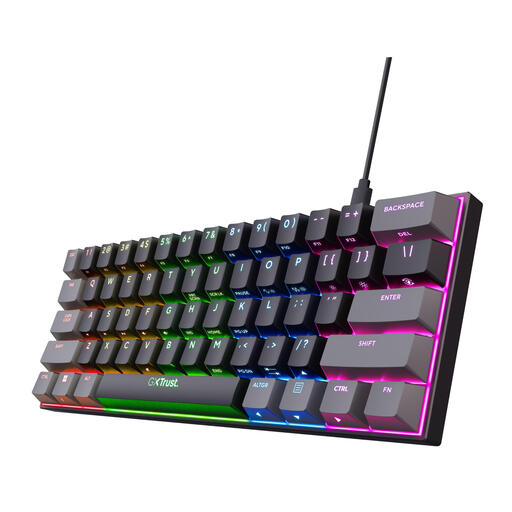 No image available
A compact wired option for a small desk if you don’t mind using an alternative layer for some key functions.
60%, RGB, US QWERTY and Outemu Red switches.
There are no dedicated arrow keys; you can access these functions using the Fn layer.
 No image available
A model to look into if analogue control is influencing your choice; check the features of this exact version and whether your racing game supports it.
US QWERTY layout.
The wired keyboards in this selection connect to your gaming device via USB. Check that it has a suitable USB port free; a free USB port is not the same as a free power socket.
No. It depends on the game’s support and the controller mode you’ve chosen. Wooting documents XInput and HID gamepad modes, but warns that games don’t always handle keyboard and controller input well at the same time. So check your racing game before choosing this type of input.
According to the Corsair manual, the keyboard continues to work wirelessly if you connect the cable while the switch is set to Bluetooth or 2.4 GHz. Set the mode switch to wired to play using a wired connection.
If a product is faulty, the seller is responsible for the statutory guarantee; there isn’t automatically a fixed two-year period. According to ACM ConsuWijzer, for a typical online consumer purchase you usually have up to 14 days from delivery to change your mind, subject to statutory exceptions.
Check that the exact version meets the applicable European product requirements and has the required CE marking. The Dutch Authority for Digital Infrastructure states that electrical, electronic and radio equipment sold in Europe must meet the applicable European requirements; a similar model name doesn’t confirm this for a specific version.