Choose a keyboard with a numpad if you often use numpad commands for 3D navigation in Blender and want them close at hand. A compact TKL model could be a better fit if extra mouse space and programmable keys matter more to you. Blender also offers numpad emulation, while you can customise key bindings in Star Citizen. If you share a home office, the layout and typing noise are worth considering too: manufacturers’ descriptions of switches are not independent noise measurements.
Who is this keyboard for?
3D modeller who switches views frequently
For example, you might design in Blender and want to control your views without having to reconfigure your keys first. Blender’s documentation describes using numpad keys for 3D navigation, as well as an option to emulate them with the regular number keys.
Spaceflight gamer with a custom control setup
You use lots of in-game commands and want to see whether custom key bindings or dedicated macro keys could work alongside your existing setup. Roberts Space Industries describes customisable key bindings for Star Citizen.
Shared home office user
You switch between designing, typing and calls, so you need to balance typing noise against the desk and mouse space available.
What should you consider when choosing?
Start with the controls your software or game requires. Then weigh up the layout, typing noise and connection options for your home office.
| What to consider |
What should you check? |
Who should give this more weight? |
| Numpad and 3D navigation |
Check whether your software uses numpad keys and whether emulation or a custom keymap works for you. |
If I often rotate the 3D view in Blender, I want to use numpad commands directly. That’s why around 25% of consumers prioritise a physical numpad for 3D navigation. |
| Custom commands |
Make a note of the actions you use most and check whether your game or software already supports them; compare this with macro keys or key remapping. |
When I use lots of in-game commands, I want to be able to customise keys without adding unnecessary controls. Around 25% of consumers put custom commands and key bindings first. |
| Typing noise |
Check the exact switch variant and, if possible, try the sound for yourself; manufacturers’ terms are not a noise measurement. |
At a shared desk, I want to type and game without the keyboard disturbing my calls. Around 20% of consumers give a quieter workspace top priority. |
| Desk space and layout |
Measure the space available and decide whether you need a physical numpad for your software before choosing a compact model. |
If space for my mouse is limited, I want to know how much room the keyboard layout leaves me. Around 15% of consumers choose desk and mouse space as their main consideration. |
| Connections and devices |
Check which connections are available for each version and how you want to connect each device. |
When I switch between devices, I want to use my preferred connection without having to rearrange my workspace each time. Around 15% of consumers prioritise flexible connectivity. |
Things to look out for when buying
-
Choosing a TKL model without checking your shortcuts
Blender uses numpad keys for 3D navigation. With numpad emulation, regular number keys can take on a different function.
Test your most important view commands before going without a physical numpad.
Allow time to set up numpad emulation or a custom keymap.
-
Taking ‘quiet’ to mean a measured comparison
Manufacturers describe some switches as quieter or silent, but these terms don’t prove which keyboard will be quietest on your desk.
Check the exact switch variant and, if possible, compare the feel and sound for yourself.
-
Overlooking the keyboard layout or model variant
A product variant may have a US layout or another regional version, which can matter if you use shortcuts frequently.
Before buying, check the model code, physical layout and switch variant of the version on offer.
You may need time to get used to a different layout or reconfigure your shortcuts.
-
Confusing an additional warranty with your statutory rights
In the Netherlands, there is no fixed period for the statutory guarantee. An additional warranty sits alongside your statutory rights, according to the Dutch Government.
Compare what an additional warranty offers, while bearing in mind your existing statutory rights.
Brands compared
Razer
The BlackWidow V4 is an option if you’re looking for a full-size keyboard with dedicated macro keys.
- Razer describes six macro keys and offers Green switches with a clicky feel or Yellow switches, which the brand describes as quieter, for this model.
- The full-size layout takes up more desk space, and the switch characteristics don’t automatically apply to other Razer models.
Logitech G
The G515 TKL range includes a wired and a wireless compact version.
- According to Logitech, the wired G515 TKL supports KEYCONTROL via G HUB; the G515 LIGHTSPEED TKL offers LIGHTSPEED, Bluetooth and wired data.
- Neither version has a physical numpad. Check which controls and connection options you need for each model.
SteelSeries
The Apex 3 TKL is worth considering if you want a compact layout and a keystroke the manufacturer describes as quiet.
- SteelSeries lists Whisper Quiet switches and IP32 for the Apex 3 TKL variant consulted.
- The noise description is not an independent measurement, and the TKL model has no numpad.
CORSAIR
The K70 CORE is a full-size gaming keyboard to compare if you’re looking for mechanical linear switches, media controls and iCUE settings.
- CORSAIR documents MLX Red switches and iCUE macros for the K70 CORE.
- The variant consulted has the US model code CH-910971E-NA. Before buying, check the layout and specification of the model on offer.
Keyboards at Joybuy
This selection includes keyboards with a numpad and more compact models for anyone who values custom controls or extra desk space. Check the layout, switches and connection options for each model.
 No image available
Razer BlackWidow V4, Yellow Switch, US Layout
A good fit if you want a physical numpad and dedicated macro keys for design or gaming commands.
Razer describes the BlackWidow V4 as having six macro keys. This version lists Yellow switches and a US layout; check that the layout suits your typing and shortcuts.
View at Joybuy
 No image available
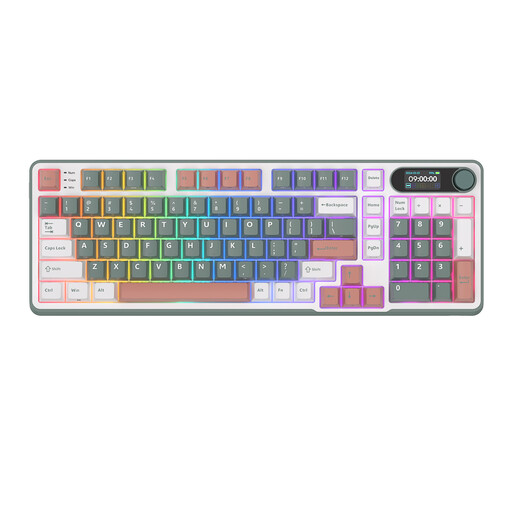
RK ROYAL KLUDGE S98 96%, Blue Switch, Camping Green
The product information pairs the 98-key layout with a numpad, which could suit you if you want to keep those controls and have several connection options too.
The name describes a wireless mechanical keyboard with Blue switches. The product information also lists a smart display, rotary knob and tri-mode connection.
View at Joybuy
 No image available
CORSAIR K70 CORE TKL, BE AZERTY, MLX Red
The compact TKL layout could suit you if you want more room beside your keyboard and are happy to use numpad emulation with your software.
This version lists BE AZERTY and MLX Red switches. Check that the Belgian AZERTY layout suits the way you work.
View at Joybuy
 No image available
CORSAIR K55 CORE TKL, US QWERTY
This compact model could suit you if you want to use less desk space and don’t need a physical numpad.
The product information describes the membrane switches as quiet and lists four media keys and key remapping via iCUE. The title specifies a US QWERTY layout.
View at Joybuy
 No image available
AJAZZ AK820 MAX 75%, Flying Fish Switches, US QWERTY
The 75% layout could suit you if you’re looking for a more compact keyboard and value customisable controls.
The product name describes a wireless mechanical keyboard with a tri-mode connection, Flying Fish switches and a US QWERTY layout. It also lists a programmable rotary knob and hot-swappable switches.
View at Joybuy
Frequently asked questions
Do I always need a numpad for 3D design?
No, not always. Blender’s documentation mentions numpad keys for 3D navigation, but Blender also offers ‘Emulate Numpad’. Whether that works well for you depends on your shortcuts and workflow; don’t assume you’ll need a numpad for other design software.
How do I set up controls for a spaceflight game?
According to Roberts Space Industries, in Star Citizen you can choose a profile via Options and Keybindings, then customise key bindings under Advanced Controls Customization. Check for conflicting assignments and test your chosen keys before deciding that dedicated macro keys are essential.
What can I do if a compact keyboard doesn’t work well for me in Blender?
In Blender Preferences, go to Input and check the ‘Emulate Numpad’ setting, or adjust your keymap. Numpad emulation gives regular number keys a different function, so decide whether that works for your workflow.
What are the rules on returns and warranties in the Netherlands?
For a standard online consumer purchase, you generally have a statutory 14-day cooling-off period after delivery, subject to exceptions; ACM ConsuWijzer explains this period. There is no fixed statutory warranty period in the Netherlands: what you can expect from a product depends on the product and the circumstances, according to the Dutch Government. An additional warranty does not replace your statutory rights.


