Start with your posture at the desk and the commands you use regularly while playing. Then choose a layout, switch type or extra features. Dedicated macro keys can be handy for frequently repeated commands, while a quieter or narrower keyboard may be better suited to a shared space or limited room for your mouse. A wrist rest or high polling rate alone is no guarantee of greater comfort or better gameplay.
Who is this relevant to?
Players who pay attention to posture during long sessions
They want to position their keyboard, mouse and arms comfortably, so they assess the whole workstation rather than just any wrist rest. Arboportaal describes repetitive movements of the fingers and hands, as well as static strain on the neck, shoulders and arms, when working at a screen.
Players who use lots of shortcuts
They often switch between game overviews or commands and want to check whether programmable keys work with their game's shortcuts. For example, Ubisoft lists Ctrl+Q as the default shortcut for the statistics overview in Anno 1800 on PC.
Players in a shared space
They take keyboard noise into account and want to compare the feel of the keys and claims about quieter typing for themselves. Manufacturers' descriptions are not a comparative sound test.
What should you look for when buying?
First decide how much space you need and which keys you use regularly. Then compare how the keys feel and sound in your playing and working environment.
Full-size membrane keyboard with macro keys
Best for: setting your own commands to dedicated keys and having room for a wide keyboard.
Keep in mind: the extra keys take up more desk space. Also check whether your game allows the key assignments you want.
Full-size keyboard designed for quieter use
Best for: keeping the number pad when keyboard noise matters in a shared space.
Keep in mind: manufacturers' claims about quiet use are not comparative sound measurements. According to Razer, the Razer Ornata V3 X does not have anti-ghosting.
Programmable mechanical keyboard
Best for: mechanical switches and the ability to configure keys or macros yourself.
Keep in mind: check the layout and key noise. An advertised polling rate of 8000 Hz alone does not prove an advantage in simulation games.
More compact keyboard without a number pad
Best for: making more room for your mouse beside the keyboard, if you rarely use the number pad.
Keep in mind: you lose dedicated keys. A more compact shape alone does not guarantee better wrist posture.
| Concern |
What should you look for? |
Which consumers? |
| Posture and room for your arms and mouse |
Check the width and height on your own desk, and make sure you can keep your shoulders relaxed and wrists straight. |
When I play for a long time, I want to position my arms and mouse comfortably without relying on a wrist rest. Around 36% of consumers put posture and space first. |
| Shortcuts and programmability |
Make a note of the commands you use often and check how the key functions are set up on each model. |
When I want quicker access to repeated in-game commands, I look for suitable shortcuts or programmable keys. Around 29% of consumers prioritise this. |
| Key noise and feel |
Compare the exact switch type and, if possible, try out the sound and feel in a similar environment. |
In a shared space, I want to know how a keyboard sounds and feels before choosing one. Around 21% of consumers put low key noise first. |
| Layout and desk width |
Check whether you need a number pad, arrow keys and the QWERTY layout you want. |
If I want more room for my mouse, I weigh that up against the keys omitted from a more compact layout. Around 14% of consumers mainly choose a narrower set-up. |
Things to watch out for when buying
-
Assuming a wrist rest guarantees comfortable gaming
A wrist rest is no substitute for positioning your keyboard, chair and mouse properly. Height, distance and arm position all matter during long periods at a computer.
Assess your whole desk set-up and try to keep your wrists as straight as possible.
-
Confusing the Corsair K55 RGB PRO with the K55 RGB PRO XT
Corsair describes the K55 RGB PRO as having five lighting zones, while the separate PRO XT version has per-key lighting.
Check the full model name and version, not just the K55 designation.
-
Letting a high polling rate decide for you
Keychron lists 8000 Hz for the V6 8K, but that specification does not prove an advantage in economic simulation games.
Consider the layout, key feel and useful commands before choosing based on that figure.
-
Assuming an additional warranty is the same as your statutory rights
An additional warranty product is separate from your statutory rights. The Dutch government says there is no fixed statutory warranty period in the Netherlands; if a product is faulty, the retailer is your point of contact.
Read what extra rights an additional warranty offers before taking it out.
Brands to consider
Corsair
The K55 RGB PRO is a full-size membrane keyboard with dedicated macro keys.
- Corsair lists six macro keys, five lighting zones, a detachable palm rest and a USB connection for this model.
- Per-key lighting is a feature of the PRO XT, not the PRO.
SteelSeries
SteelSeries describes the Apex 3 as a full-size keyboard designed for quiet use.
- The manufacturer lists media controls and dust and water resistance.
- These descriptions are not an independent comparison of sound or comfort, and do not automatically apply to all SteelSeries keyboards.
Razer
Razer describes the Ornata V3 X as a full-size model with a low profile and membrane switches.
- The manufacturer lists a detachable wrist rest and programmable keys.
- Razer says the Ornata V3 X does not have anti-ghosting. Don't confuse this model with the differently configured Ornata V3.
Keychron
According to Keychron, the V6 8K is a wired, full-size mechanical keyboard with an ANSI layout.
- Keychron lists hot-swappable switches and support for Windows and macOS.
- The stated 8000 Hz does not prove that economic simulations will feel noticeably better to play.
Logitech G
Logitech G describes the G815 as a wired mechanical keyboard with a low profile and dedicated G keys.
- The manufacturer offers linear, tactile and clicky switch options.
- These options differ in feel and sound, so check which version you're looking at.
Joybuy products
These keyboards offer a range of options for long sessions, from compact layouts to full-size models with programmable keys.
 No image available
AJAZZ AK820 MAX 75% Wireless Mechanical Keyboard, Flying Fish Switches, US Layout QWERTY
The compact layout may suit you if you want to leave room beside the keyboard while keeping the arrow and function keys.
The description lists 82 keys, customisable macros and key functions with onboard memory.
The product name lists tri-mode connectivity, hot-swappable switches, a volume knob and an 8000 mAh battery.
View at Joybuy
 No image available
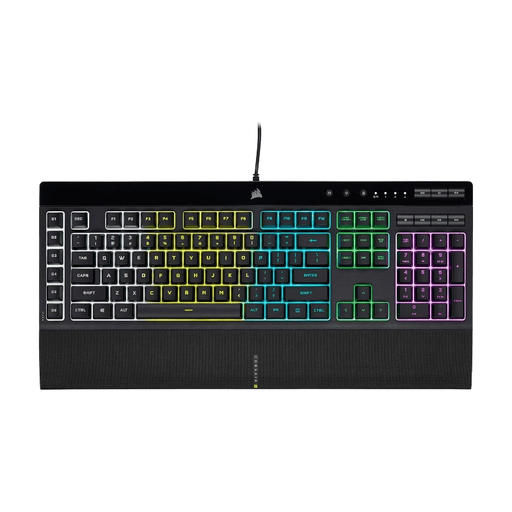
Corsair K55 RGB PRO Gaming Keyboard - US QWERTY
This full-size membrane keyboard may suit you if you want a number pad and dedicated keys for frequently repeated commands.
The description lists six macro keys, a detachable palm rest and macro programming. Corsair lists five lighting zones for the PRO version.
View at Joybuy
 No image available
Corsair K70 RGB PRO Gaming Keyboard, USB QWERTY English
This full-size mechanical model may suit you if you want to combine mechanical keys with programmable features.
The description lists 104 keys, macro programming via iCUE, a USB connection, a detachable wrist rest and adjustable height.
View at Joybuy
 No image available
Razer DeathStalker V2 Pro Tenkeyless Gaming Keyboard - US Layout
The tenkeyless layout may suit you if you want to use less desk width than a full-size keyboard would take up.
The description lists low-profile optical switches, Bluetooth and wireless connectivity, programmable keys and macro recording.
View at Joybuy
 No image available
Razer Huntsman V3 Pro Keyboard - US QWERTY Layout
This full-size model may suit you if you want to keep a number pad and adjust key actuation.
The description lists 104 keys, analogue optical switches, adjustable actuation, Rapid Trigger and a magnetic wrist rest.
View at Joybuy
Frequently asked questions
Do I need extra macro keys for economic simulation games?
No, extra macro keys are not essential. For example, Anno 1800 on PC uses Ctrl+Q as the default shortcut for the statistics overview. Make a note of the commands you use often, then check whether extra keys or remapping would help.
How should I set up my keyboard for a long session?
Position the keyboard directly in front of you and adjust its height and distance so your shoulders are relaxed and your wrists are straight. Break up long periods of sitting still; a palm rest is no substitute for a suitable workstation set-up.
What software do I need to customise the keys?
Corsair describes iCUE for more advanced macro programming on the K55 RGB PRO, while Keychron describes its web-based Launcher for remapping the V6 8K. Before buying, check that the software works on your system and whether the feature you want is also available without it.
What are my rights when buying online in the Netherlands?
For eligible distance purchases from a business, you generally have a 14-day cooling-off period; the Dutch government lists exceptions, including purchases from private sellers. You also have statutory rights, with no fixed statutory warranty period. If a product is faulty, the retailer is your point of contact.
What should I look for with the CE marking?
Electrical and electronic products must comply with the relevant EU product rules. Where CE marking is required, it must be displayed. Your Europe explains that CE marking applies only to products covered by specific harmonised EU rules. Check the marking and the product identity of the version being offered.


