
Builder with lots of commands
You want quick access to lots of functions while designing or piloting. So compare a number pad and dedicated macro keys with more compact layouts.


The right layout depends on which keys you need when designing or piloting your virtual spaceship. Choose a board with more keys within easy reach if you enter lots of commands or numbers, or a more compact one if desk space matters more. RGB lighting alone won’t tell you how clearly the legends show up in a bright room, so assess the exact version in similar lighting. Then factor in key feel and noise.
You want quick access to lots of functions while designing or piloting. So compare a number pad and dedicated macro keys with more compact layouts.
You often look at the key legends in a bright room and want to know whether they’re easy to read on the exact version you’re considering. RGB lighting alone won’t tell you how clearly the legends show up in daylight.
You want to leave space next to your keyboard, but need to weigh up which keys aren’t available as dedicated keys on a TKL or 60% layout.
Start by checking how easy the legends are to read in your lighting. Then compare the keys you need quick access to with the space you want to free up, and finally consider key feel and noise.
A good fit if: your game calls for lots of commands within easy reach, or you regularly enter numbers.
The trade-off: a number pad or dedicated macro keys take up space, and the key bindings need to suit your game.
A good fit if: you want to keep the function row and arrow keys, but can do without the number pad.
The trade-off: you’ll need other bindings for commands that use the number pad.
A good fit if: the smallest possible keyboard is your priority and you’re happy using secondary functions.
The trade-off: the dedicated function row and number pad are among the keys it leaves out. Razer describes the Huntsman Mini as a 60% keyboard.
| What to consider | What should you check? | Who is this important for? |
|---|---|---|
| Legends that are easy to read | Check the keycap version and look at the legends in lighting similar to your room. Don’t rely on the RGB listing alone. | I want to make out the keys in my bright room without relying on backlighting. Around 33% of consumers prioritise readability in daylight above all else. |
| Quick access to commands | Make a note of your key bindings and check whether you need a number pad, dedicated macro keys or configuration software. | If I enter lots of commands, I want to use important bindings directly. Around 27% of consumers put quick access to commands first. |
| Key feel and noise | Check the switch type on the exact version and, where possible, try the feel and sound of the keys. | I use my keyboard for gaming and design, and want the feel and sound to suit my workspace. Around 20% of consumers prioritise key feel and noise above all else. |
| Desk space | Compare the dedicated keys on a full-size, TKL or 60% layout with your own bindings. | If I want to leave space next to my keyboard, I want to know in advance which keys I’ll be giving up. Around 20% of consumers prioritise a smaller layout. |
A lighting feature doesn’t tell you how clearly the key legends show up in a bright room or with the lighting switched off.
Check the legends on the exact version in lighting similar to your workspace.
On a more compact layout, some functions are no longer available from a dedicated key.
Check your commands and how you use the function row, arrow keys and number pad before choosing a size.
A different switch, key layout or size can change how the keyboard works day to day.
Check the full model name, switch version and layout on the product page, such as US QWERTY or BE AZERTY.
In the Netherlands, statutory consumer rights are separate from any additional manufacturer’s warranty. ACM ConsuWijzer explains that the retailer is responsible if a product doesn’t meet your reasonable expectations when used normally.
Keep your proof of purchase and contact the retailer if the product is faulty.
The BlackWidow V4 X and Huntsman Mini offer different layouts and use cases.
The Apex 3 TKL is worth considering if you’re looking for a TKL layout and a keystroke the manufacturer describes as quiet.
The K55 RGB PRO and K70 CORE offer different key layouts and keystroke feels.
The G915 X LIGHTSPEED is an option if wireless connectivity and a low-profile keyboard are priorities for you.
The Alloy Core RGB is a full-size membrane model with RGB zones.
This Joybuy selection features mechanical gaming keyboards in a range of compact layouts. Compare the number of keys and the exact layout with your bindings, and check the legends in lighting similar to your room.
 No image available
A 98% layout is worth considering if you want to compare boards that fit plenty of keys into a more compact design.
RGB lighting, TFT screen and volume knob; USB-C, Bluetooth and 2.4 GHz.
 No image available
This compact layout could suit you if you want to free up desk space and check which keys you need beforehand.
Magnetic switches and metal top plate.
 No image available
An 82-key, 75% layout offers a middle ground to compare if you’re looking for a compact board.
Magnetic switches, RGB lighting, rotary knob and adjustable actuation points.
 No image available
This wired layout is worth considering if you want to use less desk space.
Linear hot-swappable switches, white backlighting and volume knob.
 No image available
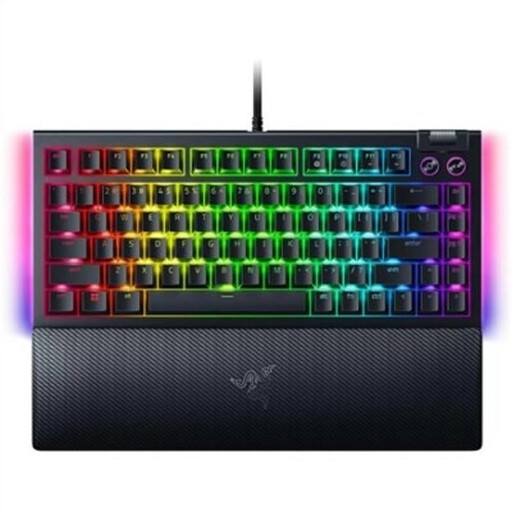
A 75% layout is worth comparing if you’re looking for a more compact mechanical gaming keyboard.
Wired, with RGB lighting and hot-swappable switches.
Not necessarily. RGB is an adjustable product feature, but it doesn’t automatically tell you how easy the key legends are to read in daylight. Check the exact keycap version in similar lighting.
First check which bindings your game supports. Razer says the BlackWidow V4 X’s six macro keys can be programmed using Synapse or macro recording. Check for yourself whether the action and configuration you want will work with your game.
When you buy as a consumer in the Netherlands, statutory rights apply if the product doesn’t meet your reasonable expectations when used normally. ACM ConsuWijzer explains that the retailer must then offer an appropriate solution at no cost. An additional manufacturer’s warranty doesn’t replace these rights.
When you buy from a business at a distance, you’re often entitled to a statutory 14-day cooling-off period. The Dutch government’s Rijksoverheid website explains how this works; check the information that applies to your purchase. This is separate from your statutory rights if the product is faulty.
Radio equipment placed on the market in the EU is covered by the Radio Equipment Directive. The European Commission lists requirements including safety, electromagnetic compatibility and the efficient use of the radio spectrum. These requirements don’t tell you how easy the legends are to read in your room.