Who is this for?

Players with limited mouse space

If you want to position your keyboard compactly to give your mouse more room to move, consider whether using an Fn layer for your commands would work for you. Trust describes this type of control for the GXT 867 Acira.

Players with lots of key bindings

If you often use function keys, arrow keys or navigation keys in strategy games, check which keys are available individually and which require a combination. Corsair and Redragonshop’s layout comparisons explain the differences between layouts.

Players who also use their desk for work

If you use the same keyboard for gaming and typing, consider the layout, feel and sound of the keys, as well as the space available for your mouse. SteelSeries and Trust describe product-specific features that may be relevant.

What should you look for?

60%

Best for: prioritising extra mouse space over direct access to a function row and arrow keys.

The trade-off: use key combinations for keys that aren’t included individually, if the model supports those functions. Check how your commands work.

65%

Best for: a compact layout with separate arrow keys.

The trade-off: a separate function row is usually omitted, and navigation keys vary by model. Check the exact version.

75%

Best for: using a function row and arrow keys separately in a more compact setup than TKL.

The trade-off: navigation keys are grouped more closely together, so check their positioning on the exact version.

TKL

Best for: direct access to the function row and navigation keys, if you have room for a wider keyboard.

The trade-off: you lose the number pad, but keep more separate keys than on smaller layouts.

What to consider What should you check? Who is this important for?
Desk width and mouse space Measure the available width, including the space you want to leave for your mouse, and compare it with the dimensions of the exact version. If I want plenty of room to move my mouse, I prioritise the space available beside the keyboard. Around 40% of consumers say desk width and mouse space are their main concern.
Direct access to commands Make a note of your most-used key bindings and check which keys are available individually and which require an Fn combination. If you use specific commands frequently during a match, you’ll want to access them without awkward key combinations. Around 30% of consumers prioritise direct access to commands.
Key feel and sound Check the switch type on the exact version and see whether any adjustment options suit the way you use it. If I also use the keyboard for typing, I consider key feel and sound alongside the space available for my mouse. Around 20% of consumers say key feel and sound are their main concern.
Connection, layout and customisation Check the connection, physical key layout and software support for your computer and operating system. If you want to customise certain key functions or need a specific key layout, check the exact version and its compatibility before buying. Around 10% of consumers put connection, layout and customisation first.

Common buying mistakes

  • Choosing the smallest layout without considering anything else

    A 60% keyboard doesn’t have a separate function row or arrow keys. If you use these often, extra key combinations can make your controls less direct.

    Make a note of your most important key bindings and, before buying, check which keys are available individually on the version you’ve chosen and how to access the remaining functions.

  • Assuming adjustable actuation means better results in matches

    SteelSeries lists adjustable actuation for the Apex Pro TKL Gen 3, but this specification doesn’t prove that it will help you play better in ranked strategy games.

    Choose the size and keys you need first. Only consider adjustable actuation if you want to use that feature yourself.

  • Overlooking the exact version or key layout

    A suitable form factor isn’t enough if the physical layout or required software features don’t suit the way you use the keyboard.

    Compare the full model name, the key layout on offer, the switch type and the compatibility of the version you want to order.

Brands to compare

Trust

The GXT 867 Acira is an example of a compact 60% layout for anyone looking to save desk space.

  • Trust says the GXT 867 Acira has Outemu Red switches, dual-function keys, software and a detachable cable.
  • With a compact layout, you’ll need to use key combinations for functions without their own dedicated keys. A manufacturer’s performance claim isn’t independent proof of an advantage in ranked strategy games.

SteelSeries

The Apex Pro TKL Gen 3 is a TKL model to consider if you want to compare separate keys and adjustable actuation.

  • SteelSeries specifies adjustable actuation from 0,1 to 4,0 mm and sound dampening for this version.
  • TKL takes up more width than smaller layouts. SteelSeries also notes that not all software features are supported on Mac; these features don’t prove an advantage in ranked strategy games.

Corsair

The K65 PRO MINI and K70 RGB TKL CHAMPION SERIES illustrate the different trade-offs between a compact layout and separate keys.

  • According to Corsair’s own comparison, the 65% version mentioned has a detachable USB cable, while the TKL version mentioned has media keys.
  • Switch options vary by version. Corsair’s genre-specific recommendations are brand advice, not independent testing; check which version is on offer.

Logitech G

The G316 X 75 is a wired 75% model worth comparing if you’re looking for a compact layout with separate keys.

  • Logitech G lists a 75% layout and a wired connection for the G316 X 75.
  • These specifications alone don’t show an advantage for strategy games. Check the full model specifications and the exact layout of the version on offer.

Gaming keyboards at Joybuy

These Joybuy products cover compact 60%, 65%, 75% and TKL layouts, so you can compare the trade-off between desk space and direct access to keys.

Trust GXT 833 Thado wired TKL gaming keyboard

Trust GXT 833 Thado TKL gaming keyboard

A TKL layout could be a good fit if you don’t need a number pad but want to keep separate keys.

Wired; QWERTY; listed for PC and PS5. Check that the physical key layout suits the way you use it.

Joybuy

Redragon M68 compact gaming keyboard with magnetic switches

Redragon M68 Magnetic Switch, 68 keys

The compact 68-key layout could suit anyone looking to save desk space; check how you can access the commands you need.

Magnetic switches; Rapid Trigger; 8000 Hz polling rate according to the product name. These specifications don’t prove better results in matches.

Joybuy

AJAZZ AK820 MAX wired gaming keyboard with magnetic switches

AJAZZ AK820 MAX, wired

A 75% layout could suit you if you’re after a compact size but still want separate keys; check the precise positioning.

Magnetic switches; adjustable actuation and Rapid Trigger according to the product name. These features alone don’t show an advantage in ranked play.

Joybuy

AJAZZ AK820 75% wired mechanical keyboard with linear switches

AJAZZ AK820 75%, linear hot-swappable switches

This 75% layout could suit you if you’re looking for a compact size with a more comprehensive key layout.

Wired; QWERTY US; 83 keys; linear hot-swappable switches according to the product name. Check the key layout and the version you need.

Joybuy
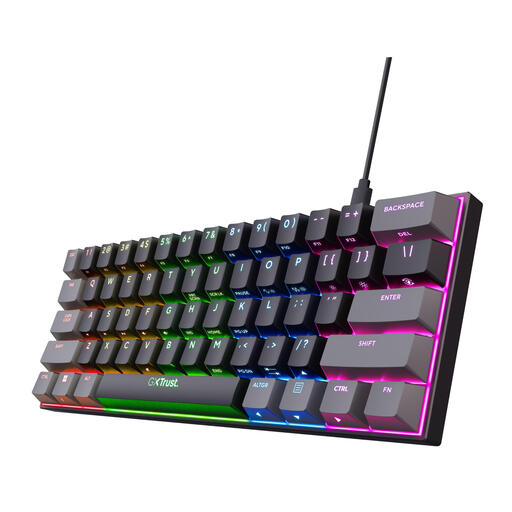
Trust GXT 867 Acira 60% gaming keyboard with Outemu Red switches

Trust GXT 867 Acira 60%, Outemu Red

A 60% layout could suit you if you want to prioritise mouse space and are happy to use key combinations for the functions you need.

Mechanical; Outemu Red switches; RGB; QWERTY US according to the product name. Arrow and navigation functions are accessed through an Fn layer, rather than as separate keys.

Joybuy

Frequently asked questions

Should I choose a 60% keyboard for strategy games?

Not necessarily. If you assign commands to separate function keys or arrow keys, compare 75% and TKL layouts too. On a 60% layout, you’ll access keys that aren’t included through combinations, if the version supports them. Corsair describes the differences between these sizes.

What should I check about connecting and customising the keyboard?

Check the connection, physical key layout and software support for the exact version. Trust lists a detachable cable and software for key functions on the GXT 867 Acira; SteelSeries notes that not all software features of the Apex Pro TKL Gen 3 are supported on Mac.

What if I find the layout awkward after buying online?

According to ACM ConsuWijzer, online consumer purchases usually come with a statutory 14-day cooling-off period after delivery, subject to exceptions. Check the terms that apply to your purchase before ordering.

Is the statutory guarantee in the Netherlands always exactly two years?

No. The Netherlands Authority for Consumers and Markets states that there is no fixed period for the statutory guarantee in the Netherlands. Under normal use, the product must meet what you could reasonably expect; if a product is faulty, the seller is responsible for providing an appropriate solution.

What should I look for in a wireless keyboard?

Check the product and conformity information for the specific model. Equipment with a radio connection is covered by the European framework for radio equipment. According to the European Commission, CE marking is required for products covered by applicable EU rules that require the mark; it doesn’t prove better gaming performance.
