
Map practice player who also works from home
Wants easy access to the keys needed for practice and work, so compares the function row, arrow keys and physical layout.


Start with the keys you actually use for practice and work. A TKL layout keeps a separate function row and arrow keys, while a 65% keyboard can give you more room for your mouse but places functions closer together. If you share your workspace, the sound of the keys and the physical keyboard layout matter too. Adjustable actuation is worth considering if you plan to use it deliberately, but it isn’t essential for learning a map.
Wants easy access to the keys needed for practice and work, so compares the function row, arrow keys and physical layout.
Wants to take key noise into account and looks at switch type and any sound dampening, without treating a manufacturer’s description as a sound measurement.
Wants to free up desk space and weighs a TKL layout against a more compact 65% layout and how easy work keys are to reach.
A good fit if: key noise is a factor and you want to keep a separate function row and arrow keys.
Bear in mind: “quiet” is a manufacturer’s description, not a measurement of the sound in your workspace.
A good fit if: you want mechanical switches with TKL key placement.
Bear in mind: sound dampening and switch options vary by model; don’t compare them without sound measurements taken under the same conditions.
A good fit if: extra room for mouse movement matters more than having a larger, separate key layout.
Bear in mind: check how easy it is to access the functions you use for work and gaming.
A good fit if: you want to adjust key actuation or use Rapid Trigger deliberately.
Bear in mind: adjustable actuation alone doesn’t prove that you’ll learn a map faster.
| Consideration | What should you check? | Who is this important for? |
|---|---|---|
| Accessible keys | Check the function row, arrow keys, navigation keys and physical language layout of the exact version. | If you want to reach the same keys easily during map practice and work, key access is your top priority. Around 33% of consumers prioritise this. |
| Key noise | Check the switch type and distinguish quiet membrane switches from mechanical keys with sound dampening. | If you work in a shared space, typing noise may influence your choice. Around 27% of consumers put key noise first. |
| Mouse space | Compare the dimensions and available keys of the exact version with the space beside your mouse. | If you’re short on desk space and want more room for mouse movement, a narrower keyboard may be more important. Around 20% of consumers name mouse space as their top priority. |
| Connectivity | Check which connection methods are supported by the exact version and your devices. | If you want to use a work device and a gaming PC, check whether the connection works with both. Around 20% of consumers prioritise the connection they need or switching between devices. |
Extra mouse space is of little help if you have to use an awkward key combination every time you work or practise a map.
Compare the key placement of the exact 65% or TKL version with the functions you use.
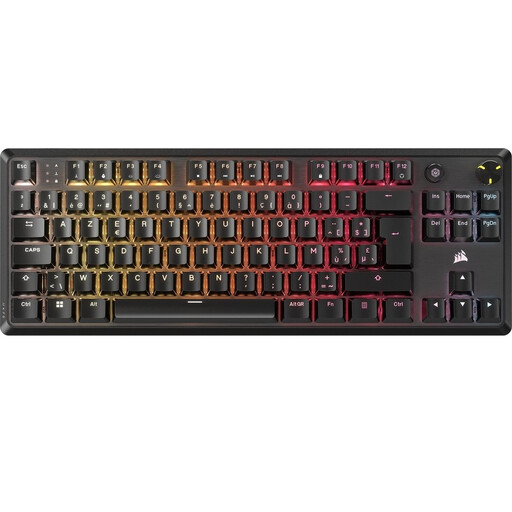
The Corsair K70 CORE TKL version reviewed is BE AZERTY; that layout is not the same as US QWERTY.
Check the language layout and full model number before comparing versions.
Switches described as quiet, case dampening and adjustable actuation are different features. They don’t prove that a keyboard will be quiet in your workspace or help you learn a map faster.
Choose the feature you need, and if it’s adjustable, check that the settings suit your game.
The G515 LIGHTSPEED TKL is an example of a mechanical TKL keyboard with several connection options.
The Apex 3 TKL is an option if you’re looking for a TKL keyboard described as quiet.
The Origins 2 65 is a compact alternative with mechanical switches.
The K70 CORE TKL is worth considering if you’re looking at a wired mechanical TKL keyboard with linear switches.
The Huntsman V3 Pro Tenkeyless is an option if you want to make targeted use of adjustable actuation.
These models are aimed at gaming and have layouts that may also suit a home workspace. The selection includes TKL and compact keyboards.
 No image available
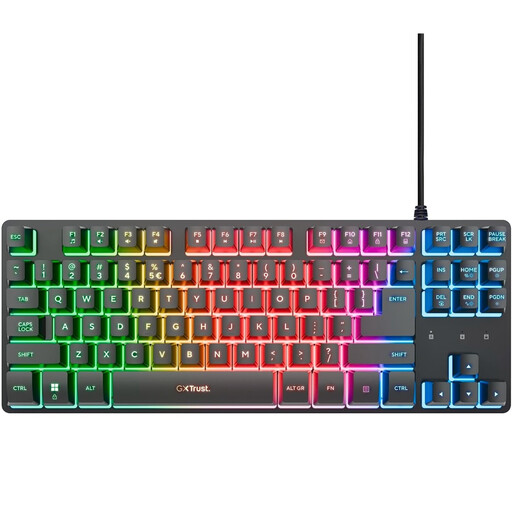
A TKL layout can leave space beside the keyboard for mouse movement. Check that the QWERTY layout suits how you use it.
 No image available
The TKL layout can leave space beside the keyboard. The product information describes quiet membrane switches; bear in mind that this is not a sound measurement in your workspace.
 No image available
The 75% layout is a compact alternative if you’re weighing mouse space against access to keys you also use for work. Check the key placement of this version to make sure it suits your needs.
 No image available
A mechanical TKL keyboard can give you mouse space as well as mechanical keys. This version is BE AZERTY, so check that the physical layout suits you.
 No image available
The TKL layout can leave room for mouse movement. Check the physical US Layout and make sure it suits the keys you use for work and gaming.
Choose TKL if you want to keep a separate function row and arrow keys. Consider 65% if extra mouse space matters more, and check how you access the other functions on each model.
First check which connections both devices support. Logitech lists LIGHTSPEED, Bluetooth and wired data for the G515 LIGHTSPEED TKL; check the available connection methods for other models individually.
Check the key bindings in the game and test the functions you use for movement and navigation. If your model has adjustable actuation, you can change the sensitivity; don’t assume the default setting will suit every player.
As a consumer in the Netherlands, you’re entitled to a product that works properly. According to the Dutch government, there is no fixed statutory guarantee period and the seller is your point of contact if there’s a problem; a manufacturer’s guarantee may be available in addition.
According to the Dutch government, online distance purchases from a business are often covered by a 14-day cooling-off period. Check the applicable terms; the Dutch government says purchases from private individuals are not covered by the distance-selling rules.