What should you look for when choosing?
Start with the sound and feel of the keys, then consider which audio features you need. Finally, check that the layout suits your game and desk.
| What to consider |
What to look for |
Who this is for |
| Key sound |
Check the exact switch type. Razer describes the Ornata V3 X as having silent membrane switches and the Ornata V3 as having clicky switches. |
If I play in a shared space, I want my keyboard to disturb others as little as possible. Around 33% of consumers prioritise key sound. |
| Volume and media |
Check whether the model has a volume control, media keys or shortcuts, and whether they work with your audio app. |
If I often adjust my headphone audio while playing, I want the controls within easy reach. Around 27% of consumers put audio and media controls first. |
| Size and keys you need |
Consider whether you need a number pad and check the layout, such as QWERTY or AZERTY, of the variant you choose. |
If my desk has limited space but my game uses specific keys, I want to know in advance which keys are missing. Around 20% of consumers prioritise size and keyboard layout. |
| Typing comfort |
Compare the key profile, wrist rest and adjustability; don’t treat these features as proof that a model will be comfortable for everyone. |
If I play for long periods, I want to choose a typing feel and setup that suit my preferences. Around 20% of consumers make typing comfort their top priority. |
Joybuy gaming keyboards for this style of play
These Joybuy products include keyboards with direct audio or media controls and more compact models, as well as an option with silent membrane switches according to Razer. Check each product’s layout, connection and controls to make sure they meet your needs.
 No image available
GXTrust Thado wired gaming keyboard, TKL, QWERTY
A good fit if you’re looking for a more compact layout with audio or media controls close at hand.
The description lists a membrane keyboard, media keys for volume and playback, and compatibility with PC and PS5.
View at Joybuy
 No image available
Turtle Beach Vulcan mechanical TKL keyboard, Linear Titan Switch, AZERTY
A good fit if you want a TKL layout with a rotary dial and programmable media controls.
The product information lists linear switches, sound-dampening foam layers and a detachable USB-C cable.
View at Joybuy
 No image available
AJAZZ AK980 V2 wireless mechanical keyboard, 98% QWERTY, Starry Night Gray
A good fit if you’re looking for a keyboard with a more compact layout and a volume control knob.
The product name lists a 10,000 mAh battery, a TFT display and Gift Switch V2. The description lists wired, Bluetooth and 2.4G connections.
View at Joybuy
 No image available
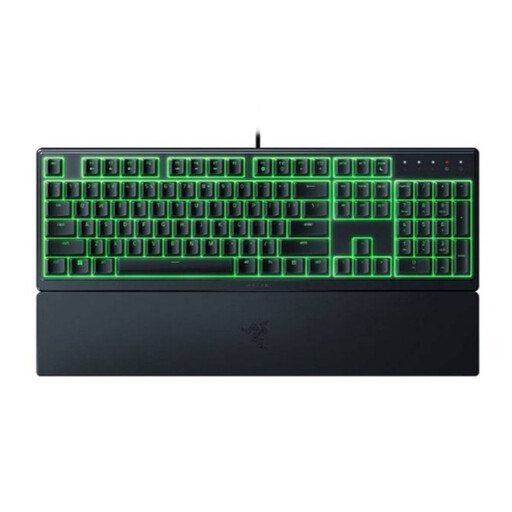
Razer Ornata V3 X low-profile gaming keyboard, US layout
A good fit if you’re looking for a full-size, low-profile model; Razer specifies silent membrane switches for the Ornata V3 X.
The product description lists an integrated wrist rest and programmable keys. The variant shown has a US layout.
View at Joybuy
 No image available
Razer BlackWidow V4 mechanical gaming keyboard, Yellow Switch, US layout
A good fit if you want a full-size layout with media and scroll controls close at hand.
The product description lists six macro keys, a multifunction scroll wheel, media keys and a wrist rest. The specifications list a number pad.
View at Joybuy
Frequently asked questions
Does your gaming keyboard need to work with headphones?
Not necessarily; the main thing is to check that the connection and controls you want suit your gaming device. Media keys can be handy for audio, but check that they work with the app you use. The Corsair manual lists USB Type-A for the K55 CORE and notes that features on consoles may vary from game to game.
How do you connect a Corsair K55 CORE?
According to Corsair, connect the K55 CORE to an available USB Type-A port that supports USB 2.0 or higher. If you’re using a console, also check whether the features you want work in your game; Corsair notes that this may vary from game to game.
What if your keyboard develops a fault after the manufacturer’s warranty expires?
In the Netherlands, your statutory rights are separate from a manufacturer’s warranty. The Dutch government states that there is no fixed statutory warranty period; what you can expect from a product depends, among other things, on the product and the sales information. If there’s a fault, contact the seller.
Do you have a cooling-off period for an online purchase?
According to the Dutch government, a 14-day cooling-off period applies in many cases when you make a typical online purchase from a business. Check the terms and any exceptions that apply to your specific purchase.
What should you look for in a wireless keyboard?
Check that the connection and features suit your gaming device. According to the Dutch Authority for Digital Infrastructure, radio equipment placed on the market in the Netherlands must meet the applicable European requirements; manufacturers apply the CE marking when these requirements are met.


