
Vandaag of morgen in huis

Kwaliteit gegarandeerd

Welkomstaanbiedingen ontgrendelen: GRATIS bezorging | Tot 80% korting | Gratis 30 dagen JoyPlus-proefperiode
Download de app
Buying a gaming keyboard seems straightforward – until you have to choose between a mechanical keyboard, a compact keyboard, wireless connectivity and different switch types. Marketing terms like “fast response”, “ergonomic” and “waterproof” sound appealing, but they don’t always tell you enough about everyday use.
So pay close attention to the layout, the connection method and the type of keys. That way, you’ll avoid missing important keys after a few weeks, ending up with an awkward QWERTY layout, or having to keep recharging a wireless model.
A 60% keyboard saves a lot of desk space, but it usually doesn’t have dedicated arrow keys, a function row or a navigation cluster. Those functions are then accessed via an Fn combination. For competitive gaming, this can be great because it gives you more room for your mouse. For programming, spreadsheets or office work, it can be less practical.
A 65% keyboard typically adds arrow keys. A 75% keyboard often includes a function row, while a TKL keyboard removes the numeric keypad but keeps the rest of the standard keys. So don’t just look at the percentage – check the exact number of keys and the corresponding layout.
Many models are sold as a QWERTY keyboard, but that could be a US ANSI or a European ISO layout. The position of keys like Enter, Shift and punctuation can differ. For a Dutch user, what matters most is whether the keys match the settings in Windows or macOS.
A US QWERTY model will technically work on a Dutch computer, but the key markings and some shortcuts may be different. If you touch-type, you’ll need to check this beforehand. The Corsair K70 CORE TKL model in this selection, for example, has a BE AZERTY layout, so it won’t automatically suit someone specifically looking for QWERTY.
A high polling rate or a very short actuation distance sounds impressive. However, the practical effect depends on the game, your computer, your settings and your personal preference. According to the product description of certain models, such as the Redragon M68, magnetic switches and Rapid Trigger can be configured via software. That’s a verifiable product specification, but it’s no guarantee that every player will perform faster.
Also pay attention to the difference between a mechanical keyboard, a membrane keyboard and optical or magnetic switches. “Mechanical feeling” doesn’t automatically mean there are mechanical switches. The MageGee TS91, for example, is described as a membrane keyboard with a mechanical feel.
Choose the size based on your workspace and usage:
If you switch between gaming and work every day, it’s better not to look at width alone. A compact layout takes up less space, but sometimes requires more Fn combinations.
Mechanical switches come with different characteristics. Linear switches press down smoothly, while clicky switches have a distinct clicking sound. Tactile switches provide a noticeable bump during the press.
A gaming keyboard with fast response can have a low actuation distance. With magnetic Hall Effect switches, the actuation can sometimes be adjusted via software, according to the product specifications. Check whether the software is compatible with your operating system.
For a shared workspace, quiet membrane keys or dampened mechanical switches are often more practical. A keyboard with RGB lighting can look attractive, but lighting is no substitute for good keycaps, stable keys or a suitable layout.
A wired keyboard usually uses USB and doesn’t need a battery or wireless receiver. That’s straightforward for a fixed PC setup. A wireless keyboard offers more flexibility, but check:
A keyboard for PC and Mac may be physically compatible, while special functions or configuration software may be limited to one platform. The Apple Magic Keyboard with Touch ID, for example, is designed for Macs with Apple Silicon and macOS 11.4 or later. It has Bluetooth, a rechargeable battery and a QWERTY layout, but it’s not a mechanical gaming keyboard.
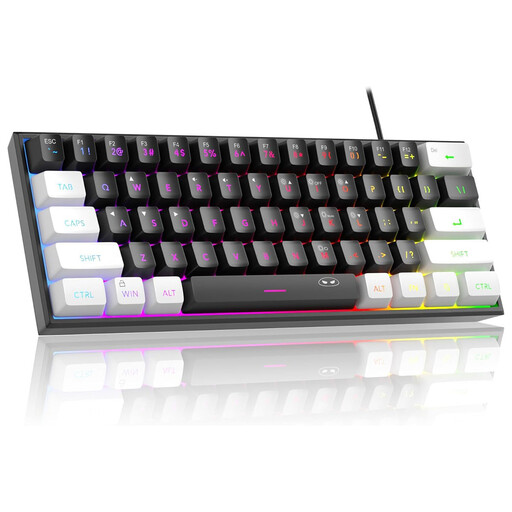
Why this fits the profile: This wired 60% model takes up little space and combines RGB lighting with a US QWERTY layout for PC and Mac.
The product description clearly states that it’s a 60% layout without a numeric keypad and that the keyboard is wired. The description mentions membrane keys with a mechanical feel, not actual mechanical switches.
61 keys, RGB modes and an IPX4-rated PCB according to the product information; the connection itself is not waterproof.
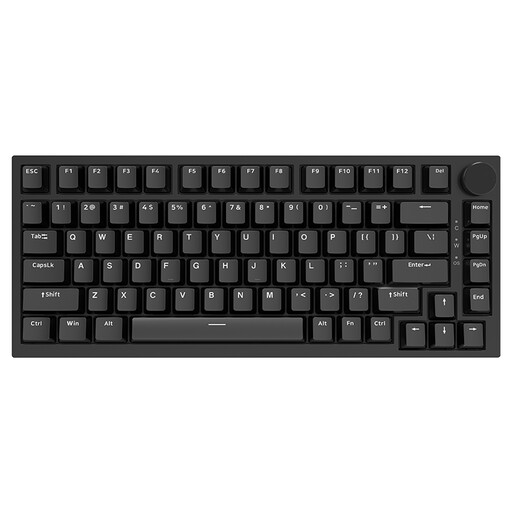
Why this fits the profile: The 75% layout offers more control keys than a 60% model, while the keyboard remains compact for gaming and working from home.
The layout, dimensions and wired USB-C connection are stated in the product specifications. So it’s clear upfront that you won’t get a wireless function or a numeric keypad.
Hot-swappable PCB, PBT keycaps, volume knob, gasket mount construction and support for Windows and macOS according to the product description.
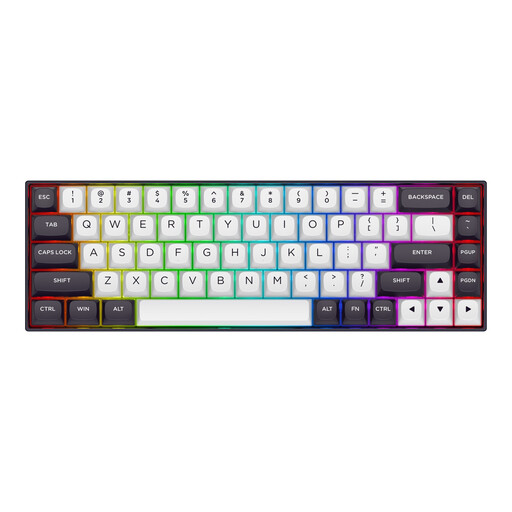
Why this fits the profile: For players of fast competitive games, this 65% model is focused on magnetic switches, Rapid Trigger and adjustable actuation.
The product description explicitly mentions the 65% format with 68 keys, a wired connection and a US layout. The mentioned Rapid Trigger and polling rate features are product specifications, not a guarantee of better gaming results.
Magnetic Hall Effect switches, adjustable actuation according to the product information, RGB lighting and an aluminium top plate.
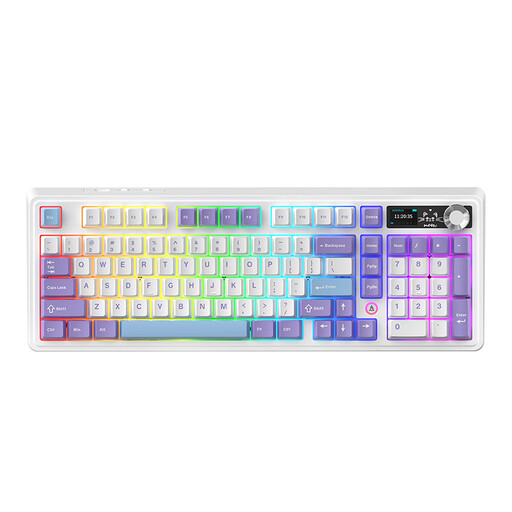
Why this fits the profile: This model combines a near full-size layout with Bluetooth, 2.4G and wired connection, making it suitable for multiple workstations.
The three connection methods are listed in the product information. Do check the desired layout and the stated battery capacity of the chosen variant before purchasing.
97 keys, volume knob, hot-swappable PCB, RGB lighting and three connection modes according to the product description.
We’ve put together a full, up-to-date list of products that fully meet these strict selection criteria and comply with current European safety regulations.
It can be, as long as you don’t use function keys, arrow keys or a numeric keypad very often. For gaming only, the compact size is often practical. For office work, coding or a lot of text editing, a 65%, 75% or TKL keyboard may be more convenient.
The lifespan varies depending on the switch, build quality and usage. Some product descriptions mention an estimated lifespan, such as tens of millions of keystrokes. Treat this as a product specification from the brand, and also check whether switches and keycaps are replaceable. A hot-swappable keyboard can make maintenance and customisation easier, because switches can be replaced without soldering.
A wireless model uses a battery or batteries. RGB lighting, high brightness and intensive use can affect battery life. A model with USB-C charging is practical if you work or game regularly. A keyboard with a USB receiver and batteries, such as the Trust Ody II, requires a different maintenance routine than a rechargeable Bluetooth model.
